Post-Purchase Emails: The Complete Flow Guide

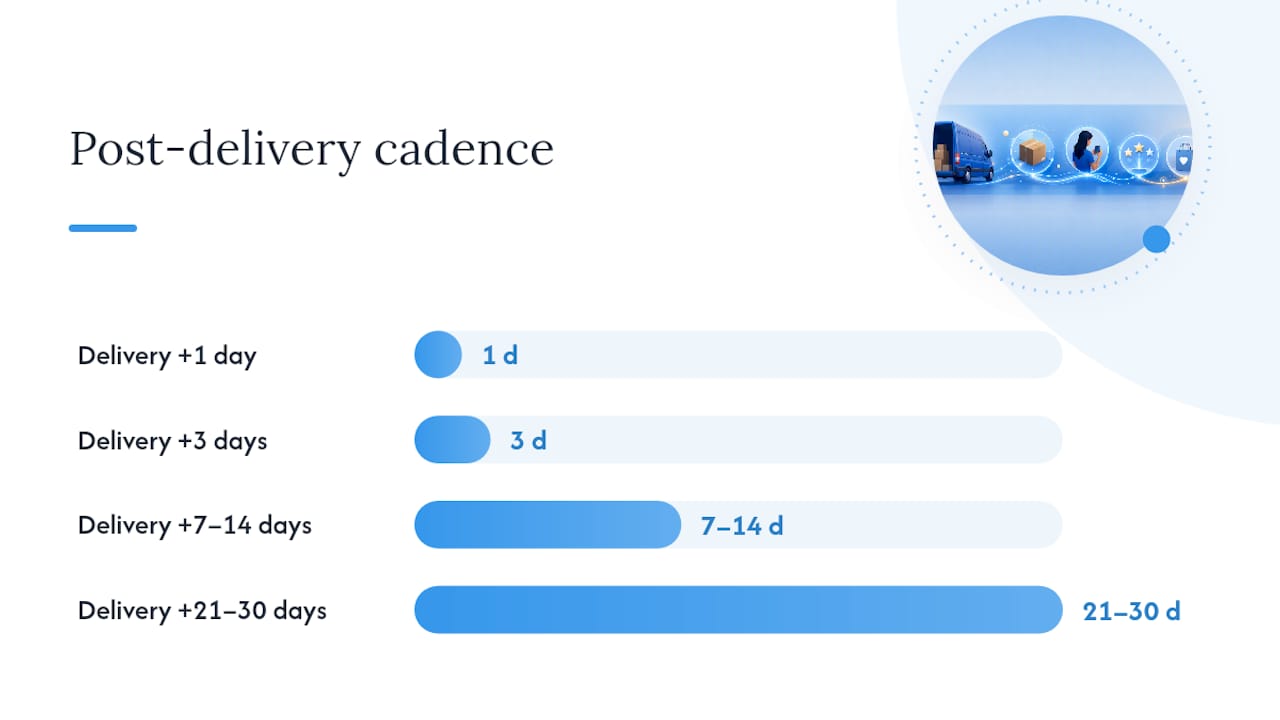
Run this sequence after every sale: order confirmation (immediate), shipping notification (fulfillment), delivery follow-up (delivery +1 day), product education (delivery +3 days), review request (delivery +7–14 days), cross-sell or replenishment prompt (delivery +21–30 days). That six-step flow, anchored to delivery rather than purchase date, is the single highest-leverage change most ecommerce stores can make to their email program.
Your core flow at a glance:
- Immediate (purchase): Order confirmation with order number, items, and estimated delivery
- Fulfillment: Shipping notification with tracking link
- Delivery +1 day: Delivery check-in or thank-you
- Delivery +3 days: Product education or onboarding
- Delivery +7–14 days: Review request (category-dependent timing)
- Delivery +21–30 days: Cross-sell, replenishment, or loyalty invite
Five subject-line formulas to copy and test:
- “Your [Product Name] has arrived — here’s what to do first” (education)
- “Quick question about your [Product Name]” (review request)
- “Running low? Reorder [Product Name] in one click” (replenishment)
- “You might also like these” (cross-sell)
- “Thank you, [First Name] — here’s something for your next order” (loyalty)
Each of these pairs with a single preheader line and one CTA. The education email links to a how-to guide or video. The review request links to an in-mail form. The replenishment email links directly to the product page. Keep it that simple until you have data telling you to do otherwise.
Key Takeaways
A delivery-anchored post-purchase email sequence with proper segmentation and exit conditions is the highest-leverage retention investment most ecommerce stores can make.
| Point | Details |
|---|---|
| Anchor timing to delivery | Trigger engagement emails from the delivery event, not the purchase date, for higher open and conversion rates. |
| Split first-time vs repeat buyers | Route new customers to education; route returning customers to cross-sell and VIP offers using order-count conditional splits. |
| Set exit conditions first | Remove customers from all engagement sequences immediately on refund, cancellation, or second purchase. |
| Measure revenue per recipient | Track RPR at the flow level and run a 10% holdout group to confirm true incremental lift. |
| Verticalbrands for full implementation | Verticalbrands audits, builds, and measures post-purchase flows from trigger setup to holdout testing in 4–6 weeks. |
Table of Contents
- What are post-purchase emails and why does the distinction matter?
- Why post-purchase emails deserve serious investment
- What types of post-purchase emails should you send?
- How do you build an automated post-purchase flow?
- What makes post-purchase email copy and design actually work?
- What metrics should you track and test?
- Which tools and platforms run post-purchase programs best?
- How Verticalbrands builds and optimizes post-purchase flows
- What compliance rules apply to post-purchase emails?
- How should you handle cancellations, returns, and complaints in your flow?
- The metrics that actually matter, from a growth agency perspective
- Verticalbrands builds post-purchase flows that move revenue, not just metrics
- Sources
What are post-purchase emails and why does the distinction matter?
Post-purchase emails are any automated messages sent after a customer completes a transaction. That sounds obvious, but the category splits into two fundamentally different types, and treating them the same is where most programs go wrong.
Transactional emails are functional and expected: order confirmation, shipping notification, delivery confirmation, and refund or return confirmation. Customers look for these. They carry legal and operational weight. Klaviyo’s transactional email best practices are clear on this point: keep them focused on order data and logistics. Packing a promotional banner into an order confirmation muddies the message and can frustrate customers who are scanning for their order number.
Engagement emails are where the revenue and retention work happens: thank-you notes, product education, review requests, cross-sell offers, replenishment reminders, referral invites, VIP access, and win-back campaigns. These are optional in the sense that customers don’t expect them, but they’re where the lifetime value gets built.
According to Twilio’s breakdown of post-purchase email types, there are 17 recognized message types across these two categories. A complete program uses both. Transactional messages build trust by meeting expectations; engagement messages build loyalty by exceeding them.
The practical rule: never put marketing content inside a transactional email. Send them separately, on separate triggers, with separate goals. Your confirmation email is not a cross-sell vehicle.
Why post-purchase emails deserve serious investment
Post-purchase messages have some of the highest open rates in the entire email lifecycle. Customers are primed to engage because they just spent money and they want reassurance. That attention window is short, and most stores waste it.
Shopify’s research on post-purchase communications cites Litmus data showing email delivers roughly $36 in return for every $1 spent. Proactive post-purchase updates also reduce inbound support volume, since customers who receive timely shipping and delivery notifications are less likely to email asking “where’s my order?”
The retention math is stark: acquiring a new customer costs five to seven times more than retaining one. Post-purchase flows are the lowest-cost retention tool available.
The business case for investing in these flows:
- Order confirmation emails often achieve high open rates, far outpacing standard promotional campaigns
- Shipping notifications drive some of the highest click rates of any email type because customers actively want the tracking link
- Review request emails sent at the right moment (after delivery, with enough time for product use) convert at meaningfully higher rates than generic feedback surveys
- Repeat purchase rates improve when customers receive timely education and relevant follow-up, reducing the gap between first and second order
Most stores send only an order confirmation and a shipping notification, then go silent. A recommended starting sequence is five emails minimum, with optional education and referral steps added as the program matures. That gap between two emails and five is where most of the retention opportunity lives.
What types of post-purchase emails should you send?
Here’s the full set, with timing anchors, purpose, and a short template for each. Use this as your build list.
Transactional emails (required)
Order confirmation Send immediately on purchase. Include order number, itemized list, shipping address, and estimated delivery window. Subject line formula: “Order confirmed: [Order #] is on its way.” This email exists to reduce anxiety, not to sell anything else.
Shipping notification Send on fulfillment. Include carrier name, tracking link, and expected delivery date. Subject: “Your [Product Name] is on its way — track it here.” One CTA: the tracking link. Nothing else.
Delivery confirmation Send within 24 hours of confirmed delivery. Brief, warm, and functional. Subject: “Your order has arrived!” This is the anchor event for everything that follows in your engagement sequence.
Refund or return confirmation Send immediately when a refund or return is processed. Confirm the amount, timeline, and next steps. Subject: “Your refund for [Order #] is being processed.” Tone matters here: clear and reassuring, no upsell.
Engagement emails (revenue and retention)
The timing chart below shows recommended delays anchored to the delivery event, which consistently outperforms purchase-date anchoring.
Thank-you email: Subject: “Thank you, [First Name] — we’re glad you’re here.” One sentence of genuine warmth, one CTA to your community, blog, or care guide. No discount unless your margin supports it.
Product education: Subject: “Get the most out of your [Product Name].” Link to a how-to video, usage guide, or FAQ. For consumables, this is also where you plant the replenishment idea.
Review request: Yotpo’s timing guidance is specific: wait until after delivery and allow enough time for product use, which means 7 days for apparel and 14–21 days for electronics or furniture. Subject: “How’s your [Product Name]?” Use an in-mail review form if your platform supports it. Bazaarvoice’s research shows that in-email forms and one-click review links dramatically increase conversion compared with sending customers to a third-party page. A small incentive (loyalty points, a discount on the next order) raises response rates further when used selectively.

Cross-sell / upsell: Subject: “Customers who bought [Product Name] also love these.” Use a dynamic product block populated by purchase history or complementary category logic. Keep it to three products maximum.
Replenishment reminder: Especially powerful for consumables. Subject: “Running low on [Product Name]?” Anchor the timing to average consumption rate by SKU. One CTA: reorder link.
Referral or loyalty invite: Send after a positive signal (a review submitted, a second purchase, a high-value order). Subject: “Share [Brand] with a friend — you both get [Reward].” Keep the mechanics simple.
Win-back: If no second purchase occurs within 60–90 days, send a re-engagement email. Subject: “We miss you, [First Name].” Include a modest incentive and a clear expiry date.
How do you build an automated post-purchase flow?
The blueprint is straightforward. The execution details are where most teams get stuck.
High-level flow structure:
- Trigger: “Placed Order” event fires in your ESP
- Branch 1 (Fulfillment): When fulfillment event fires, send shipping notification
- Branch 2 (Delivery): When delivery event fires (or time-delay fallback), send delivery confirmation
- Engagement sequence: Delivery +1, +3, +7/14, +21/30 days with conditional splits at each node
- Exit conditions: Remove from flow on refund, cancellation, or second purchase
Geysera’s post-purchase flow guide makes a practical point about delivery triggers: they require a tracking integration for best accuracy. Tools like AfterShip or ShipStation fire a “delivered” event your ESP can catch. Without that integration, use time-delay approximations: 5 days after fulfillment for domestic orders, 10–14 days for international. It’s less precise, but it’s far better than anchoring everything to the purchase date.
Segmentation and conditional splits:
The most important split is first-time buyer versus repeat buyer. Klaviyo’s post-purchase flow guidance recommends using order count as a conditional: if order count equals 1, route to onboarding and education; if order count is greater than 1, route to revenue-focused messages like cross-sell and VIP. For practical guidance on building these customer segments, Brown Bag Consultants’ segmentation guide covers behavioral splits in detail.
Additional splits worth building:
- Product category: Consumable vs durable changes replenishment timing and education depth
- Order value: High-value orders may warrant a VIP or white-glove follow-up
- Fulfillment status: Refunded or cancelled orders should exit immediately
Exit conditions are non-negotiable. Without them, a customer who returns a product receives a review request. A customer who repurchases on day 10 receives a replenishment email on day 21. Both are tone-deaf and damage trust. Set exits for: refund processed, order cancelled, second purchase placed.
Pro Tip: Add a non-opener follow-up branch to your review request node. If the customer doesn’t open the review email within 3 days, send a shorter version with a different subject line. MailerLite’s automation builder supports this with a simple conditional branch on “email opened = false.”
What makes post-purchase email copy and design actually work?
Subject lines are where the open rate lives, and most post-purchase subject lines are generic. Here are six formulas that consistently perform:
- “Your [Product Name] is here — here’s what to do first” (education)
- “Quick question about your [Product Name]” (review request, low-pressure framing)
- “[First Name], your next order of [Product] is almost ready” (replenishment)
- “You might also like [Related Product]” (cross-sell, specific product name beats generic)
- “Something for your next order, [First Name]” (loyalty, curiosity-driven)
- “We haven’t seen you in a while” (win-back, plain language outperforms clever)
Keep subject lines under 50 characters for mobile. The preheader should add information the subject line doesn’t, not repeat it. If your subject is “Quick question about your [Product Name],” the preheader might read: “Takes 30 seconds — your feedback helps other shoppers.”
Design checklist for transactional emails:
- Clean header with logo, no promotional banners
- Order details in a scannable table or list
- Single CTA (tracking link or account login)
- Plain text fallback that carries all critical information
- Alt text on every image
Design checklist for engagement emails:
- Product image above the fold
- One primary CTA, visually distinct (button, not text link)
- Mobile-first layout: minimum 16px body text, 44px tappable targets
- No more than two secondary links
- Unsubscribe link visible without scrolling
Keep transactional and marketing content in separate emails. Klaviyo’s transactional email guidelines are explicit: mixing promotional content into confirmations risks confusing customers and undermining the functional clarity those emails need. A customer scanning for their order number should not have to navigate past a banner ad to find it.
For accessibility: use sufficient color contrast (WCAG AA minimum), write descriptive alt text for product images, and avoid relying on images alone to convey critical information. Many email clients block images by default.
What metrics should you track and test?
Track these at both the flow level and the individual email level.
Primary KPIs:
- Revenue per recipient (RPR): Total flow revenue divided by unique recipients. This is the single most useful flow-level metric because it accounts for both conversion rate and order value.
- Repeat purchase rate: Percentage of first-time buyers who make a second purchase within 90 days
- Time to second purchase: Median days between first and second order; a shorter gap indicates the flow is working
- Per-email open rate and click rate: Benchmark against your own historical data first, then industry averages
- Review conversion rate: Reviews submitted divided by review request emails delivered
Attribution note: Use a holdout group (5–10% of eligible customers who receive no post-purchase engagement emails) to measure true incremental lift. Without a holdout, you’re measuring correlation, not causation.
A/B tests worth running:
- Subject line specificity: product name vs generic (“Your order” vs “Your Vitamin C Serum”)
- Send timing: delivery +7 days vs delivery +10 days for review requests
- Single CTA vs two CTAs in cross-sell emails
- In-mail review form vs link to review page
- Incentive vs no incentive for review requests (test on a segment, not your full list)
Practical sample-size guidance: For a meaningful result on open rate, you need at least 1,000 recipients per variant. For conversion rate tests, you need more. If your list is small, run tests sequentially (one month on, one month off) rather than splitting a thin list in half.
Benchmarks to calibrate against:
- Order confirmation open rates regularly exceed 60%
- Shipping notifications typically see click rates well above standard promotional emails
- Review request emails sent at the right timing (post-delivery, category-appropriate delay) convert at higher rates than generic survey emails
When your numbers fall significantly below these ranges, the problem is usually timing (anchored to purchase instead of delivery), subject line (generic), or a missing exit condition causing irrelevant sends.
Which tools and platforms run post-purchase programs best?
The right stack depends on your scale and the features you actually need. Here’s what to look for, and where each major platform fits.
Feature checklist for any platform:
- Delivery/tracking event integration (native or via AfterShip, ShipStation)
- Dynamic product blocks populated by purchase history
- Conditional splits on order count, product category, and fulfillment status
- In-email review forms or one-click review links
- Loyalty program integration
- Holdout group functionality for measurement
- Litmus or equivalent inbox preview and rendering testing
For a full checklist of communication tool features to evaluate, Brown Bag Consultants’ customer communication tools checklist covers the key capabilities to assess before committing to a platform.
Platform notes:
Klaviyo is the dominant choice for mid-market ecommerce. Its flow builder supports delivery-triggered events natively when connected to Shopify or via AfterShip, and its conditional split logic handles first-time vs repeat buyer routing cleanly. Dynamic product blocks pull from purchase history without custom code.
MailerLite suits smaller stores and early-stage brands. Its automation builder handles purchase triggers, delays, and conditional branches. MailerLite’s review request automation walks through a practical setup including non-opener follow-up branches.
Bloomreach targets mid-market to enterprise retailers who need omnichannel orchestration. Its strength is combining email, SMS, and on-site personalization in a single flow, with predictive product recommendations built in.
Twilio (via Twilio SendGrid or Twilio Engage) is the developer-friendly option for teams that want API-level control over transactional sends. It handles high-volume transactional email reliably and integrates with custom data pipelines.
Yotpo handles review collection and loyalty within post-purchase flows. Its in-email review forms reduce friction significantly, and its loyalty module integrates with Klaviyo and Shopify to trigger loyalty-based emails on point milestones.
Bazaarvoice is the enterprise choice for review collection at scale, particularly for brands selling across multiple retail channels. Its review request tools include in-email forms and syndication across retail partners.
Litmus is not an ESP. It’s a testing and analytics layer that sits on top of your existing platform, providing inbox rendering previews across 100+ email clients, spam filter testing, and engagement analytics. Run every new template through Litmus before activating a flow.
Stack recommendation by scale:
- Small store (under 500 orders/month): MailerLite + Yotpo for reviews
- Mid-market (500–5,000 orders/month): Klaviyo + Yotpo or Bazaarvoice + Litmus
- Enterprise (5,000+ orders/month): Bloomreach or Klaviyo Enterprise + Bazaarvoice + Twilio for transactional + Litmus
How Verticalbrands builds and optimizes post-purchase flows
The agency’s implementation process follows a consistent sequence regardless of platform or store size.
- Audit: Review existing flows, identify gaps (missing exit conditions, purchase-anchored timing, no first-time vs repeat split), and benchmark current RPR and repeat purchase rate
- Hypothesis: Define the two or three changes most likely to move RPR based on the audit findings
- Flow build: Construct delivery-anchored flows with conditional splits for order count and product category; set all exit conditions before activation
- QA: Test every branch with real order data, verify tracking integration fires correctly, preview in Litmus across mobile and desktop clients
- Holdout test: Activate with a 10% holdout group to measure true incremental lift over 30–60 days
- Scale: Once lift is confirmed, roll out to full audience and begin iterating on individual email elements
Implementation handoff checklist:
- Tracking integration confirmed (AfterShip or carrier webhook)
- All exit conditions set (refund, cancellation, second purchase)
- Conditional splits verified with test profiles (order count = 1 and order count > 1)
- Litmus preview completed for top 5 email clients
- Holdout segment defined and excluded from flow
The results from this process are measurable. Tribal, another client, reported significant growth outcomes through the same integrated approach.
A typical agency engagement runs 4–6 weeks from audit to live flow, with a two-week QA and holdout period before full activation. Deliverables include the flow architecture, all email templates, tracking integration documentation, and a measurement dashboard.
What compliance rules apply to post-purchase emails?
Post-purchase emails sit at the intersection of transactional and marketing law, and the rules differ depending on message type and recipient location.
CAN-SPAM (United States): Transactional emails (order confirmation, shipping, delivery, refund) are exempt from most CAN-SPAM requirements because they convey information the recipient requested. Engagement emails (review requests, cross-sell, loyalty) are commercial messages and must include a physical mailing address, a clear sender identification, and an unsubscribe mechanism that works within 10 business days.
GDPR (United Kingdom and European Union): The legal basis for sending post-purchase engagement emails is typically “legitimate interests” for existing customers, provided the emails relate to similar products or services and the customer had a reasonable expectation of receiving them. Customers must always have a clear, easy way to opt out. Transactional emails don’t require a separate opt-in, but they must not carry marketing content, or they lose their transactional status under GDPR.
PECR (United Kingdom): The Privacy and Electronic Communications Regulations require that marketing emails to individuals are sent only with consent or under the “soft opt-in” exemption. The soft opt-in applies when a customer purchased a similar product or service, was given a clear opportunity to opt out at the time of purchase, and is given an opt-out in every subsequent message. Review requests and cross-sell emails typically qualify under soft opt-in for UK customers, provided the opt-out mechanism is present.
Practical rules for every post-purchase email:
- Include your physical business address in all commercial messages
- Make the unsubscribe link visible without scrolling
- Honor opt-outs within the legally required window (10 business days under CAN-SPAM; promptly under GDPR)
- Never suppress the unsubscribe link from transactional emails that carry any marketing content
- Store consent records and opt-out timestamps in your CRM
This section covers general principles. Confirm your specific obligations with a qualified legal professional, as rules vary by jurisdiction and customer location.
How should you handle cancellations, returns, and complaints in your flow?
Negative scenarios are where most post-purchase flows fail silently. The flow keeps running; the customer gets a review request after returning a product; the relationship ends badly.
Cancellations: When an order is cancelled, send a single confirmation email immediately. State the order number, confirm the cancellation, and outline the refund timeline if payment was taken. Exit the customer from all engagement sequences immediately. Do not send a shipping notification, a delivery follow-up, or a review request. The exit condition in your flow should be: “Order status = cancelled → remove from all active post-purchase sequences.”
Returns and refunds: Send a return confirmation as soon as the return is initiated, and a refund confirmation when the refund is processed. Both emails should be warm, clear, and free of any promotional content. Include the refund amount, the payment method, and the expected timeline. Exit the customer from the engagement sequence at the point of return initiation, not after the refund clears. A customer who has shipped a product back does not want a cross-sell email while they’re waiting for their money.
Complaints: When a customer contacts support with a complaint, flag that interaction in your CRM and suppress post-purchase engagement emails until the issue is resolved. Sending a review request to a customer with an open complaint is one of the fastest ways to generate a one-star review. Most ESPs support suppression lists or tags; use them. Once the complaint is resolved, a brief follow-up from customer service (not an automated email) is more effective than resuming the standard flow.
The general rule: build your exit conditions before you build your email copy. A flow without exit conditions is not a customer experience; it’s a broadcast.
The metrics that actually matter, from a growth agency perspective
Most post-purchase email guides tell you to watch open rates. Open rates are a leading indicator, not a business outcome. Here’s where the real attention should go.
Revenue per recipient is the number that tells you whether the flow is working. It accounts for both the percentage of customers who convert and what they spend when they do. Track RPR at the flow level, not just per email.
The second number worth obsessing over is time to second purchase. If your post-purchase flow is doing its job, the median gap between first and second order should shrink over time. That compression is the clearest signal that your education, cross-sell, and replenishment emails are landing with the right customers at the right moment.
The third priority is the holdout test. Run one. The holdout is what separates a measurement from a guess.
Verticalbrands builds post-purchase flows that move revenue, not just metrics
Building a post-purchase email program that actually lifts repeat purchase rate requires more than templates. It requires delivery-anchored triggers, conditional splits that separate first-time buyers from returning customers, exit conditions that protect the customer relationship, and a measurement setup that distinguishes real lift from coincidence.
Verticalbrands is a growth marketing agency that handles the full build: email automation, CRM segmentation, creative templates, tracking integration, and holdout measurement. The agency’s process moves from audit to live flow in 4–6 weeks, with every exit condition, conditional split, and Litmus preview completed before activation.
If your current flow is two emails and a prayer, Verticalbrands and find out exactly where the revenue is leaking.
Sources
- 17 types of post-purchase emails to build brand loyalty | Twilio
- Post-Purchase Communications That Drive Loyalty (2026) - Shopify
- Post-Purchase Email Flow Guide (2026) | Geysera
- Klaviyo help: transactional email best practices
Recommended

Other posts



















































Stay ahead with better decisions.
Get business insights today.
