Ecommerce 90 Day Pilot: Turn Post Purchase Surveys Into Revenue

A post-purchase survey is a short set of questions sent after checkout to capture zero-party data directly from the customer, information no analytics tool can infer on its own. The single next step: pick one business decision you need to inform, then ask one to three focused questions on the confirmation page before the customer’s attention moves elsewhere.
TL;DR:
- Focus on a single decision each survey, such as checkout friction or product expectations, to ensure clear, actionable insights and high completion rates.
- Timing surveys immediately after purchase for attribution and checkout issues, and 7 to 14 days post-delivery for product satisfaction and repurchase intent.
- Embed one-to-three questions on the confirmation page and keep surveys brief, with response rates significantly higher than external email forms.
- Route low scores to support and high scores to review flows to maximize retention and review conversions, connecting responses directly to specific workflows.
- Build small, targeted pilots with clear goals, questions, and routing to validate response rates and impact before scaling or investing in full program implementation.
Table of Contents
- What Post-Purchase Surveys Actually Deliver for Ecommerce Brands
- Which Decision Should Your Survey Inform?
- When Should You Send Each Survey Question?
- How Do You Get More Customers to Actually Respond?
- What Should You Actually Ask? Copy These Templates
- Turning Survey Answers Into Fixes and Revenue
- Getting the Operational Details Right
- How Vertical Runs Post-Purchase Pilots
- What Most Teams Get Wrong About Post-Purchase Feedback
- Let Vertical Brands Build Your Survey Program
- Sources
What Post-Purchase Surveys Actually Deliver for Ecommerce Brands
Analytics tools tell you what happened. Post-purchase surveys tell you why. Google Analytics can show that a customer abandoned a cart twice before buying, but only a survey question can tell you they almost left because your sizing chart confused them. That distinction is the entire case for running these surveys in the first place.
Zero-party data, information customers volunteer directly rather than data inferred from behavior, fills the gap that cookie deprecation and platform-level attribution loss have widened over the past few years. Klaviyo’s guidance on post-purchase surveys frames this well: surveys reveal the “why” behind a purchase, which lets marketing teams build segments and lifecycle messages around actual customer intent instead of guesswork built on purchase history alone.
The business outcomes tend to cluster around three areas:
- Retention: knowing why someone bought and what they expected lets you tailor the post-purchase email sequence instead of sending the same generic thank-you flow to everyone.
- Returns reduction: a checkout friction or product expectation question surfaces sizing, description, or shipping-time mismatches before they turn into a return request.
- Sharper ad spend: attribution questions like “how did you hear about us” catch discovery channels that last-click tracking misses entirely, which is especially common with word-of-mouth, podcast ads, and organic social.
Pro Tip: Run your first survey for two weeks before touching your media budget. You want a clean read on discovery channels before you shift spend based on what customers say versus what your ad platform claims.
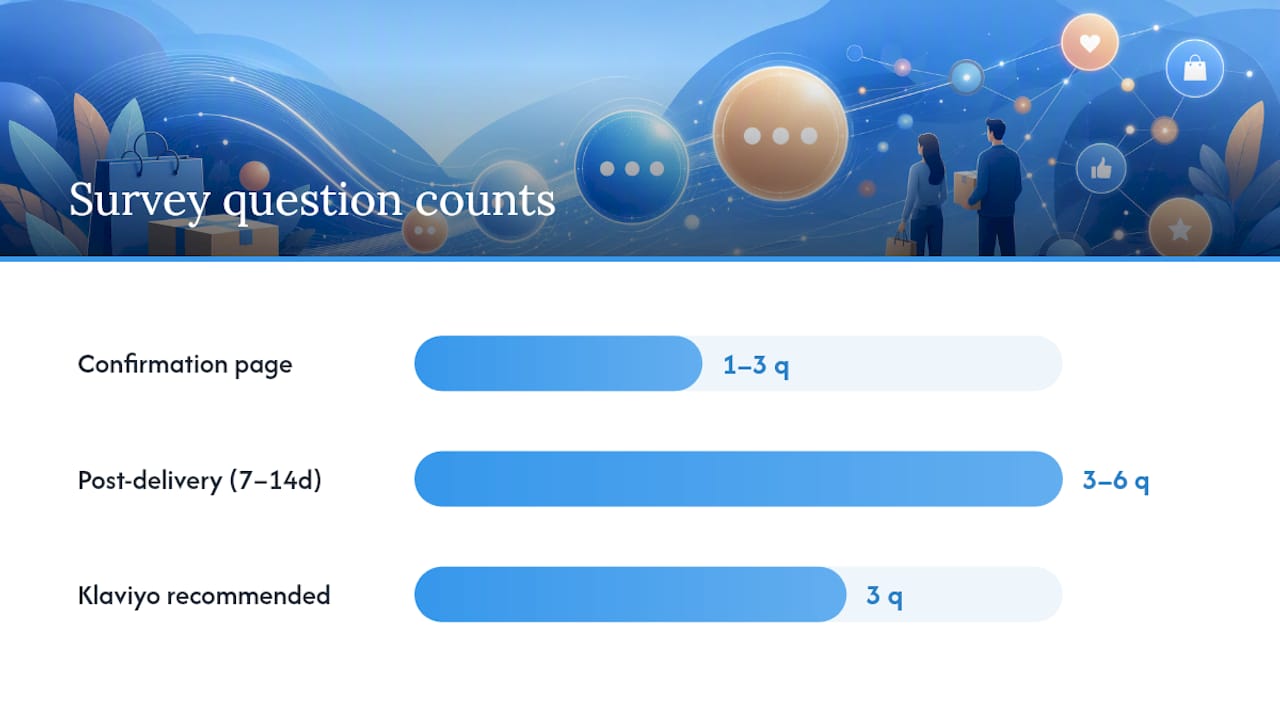
Response rates on well-placed confirmation-page questions often land meaningfully higher than external email surveys, largely because the customer is already engaged with the page. The SurveyMonkey guide to post-purchase questions recommends keeping these on-page prompts to one to three questions specifically because completion drops fast past that point.
Ownership matters here too. Marketing typically owns attribution and channel questions. Product or merchandising owns expectation and satisfaction questions. Customer experience owns checkout friction and delivery complaints. Assign a single owner per metric before you launch, or the data sits in a dashboard nobody acts on.
Which Decision Should Your Survey Inform?
Every post-purchase survey should exist to answer one specific business question, not to gather general feedback. Trying to cover five decisions in one survey is the fastest way to kill your completion rate and end up with data too thin to act on.
Five decision groups cover almost everything an ecommerce team needs from post-transaction feedback:
- Why they bought: reveals the core purchase driver (price, need, gift, recommendation) and feeds product positioning and ad creative.
- Channel attribution: a “where did you hear about us” style question catches discovery paths that pixel-based tracking loses, particularly for word-of-mouth and offline touchpoints.
- Checkout friction: identifies where the purchase path nearly broke down, from payment errors to confusing shipping options.
- Product expectations: flags mismatches between marketing copy or images and what the customer thought they were buying.
- Repurchase intent: signals how likely the customer is to buy again and whether a loyalty or win-back nudge is worth the spend.
UserLoop’s research on “how did you hear about us” surveys makes a specific point worth internalizing: structured discovery questions solve attribution gaps that last-click analytics simply cannot see, because a customer who found you through a friend’s recommendation shows up in your ad platform as “direct traffic.”
Each decision maps to a clear owner and a clear next action. Channel attribution goes to whoever manages media budget, and the action is reallocating spend toward the channels customers actually name. Checkout friction goes to whoever owns the ecommerce platform, and the action is a UX fix on the specific step customers flag. Product expectations goes to the merchandising or content team, and the action is rewriting a product description or swapping a misleading photo. Repurchase intent goes to whoever runs lifecycle email, and the action is building a win-back segment for low scorers and a referral ask for high scorers.
The guidance that matters most here: choose one primary decision per short survey. A confirmation-page survey asking about checkout friction and product expectations in the same three questions produces answers that are hard to interpret, because a customer rushing through checkout will often skip or rush the second question. Run separate, timed surveys for separate decisions instead of one bloated form trying to do everything at once.
When Should You Send Each Survey Question?
Timing determines whether a question even makes sense to the customer receiving it. Asking about product satisfaction the moment someone clicks “buy” is asking them to predict the future. Asking about checkout friction two weeks later means they’ve forgotten the details entirely.
Responsly’s timing research lays out a matrix that maps question type to the moment the customer can actually answer it accurately.
| Question focus | Best timing | Why this window works |
|---|---|---|
| Channel attribution, checkout friction | Immediately on confirmation page | Customer just completed the action; memory is fresh and engagement is already active |
| Delivery satisfaction | 1 to 3 days after delivery | Package has arrived; shipping and packaging experience is fresh but product use hasn’t started |
| Product satisfaction, repurchase intent | 7 to 14 days after delivery | Customer has had time to actually use the product and form a real opinion |
| Durability, long-term NPS | 7 to 14 days after delivery | Enough time has passed to judge whether the product held up |
Frequency caps matter as much as timing. Sending a delivery satisfaction survey and a product satisfaction survey within the same week to the same customer trains them to ignore your emails entirely. A reasonable cap: no more than one survey touchpoint per order stage, and never more than two total survey emails per order regardless of how many decisions you’re trying to inform.
The rationale behind waiting for product-satisfaction questions is straightforward but often ignored. A customer asked “how satisfied are you with this product” on day one is really answering “how satisfied am I that my order went through,” which is a different question entirely. Waiting until the product has been unboxed and used gives you a signal you can actually act on.
How Do You Get More Customers to Actually Respond?
Where you place the question matters almost as much as what you ask. A survey buried in a follow-up email three clicks deep will always underperform one sitting directly on the page the customer is already looking at.
Distribution tactics that consistently move completion rates:
- Confirmation page embedded questions outperform linked external forms because the customer never has to leave the page they’re already on. SurveyMonkey’s research on post-purchase questions confirms that short, single-topic prompts embedded directly into the confirmation page produce meaningfully higher completion than forms requiring an extra click.
- Email one-click surveys, where the answer options appear as clickable buttons directly in the email body, convert far better than emails linking out to a separate survey tool.
- SMS and WhatsApp work well for delivery satisfaction checks given how fast people open text messages, but keep it to a single yes/no or rating question given the format’s limits.
- QR codes printed on packing slips or inserts capture post-usage feedback weeks later, useful for durability or repurchase-intent questions tied to the unboxing moment.
- On-site widgets triggered on account or order-history pages catch customers who are already thinking about their purchase history, a natural moment for repurchase-intent questions.
Personalization pushes response rates further. Inserting the actual product name, order date, or delivery date into the question text (“How did the Classic Wool Coat you ordered on March 3 work out?”) reads as attentive rather than automated, and customers respond to specificity.
Pro Tip: If you only have bandwidth to fix one channel this quarter, fix your confirmation page. It’s the single highest-engagement moment you’ll ever have with a customer, and most brands waste it on a generic “thank you for your order” screen with no question at all.

What Should You Actually Ask? Copy These Templates
Question wording determines whether you get a usable answer or a shrug. Vague questions get vague answers. Specific, single-topic questions get data you can act on the same week.
Here’s a field-ready set for the two moments that matter most:
-
Confirmation page, immediately after checkout (1 to 3 questions, multiple choice)
- “How did you hear about us?” with specific channel options (Instagram, Google search, friend or family, podcast, other) rather than an open text box, since open responses at this stage have low completion.
- “Was there anything that almost stopped you from completing your order?” with options like price, shipping cost, sizing uncertainty, payment issues, or “nothing, it was smooth.”
- “Who is this purchase for?” (self, gift, someone else) when relevant to your product category.
-
Post-delivery, 7 to 14 days out (3 to 6 questions, mixed format)
- “How satisfied are you with [product name]?” on a consistent 1 to 5 scale, with endpoints labeled “very dissatisfied” and “very satisfied.”
- “Did the product match what you expected based on our description and photos?” (yes, mostly, no).
- “How likely are you to purchase from us again?” on the same 1 to 5 scale used elsewhere in the survey.
- “What almost stopped you from buying, or what could we improve?” as an open-text diagnostic question, placed last.
Klaviyo recommends three specific questions worth borrowing directly: who the purchase was for, how often they’ll need to repurchase or replace the item, and which product features matter most to them. All three convert a single transaction into a longer-term revenue signal, since repurchase timing feeds directly into your email cadence and feature preference feeds directly into future product decisions.
Scale consistency is not optional. If question two uses a 1 to 5 scale and question four switches to a 1 to 10 scale, you introduce comparison errors when analyzing results side by side. SurveyMonkey’s guidance is direct on this: pick one scale, label both endpoints clearly, and hold that scale for the entire survey. Ask one thing per question rather than compound questions like “were you satisfied with the product and the delivery speed,” which forces the customer to average two separate experiences into one answer.
Open-text questions belong at the end, never the beginning. Leading with an open box before the customer has warmed up with easier multiple-choice questions tanks completion rates. Save it for the diagnostic close, when you’ve already earned a few seconds of their attention.
Turning Survey Answers Into Fixes and Revenue
A survey response sitting unread in a dashboard has zero value. The entire point of collecting this data is routing it to a person or workflow that acts on it within days, not quarters.
Start by segmenting responses and joining them to order data you already have, average order value, product category, first-time versus repeat buyer. A low satisfaction score from a customer who spent $200 on their first order deserves faster attention than the same score from someone who bought a $15 add-on. This join is usually a straightforward export-and-merge job between your survey tool and your ecommerce platform, not a complex data project.
From there, automated routing does the heavy lifting:
- Low scores (typically 1 to 2 on a 5-point scale, or explicit dissatisfaction in open text) route directly to a support queue for proactive outreach before the customer files a return or leaves a public review.
- High scores route into a review-request or referral flow, since a customer who just told you they’re highly satisfied is your best shot at a five-star review or a friend referral.
- Neutral or mixed scores feed into a lifecycle segment for a targeted follow-up email addressing whatever specific issue they flagged in open text.
The Koji guide on post-purchase survey design backs this up directly: routing low scores to support and high scorers to review or advocacy flows increases both retention and review conversion, because you’re intervening at the moment sentiment is freshest rather than waiting for it to surface as a return or a complaint.
Three KPIs are worth putting on a recurring dashboard: repeat purchase rate segmented by survey sentiment, return rate segmented by product-expectation answers, and customer lifetime value segmented by repurchase-intent score. Each one draws a direct line from a survey answer to a revenue outcome, which is the argument you’ll need when asking for budget to keep the program running.
Getting the Operational Details Right
The mechanics of running a survey program well are less exciting than the strategy, but they’re what separates a program that generates clean data from one that generates noise.
Keep it short by channel. Confirmation-page surveys should stay at a few questions. Email surveys can be longer when justified. Anything longer belongs behind an incentive and a clear time estimate, not embedded casually in a post-purchase flow.
Incentives introduce a trade-off worth thinking through before you offer one. Discount codes attached to survey completion tend to skew responses toward customers motivated by the discount rather than genuine feedback, which can inflate satisfaction scores artificially. Loyalty points carry less of that distortion since they don’t create the same immediate financial incentive to rate everything favorably, and they reinforce a relationship with customers already inclined to stick around.
A short checklist worth running through before launch:
- Hold one consistent rating scale across every survey in your program, not just within a single survey.
- Sequence questions from easiest (multiple choice) to hardest (open text), always ending on open text.
- Assign someone to read open-text responses weekly, not quarterly, since diagnostic value decays fast.
- State plainly why you’re asking and how the answer will be used (“this helps us improve shipping times”), which improves both completion and trust.
- Give customers a clear opt-out and treat every response as first-party data you own directly, not data shared with or sold to a third party.
That last point matters more than it might seem. Being upfront about intended use and honoring opt-outs isn’t just good practice, it’s the difference between a survey program customers trust and one that quietly erodes goodwill with every unwanted follow-up.
How Vertical Runs Post-Purchase Pilots
Vertical Brands treats a post-purchase survey program the same way it treats any performance channel: define the goal first, build the smallest version that can prove it, then scale what works. That discipline shows up in a four-step pilot structure used with ecommerce clients:
- Goal: pick the single decision the pilot needs to inform, whether that’s attribution, checkout friction, or repurchase intent.
- Question set: build the shortest survey that can answer that one decision, following the same one-to-three-question confirmation-page rule covered earlier.
- Trigger and routing: connect survey responses to existing CRM and lifecycle tools so low and high scores trigger the right workflow automatically.
- Dashboard and action: build the KPI view that ties survey sentiment to repeat purchase rate and CLV, then assign an owner to act on it weekly.
This approach mirrors the targeted, data-driven interventions behind Vertical’s work with FACEGYM, where combining performance marketing with sharper customer insight contributed to a 50% increase in purchases and a 41% rise in bookings. The lesson carries directly into survey work: insight without a routing mechanism behind it rarely moves a business metric.
A realistic 90-day pilot structure: run a one-question confirmation-page survey for the first two weeks to establish a baseline response rate, then A/B a two-question variant to test the lift from added segmentation. Layer in a three-question post-delivery survey in week three, and spend week four building the routing rules that send scores where they need to go. Success by day 90 looks like a measurable baseline response rate, at least one routing workflow live, and one KPI already showing movement.
What Most Teams Get Wrong About Post-Purchase Feedback
The most common mistake isn’t a bad question. It’s asking too many good questions at once, which is really just one long survey wearing a short survey’s disguise. A confirmation page with five questions covering attribution, satisfaction, and repurchase intent will always underperform three separate, well-timed surveys asking one thing each.
The second mistake is timing driven by convenience rather than logic, sending the product-satisfaction question the moment an order ships because that’s when the automation is easiest to build, rather than waiting until the customer has actually used the product. The third, and the one I see ignored most often, is treating open text as a box to check rather than a diagnostic tool. Teams collect it, glance at it once, and never build a habit of reading it weekly, which means the richest signal in the entire survey goes to waste.
If you take one thing from this, make it small. Build a single-question confirmation-page test this week, run it for two weeks, and see what the response rate and the answers actually tell you before building anything more elaborate.
— Alex
Let Vertical Brands Build Your Survey Program
Building a post-purchase survey program from scratch means stitching together a survey tool, your ecommerce platform, your CRM, and a dashboard, then finding the time to actually act on what comes back. Vertical Brands runs that entire pilot for you: goal definition, question design, CRM and lifecycle integration, and the dashboard that ties responses to repeat purchase rate and lifetime value.
A managed pilot means you skip the setup work and go straight to a working program with a clear success benchmark, the same structure Vertical uses with clients like FACEGYM to turn customer feedback into measurable retention gains. This is an optional path for teams who’d rather have someone build and run the first ninety days than assemble the stack themselves. If that’s where you are, request a pilot and Vertical will scope the goal, the question set, and the routing rules with you before anything goes live.
Sources

Other posts




























































Stay ahead with better decisions.
Get business insights today.
