Marketers: Recover Conversions in Two Weeks with Server Side Tracking

Server-side tracking processes your website events on a server you control, then forwards clean, structured data to analytics and ad platforms instead of letting browsers handle it directly. For most marketing teams, it pays off: you recover data lost to ad blockers and browser restrictions, gain more control over what leaves your domain, and often speed up page load. The catch is real too. This is an engineering project, not a tag swap, and it needs ongoing governance to stay accurate and compliant.
TL;DR:
- Implementing server-side tracking requires ongoing governance and technical expertise to ensure accuracy and compliance over time.
- Moving requests to your own domain helps recover a significant share of ad blocker–blocked events, but the success rate depends on your traffic and blocker intensity.
- Most organizations should pilot server containers for high-impact conversion events before expanding to full-site coverage to minimize risk and cost.
- Building a hybrid setup with server containers for marketing tags and direct API connections for critical integrations offers the best control and flexibility.
- Prioritize first fixing ad blocker and privacy leak issues in high-value areas like checkout or lead forms to verify data integrity before scaling deployment.
Table of Contents
- What Is Server-Side Tracking and How Does It Work?
- What Are the Benefits of Server-Side Tracking?
- Client-Side vs. Server-Side: What Each Actually Captures
- Which Implementation Approach Should You Choose?
- What Does a Server-Side Deployment Checklist Look Like?
- What Are the Trade-Offs and Common Pitfalls?
- How Vertical Brands Approaches Tracking and Measurement
- What Should You Prioritize First?
- How a growth marketing agency can help you get this right
- Sources
What Is Server-Side Tracking and How Does It Work?
Client-side tracking runs entirely in the visitor’s browser. A tag fires, a script calls out to Google, Meta, or a dozen other vendors, and the browser handles every request in the open, where ad blockers and privacy settings can intercept it. Server-side tracking moves that work off the browser and onto infrastructure you control.
The architecture has a few consistent parts. A collection endpoint sits on your own domain and receives the initial request. A server container, most commonly Google Tag Manager’s server-side option, takes that request and hands it to “clients,” which transform raw hits into structured events. Tags and triggers inside the container then decide what happens next, and variables shape the data before it’s forwarded.
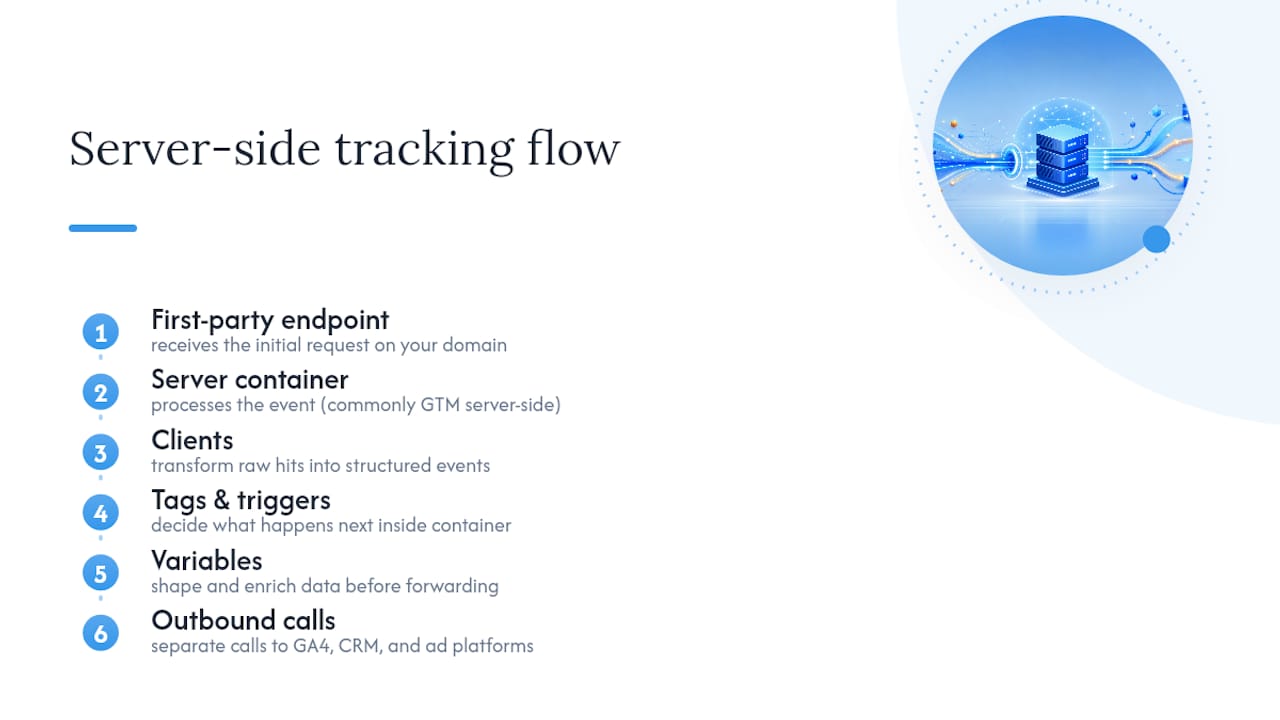
Picture a simple page view. A visitor lands on a product page, the browser sends one request to your subdomain instead of five separate calls to five vendors. Your server container processes that single event, applies your business logic, then forwards clean records to GA4, your CRM, and your ad platforms as separate outbound calls the browser never has to make.
What Are the Benefits of Server-Side Tracking?
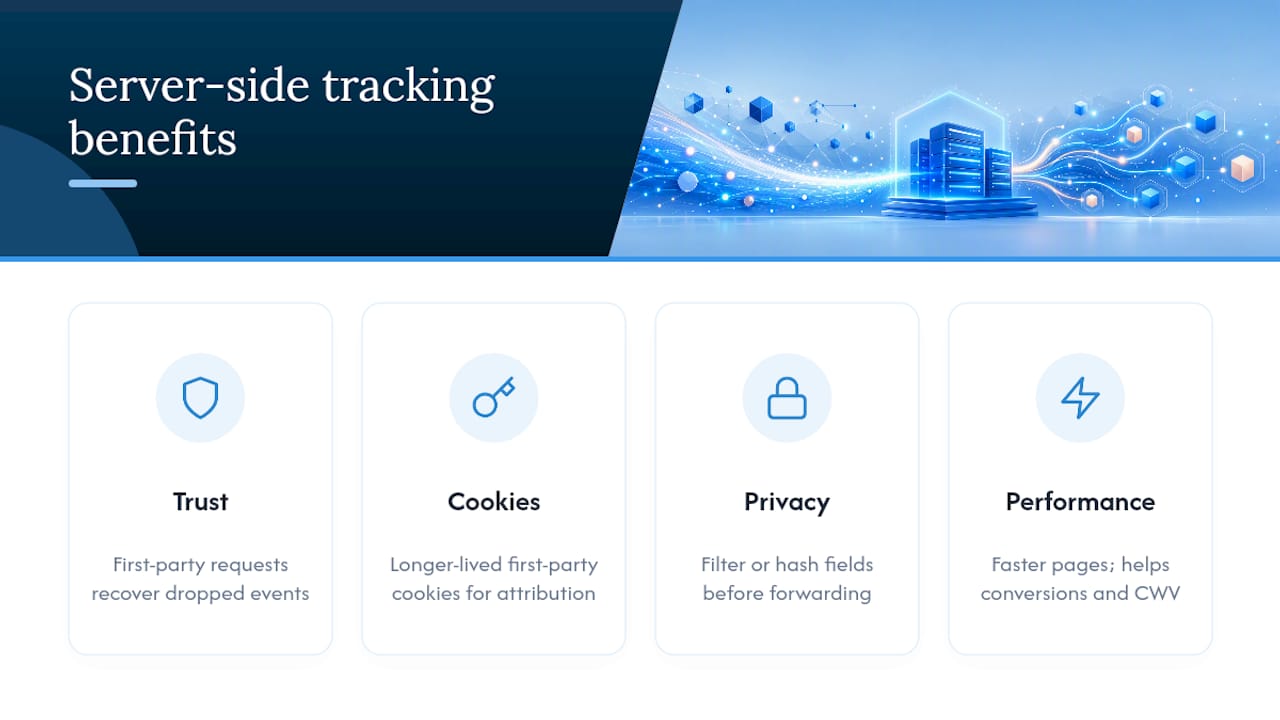
The biggest win is data you can actually trust. Because requests originate from your own domain, they get treated as first-party traffic, which sidesteps a lot of what ad blockers and Safari’s Intelligent Tracking Prevention are built to catch. Server-side setups can recover a meaningful share of events that client-side-only tracking silently drops, though the exact recovery rate depends heavily on your traffic mix and how aggressively your visitors block trackers.
First-party cookies set from your own subdomain also tend to survive longer than third-party cookies dropped by an external script, which matters directly for attribution windows and remarketing audiences.
You get a privacy dividend too. Because your server sits between the browser and every vendor, you decide exactly which fields get forwarded and which get stripped or hashed before they leave your infrastructure. And with fewer third-party scripts blocking the render path, most sites see a real bump in page speed, which matters for both conversion rate and Core Web Vitals.
Client-Side vs. Server-Side: What Each Actually Captures
Neither approach replaces the other completely, and treating this as an either-or choice is the most common mistake marketing teams make. Client-side tracking still wins for rich interaction data: scroll depth, mouse movement, form field abandonment, anything that needs to observe the browser’s actual state in real time. Server-side wins for reliability on the events that matter most to revenue: purchases, sign-ups, lead form submissions.
Here’s how the two stack up on the factors that actually drive a decision:
- Where code runs: client-side executes in the browser; server-side executes on infrastructure you or a vendor host.
- Ad blocker exposure: client-side scripts get flagged and blocked directly; server-side requests from your own domain are far harder to detect and filter.
- Cookie dependence: client-side relies heavily on third-party cookies with short lifespans; server-side can extend first-party cookie duration.
- Implementation effort: client-side is largely point-and-click in most tag managers; server-side needs a container, a subdomain, and ongoing maintenance.
- Data accuracy: client-side data degrades as browsers tighten restrictions; server-side holds up better over time but only if it’s maintained.
The pattern most teams land on: pilot server-side tracking for conversion events first, since that’s where inaccurate data costs the most money, and keep client-side running for the interaction-level detail server containers were never built to capture.
Which Implementation Approach Should You Choose?
Three patterns cover almost every real-world setup, and picking between them comes down to team size, engineering bandwidth, and how much control you need.
- Server containers (Google Tag Manager server-side): the most marketer-friendly route. You configure clients, tags, and triggers through a familiar interface, but you still need a hosting environment, a mapped subdomain, and someone who can keep the container running in production mode rather than preview mode.
- Direct server-to-server APIs (Measurement Protocol and similar): the highest level of control. You send events directly to a platform’s API without a container layer in between. This suits teams with dedicated engineering resources, since managing identifiers and request formatting correctly requires real technical discipline.
- Analytics platforms with built-in server-side options, like Matomo: Matomo supports both log import and API-based SDKs, which gives privacy-conscious or self-hosted teams a lower-code path than building a custom server container from scratch.
Most organizations land on a hybrid: a server container for the bulk of marketing tags, with a direct API connection reserved for one or two high-value integrations that need tighter control, like a CRM sync or a fraud-detection feed.
What Does a Server-Side Deployment Checklist Look Like?
Before any of this goes live, your team needs a clear sequence, and skipping steps here is where most pilots stall out.
- Create a custom subdomain and point DNS to your server container. Using a generic cloud provider hostname instead of your own domain reintroduces the exact ad blocker and cookie problems you’re trying to solve.
- Configure first-party cookie attributes deliberately. Set
Secure, considerhttpOnlywhere appropriate, and choose amax-agethat matches your attribution window rather than defaulting to whatever the platform suggests. - Wire your CMP to pass consent signals to the server, so only attributes the visitor actually consented to ever get forwarded downstream, and keep a recorded log of that consent to satisfy GDPR requirements.
- Test with preview mode and sample events, checking response codes at each stage before flipping the container to production.
- Monitor continuously, watching for bot traffic inflating event counts and running regular data quality audits against your source systems.
Pro Tip: Build a two-tier consent model: collect anonymized, aggregate events by default, and only enable full session linking once a visitor gives explicit consent. It keeps your baseline reporting intact without ever forwarding data you didn’t have permission to collect.
What Are the Trade-Offs and Common Pitfalls?
Server-side tracking isn’t free, in either sense of the word. You’re paying for hosting and maintenance, and some vendors charge forwarding fees on top of that. Budget for both before you commit to a rollout.
The bigger hidden cost is data hygiene. Client-side SDKs auto-capture fields like UTM parameters, referrer strings, and user-agent details. Server-side setups often need those fields rebuilt manually, which shifts real engineering work onto your team. A consistent UTM naming convention becomes essential once you’re reconstructing campaign data by hand instead of relying on a script to grab it automatically.
One misconception worth killing outright: server-side tracking is not a way around consent requirements. You still need a valid legal basis to collect the data, and testing takes real discipline, since a broken server pipeline fails silently instead of throwing a console error a developer would catch immediately.
How Vertical Brands Approaches Tracking and Measurement
Vertical Brands treats tracking as part of the same system as creative and paid media, not a separate technical afterthought bolted on after launch.
Neither figure claims server-side tracking alone caused those gains. Better data discipline made every other lever, from creative testing to campaign targeting, work harder because the numbers behind it were trustworthy. A sound pilot brings engineers, your CMP vendor, and your analytics lead into the same room before a single tag goes live, then tests weekly for the first month.
What Should You Prioritize First?
Prioritize server-side work where conversions are getting lost to ad blockers, not everywhere at once. Run a focused two-week pilot on your checkout or lead form, wire CMP consent to the server from day one, and measure the lift before scaling further. Chasing full-site coverage before proving the model wastes both engineering time and trust in the data.
— Alex
How a growth marketing agency can help you get this right
Getting server-side tracking right takes more than a container and a subdomain. It takes a team that understands the wiring between your CMP, your analytics stack, and the creative decisions that data is supposed to inform. A single growth marketing team can handle tracking and attribution, CMP integration, and the web development work a proper deployment requires, providing these services under one roof instead of three separate contracts.

That matters most when you’re moving fast, since a misconfigured DNS record or an unwired consent signal can quietly break your data for weeks before anyone notices. If you’re weighing a server-side pilot against your current setup, start with an audit. Talk to Vertical Brands about scoping a managed pilot before you commit engineering resources to a full rollout.
Sources
- An introduction to server-side tagging | Google Tag Manager - Server-side
- Server-side tracking: the complete guide for marketers | iubenda
- Server-side tracking: Complete setup guide without cookies – AnalyticsApi
Recommended

Other posts





























































Stay ahead with better decisions.
Get business insights today.
