What a Technical SEO Audit Actually Fixes (and Where to Start)

A technical SEO audit is a systematic check of the parts of your website that control whether search engines can find, understand, and rank your pages, distinct from content or backlink work. If you only run four checks this week, run these: fetch your robots.txt to confirm nothing important is blocked, open your XML sitemap and confirm it lists real, indexable URLs, pull Google Search Console’s Coverage and Crawl Stats reports, and run Lighthouse or PageSpeed Insights on a top revenue page. Then crawl the site to catch 4xx and 5xx errors and redirect chains.
That short list surfaces most of what actually breaks visibility.
- Fetch and read
robots.txtline by line - Open
sitemap.xmland spot-check five URLs for 200 status and canonical match - Pull GSC Coverage and Crawl Stats reports
- Run Lighthouse or PageSpeed Insights on your highest-traffic template
- Crawl the site for 4xx/5xx errors and redirect chains
Pro Tip: A complete technical audit covers sitemap and robots checks, redirect and status-code analysis, Core Web Vitals, schema validation, and canonical audits together, because these issues compound when left isolated. The outcome you want is a prioritized fix list, sorted by business impact, that your dev and content teams can act on without a follow-up meeting.
Key Takeaways
A technical SEO audit that pairs Google Search Console data with server log analysis catches indexing problems that crawler-only tools miss entirely.
| Point | Details |
|---|---|
| Start with GSC and robots.txt | Confirm crawlability and coverage before investing time in performance fixes. |
| Cross-check logs against crawls | Server logs reveal which URLs Googlebot actually visits, not just which ones exist. |
| Meet Core Web Vitals thresholds | Target LCP under 2.5 seconds, CLS under 0.1, and INP under 200 milliseconds. |
| Sort fixes by urgency | Use Bleeding now, Compounding, and Structural buckets to sequence sprint work. |
| Vertical Brands turns audits into sprints | Vertical Brands routes GSC, log, and crawl findings directly into prioritized dev backlogs, as shown in the FACEGYM and Tribal results. |
Table of Contents
- Technical SEO Audit Checklist You Can Run End to End
- How to Diagnose Crawlability, Sitemap, and Canonical Problems
- Core Web Vitals: What to Measure and What to Fix First
- Confirming What Search Engines Actually Index From Your Pages
- The Minimum Toolkit for a Repeatable Audit Workflow
- Turning Findings Into a Prioritized Fix Schedule
- Vertical Brands’ Audit-to-Fix Process in Practice
- Why URL Structure Still Trips Up Growing Sites
- Mapping Site Architecture Through Internal Links
- Finding and Fixing Duplicate Content at Scale
- Getting Your XML Sitemap to Actually Earn Its Keep
- Recommended Reading and Tools for Deeper Audits
- What Most Audits Get Wrong
- Turn Audit Findings Into Measurable Growth
- Sources
Technical SEO Audit Checklist You Can Run End to End
Run these steps in order. Skipping ahead to Core Web Vitals before confirming the site is even crawlable wastes time on pages that were never getting indexed anyway.
- Discovery. Pull your full URL list from your CMS or a crawl of the XML sitemap. Export as CSV.
- Fetch. Check
robots.txtfor accidental disallow rules, and confirm the sitemap is submitted in Google Search Console. Screenshot the Sitemaps report. - Crawl. Run Screaming Frog or Sitebulb across the site. Export status codes, redirect chains, and duplicate title tags.
- Render. Use GSC’s URL Inspection tool on five to ten key templates to compare the rendered HTML against the raw source.
- Index. Check the Coverage report for “Excluded” and “Crawled, currently not indexed” spikes. Note affected URL patterns.
- Verify. Run PageSpeed Insights on your top three templates and save the Core Web Vitals scores.
Collect evidence as you go:
- GSC Coverage and Crawl Stats screenshots
- Crawler export (CSV) with status codes and redirect paths
- Sample log file rows showing Googlebot hits
- PageSpeed Insights reports for each key template
This gives you a paper trail that survives the “can you prove it” question from an engineering lead.
How to Diagnose Crawlability, Sitemap, and Canonical Problems
Google Search Console’s Crawl Stats report tells you how many requests Googlebot made, which file types it fetched, and how response times trended. A rising trend in 5xx responses or a sudden drop in total crawl requests both deserve investigation before anything else. The Coverage report, meanwhile, tells you what happened after the crawl. Watch for “Discovered, currently not indexed,” which usually means Google visited a URL and decided it wasn’t worth keeping.
Server logs go further than either report. Pulling raw logs shows exactly which URLs Googlebot hit, how often, and with what status code. That’s how you find sections of the site the crawler is ignoring entirely, something a GSC summary won’t show you.
Pro Tip: Cross-reference your log file’s top-crawled URLs against your revenue pages. If Googlebot spends most of its budget on filtered category pages instead of product pages, that’s a crawl-budget leak worth fixing this sprint.
Sitemap hygiene matters more than most teams treat it: only canonical, indexable, 200-status URLs belong in the file. Common canonical failures include self-referencing canonicals pointing to a redirected URL, or paginated pages canonicalizing to page one and disappearing from the index. Fix these in bulk through your CMS template, not URL by URL.
- Remove noindexed or redirected URLs from the sitemap
- Audit canonical tags on paginated and filtered pages
- Check for conflicting canonical and noindex signals on the same URL
One caveat on crawl budget: Google states plainly that crawl budget is mostly a concern for large, complex sites, not smaller ones. If your site runs under a few thousand URLs, don’t spend a sprint chasing crawl efficiency before fixing basic indexability.
Core Web Vitals: What to Measure and What to Fix First
Google’s three Core Web Vitals thresholds are the pass bar: Largest Contentful Paint (LCP) under 2.5 seconds, Cumulative Layout Shift (CLS) under 0.1, and Interaction to Next Paint (INP) under 200 milliseconds. INP replaced First Input Delay as the responsiveness metric, and it’s commonly failed because of long JavaScript tasks that block the main thread during user interaction, not because of slow servers.
Find your failing templates in the GSC Core Web Vitals report, which groups URLs by pattern rather than listing every page individually. Cross-check with PageSpeed Insights for lab data on the specific page dragging the group average down.
The fixes that move the needle fastest:
- Convert hero images to WebP or AVIF and set explicit width and height attributes
- Inline critical CSS and defer everything else
- Delay third-party scripts (chat widgets, tracking pixels) until after page load
- Break up long JavaScript tasks that block the main thread during interaction
Prioritize by traffic volume and conversion value per template, not by which fix is technically easiest.
Confirming What Search Engines Actually Index From Your Pages
Rendering problems hide well because the page looks fine in a browser. The test that exposes them: load the page with JavaScript disabled and compare that raw HTML against the rendered version in GSC’s URL Inspection tool. If your primary content, headings, or internal links only appear after JavaScript executes, and the rendered HTML in Search Console doesn’t show them either, Google isn’t seeing what your visitors see.
Common failure points include blocked JavaScript or CSS files in robots.txt, third-party scripts that time out before rendering completes, and API calls that fail silently in Googlebot’s rendering environment even though they work in a live browser.
- Compare no-JS HTML against GSC’s rendered HTML side by side
- Check
robots.txtfor accidentally blocked.jsor.cssresources - Test render timing under throttled conditions, not just on a fast connection
Pro Tip: If a template relies heavily on client-side rendering for core content, move to server-side rendering or static generation for that template specifically. You don’t need to rebuild the whole site to protect the pages that matter most.
The Minimum Toolkit for a Repeatable Audit Workflow
You don’t need a dozen subscriptions. A workable stack covers five jobs: Google Search Console for indexing and crawl data, Screaming Frog or Sitebulb for site crawls, PageSpeed Insights or Lighthouse for performance, the Rich Results Test for schema validation, and a log file analyzer such as Screaming Frog’s Log File Analyser for crawl behavior. Add a backlink tool if link signals factor into your audit scope. For a broader look at how agencies stack these tools together, this rundown of agency SEO tools is worth a read.
The real work is merging outputs. Export each tool’s findings into one master CSV, keyed by URL, with columns for issue type, severity, and owner. That single sheet becomes your triage document instead of five disconnected tabs.
- Export crawler data, log data, and GSC data separately
- Merge on URL into one spreadsheet
- Tag each row with severity and assigned owner
- Set a recurring calendar block to re-run the merge
Automate what you can: schedule monthly crawls, set GSC email alerts for indexing spikes, and reserve a lighter monthly pass alongside a deeper quarterly one rather than treating every audit as a full rebuild from scratch.
Turning Findings Into a Prioritized Fix Schedule
Not every issue deserves the same urgency. Sorting findings into three buckets keeps engineering conversations short and focused: Bleeding now covers issues actively losing traffic or revenue today, like accidental noindex tags on money pages or broken redirect chains on category pages. Compounding covers issues that get worse over time but aren’t emergencies, like duplicate title tags spreading across a growing product catalog. Structural covers deeper architecture work, like migrating a template to server-side rendering.
| Priority Bucket | Example Issue | Typical Timeline |
|---|---|---|
| Bleeding now | Noindex tag on a revenue page | Fix promptly |
| Compounding | Duplicate titles across product variants | Address next sprint |
| Structural | Client-side rendering blocking indexation | Plan into a quarterly roadmap |
On cadence, a light monthly pass catches drift early, a full quarterly audit catches what accumulates, and an audit immediately after any migration or major deploy catches what a redesign quietly broke. When handing findings to a dev team, package each issue with a screenshot, three to five sample URLs, and one sentence on expected business impact. That framing gets issues into the sprint instead of the backlog.
- Bundle each issue with screenshots and sample URLs
- State the expected traffic or revenue impact in one sentence
- Route “Bleeding now” items directly to engineering, not the general backlog
Vertical Brands’ Audit-to-Fix Process in Practice
An audit that never turns into a sprint is a report nobody reads. Vertical Brands runs technical audits as the front end of an execution pipeline: findings from GSC, log files, and crawl data feed directly into a prioritized backlog that developers and marketers work from the same week.
That approach showed up in client outcomes. FACEGYM experienced notable increases in purchases and bookings after Vertical Brands aligned technical fixes with performance marketing and creative work. Tribal saw comparable gains from the same integrated model.
Evidence beats guesswork when you’re asking an engineering team to reprioritize a sprint. Pairing a crawl export with a log file snippet showing exactly which URLs Googlebot skipped turns a debate into a work ticket.
- Audit findings route directly into a shared backlog with dev and marketing
- Log data and GSC exports back every prioritization decision
- Fixes are sequenced by revenue impact, not by ease of implementation
Why URL Structure Still Trips Up Growing Sites
URL structure looks like a solved problem until a site scales past a few hundred pages, and then parameter sprawl starts eating crawl budget and splitting ranking signals across near-duplicate URLs. The fix starts with consistency: use lowercase, hyphen-separated words, avoid stacking more than three or four folder levels deep, and keep URLs descriptive without cramming in every target keyword.
Parameters cause more damage than static URL length ever does. Tracking parameters (?utm_source=), session IDs, and faceted navigation filters (?color=blue&size=large) can generate thousands of crawlable variants of the same page. Each variant competes with its own canonical version for crawl attention and, without a clear signal, can dilute ranking strength across duplicates instead of consolidating it on one URL.
Handle parameters with a layered approach rather than one blanket rule:
- Set canonical tags pointing every parameterized variant back to the clean URL
- Block low-value parameter combinations in
robots.txtwhen they serve no unique content - Use GSC’s URL parameter handling only for legacy cases, since Google now leans primarily on canonical signals
- Keep faceted navigation crawlable only where a filtered view has genuine standalone search demand
For eCommerce sites specifically, decide early whether filter combinations like “blue running shoes size 10” deserve their own indexable, canonical URL or whether they should stay parameter-only and non-indexed. That decision, made once at the template level, prevents thousands of individual judgment calls later. Document the rule in your CMS style guide so new developers don’t reintroduce the problem six months after you fixed it.
Mapping Site Architecture Through Internal Links
Internal links do two jobs at once: they help visitors navigate, and they tell search engines which pages matter most. A page buried five clicks from the homepage with zero internal links pointing to it sends a clear signal, whether you intended it or not, that the page isn’t a priority.

Run a crawl and pull the “Inlinks” column from Screaming Frog to see how many internal links each URL receives. Pages with very few internal links, particularly important ones, need attention. Flat architecture, where every page sits within two or three clicks of the homepage, generally distributes authority more evenly than deep, nested hierarchies that bury category and product pages under multiple parent folders.
Orphan pages, meaning URLs with no internal links pointing to them at all, are the most common architecture failure. They typically show up when a page gets built for a campaign, published, and then never linked from navigation or related-content modules. A crawl will find them if you cross-reference your full URL list against your crawler’s discovered-via-links list; anything in the sitemap but missing from the link graph is orphaned.
Fixing architecture usually means:
- Adding contextual links from high-authority pages to underlinked priority pages
- Building out related-content or “you might also like” modules on product and blog templates
- Reviewing navigation and footer links quarterly as the site grows
- Auditing orphan pages specifically after any content migration or site redesign
Anchor text matters here too. Generic anchors like “click here” carry no topical signal, while descriptive anchors that match the target page’s subject reinforce relevance for both users and crawlers.
Finding and Fixing Duplicate Content at Scale
Duplicate content rarely comes from copy-paste plagiarism. It comes from technical patterns: URL parameters generating multiple paths to the same page, HTTP and HTTPS versions both resolving live, www and non-www variants both indexed, or print-friendly and mobile versions of the same article sitting at separate URLs.
Start by crawling the site and grouping pages by title tag and meta description, since exact or near-exact matches across different URLs almost always point to duplication. Screaming Frog’s “duplicate” filters catch most of this automatically. For content-level duplication, such as manufacturer product descriptions reused verbatim across dozens of eCommerce sites, a similarity check against a sample of competitor pages will confirm whether your version is distinct enough to rank independently.
The fix depends on the cause:
- Technical duplicates (parameters, protocol variants): resolve with 301 redirects to a single canonical version, not just a canonical tag
- Syndicated or manufacturer content: rewrite the highest-traffic-potential pages first, then work down the list by priority
- Paginated series: use self-referencing canonicals per page rather than canonicalizing every page to page one, which can suppress deeper pages from indexing entirely
Where consolidation isn’t possible (two legitimately similar but distinct pages), differentiate the content meaningfully rather than relying on canonical tags to paper over near-identical pages. A canonical tag tells Google which version to index; it doesn’t fix why two pages said the same thing in the first place.
Getting Your XML Sitemap to Actually Earn Its Keep
A sitemap’s job is narrow: list the URLs you want indexed, in a format crawlers can parse instantly, kept current without manual maintenance. Most sitemap problems come from treating it as a static file instead of a live reflection of the site.
Start with what belongs in the file: only canonical, indexable URLs returning a 200 status code. Strip out redirected URLs, noindexed pages, and anything blocked by robots.txt, since including them just wastes crawl attention on dead ends. For large sites, split the sitemap by content type (products, categories, blog posts) using a sitemap index file, which makes it easier to spot where indexing problems concentrate.
Submit the sitemap through Google Search Console’s Sitemaps report, and check back regularly rather than assuming a one-time submission is enough. The report shows discovered versus indexed URL counts, and a wide gap between the two numbers is worth investigating before it grows. Update the sitemap automatically through your CMS rather than manually, since manually maintained sitemaps drift out of date within weeks on any actively updated site.
- Include only canonical, indexable, 200-status URLs
- Split large sites into multiple sitemaps by content type, linked from a sitemap index
- Resubmit and monitor the Sitemaps report in Google Search Console after major site changes
- Automate sitemap generation through the CMS instead of maintaining it by hand
Recommended Reading and Tools for Deeper Audits
For more detail beyond this checklist, start with Google’s own crawl budget documentation, a full technical audit checklist covering schema and canonical checks, and a layered audit framework that adds AI crawler access to the standard crawl-render-index model.
- Google Search Console Help Center for Coverage and Crawl Stats definitions
- Screaming Frog, Sitebulb, and PageSpeed Insights documentation for tool-specific setup
- The Rich Results Test for schema validation before deployment
What Most Audits Get Wrong
Most technical SEO audits treat the crawler export as the finish line. It’s the starting point. A crawl tool tells you what a URL looks like structurally, but it can’t tell you whether Googlebot actually visited that URL last week or ignored it for three months. That gap is exactly why log file analysis keeps showing up across every serious audit framework, yet keeps getting skipped in practice, usually because pulling raw server logs takes more coordination with a hosting team than opening a crawler dashboard.
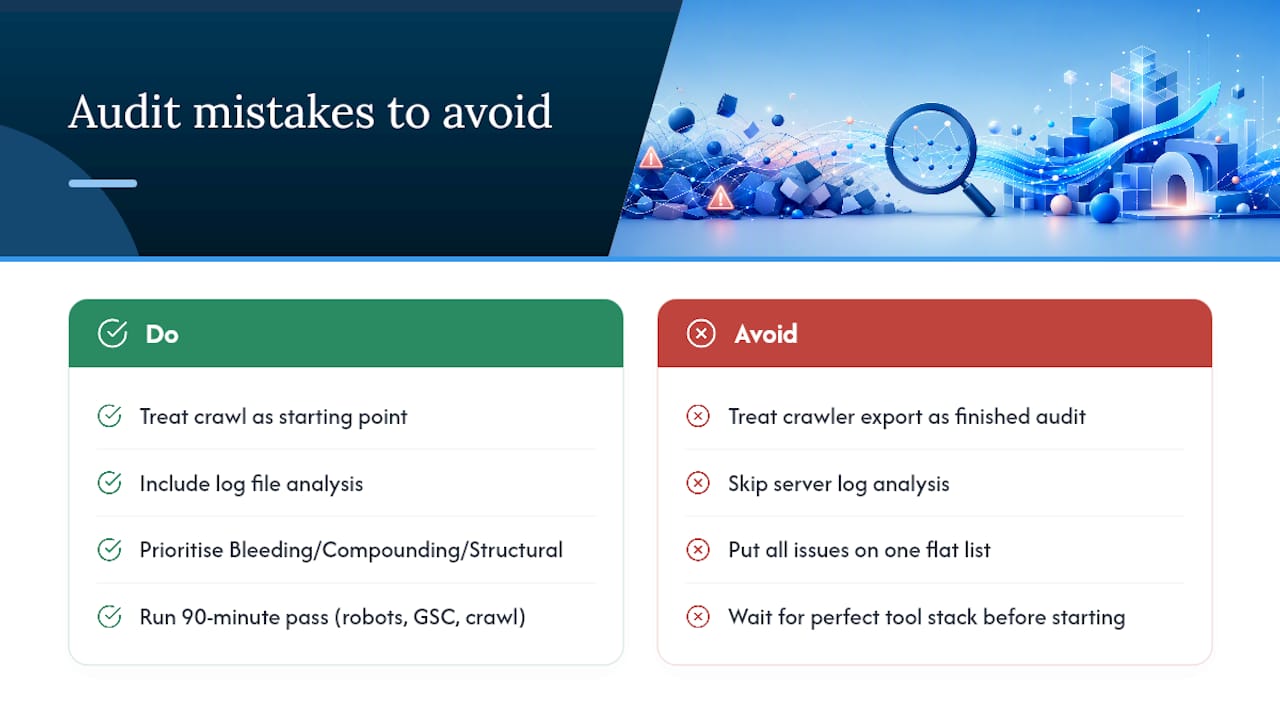
The conventional advice to “run a full audit” also undersells how much urgency varies within a single audit. A noindex tag on a checkout page and a duplicate title on a blog post from three years ago do not belong on the same to-do list, yet plenty of audit templates present them that way, as a flat checklist with no weighting. The Bleeding now, Compounding, Structural framing exists because sequencing matters as much as detection.
If you take one thing from this: don’t wait for the perfect audit tool stack before you start. A 90-minute pass through robots.txt, GSC Coverage, and a basic crawl surfaces most of what’s actively costing you traffic. Perfection can wait for the quarterly deep dive.
— Alex
Turn Audit Findings Into Measurable Growth
Vertical Brands is the alternative to hiring a standalone SEO consultant and a separate dev shop to act on their findings. Most audits stall because the agency that finds the problems can’t fix them, and the dev team that could fix them never gets clear priorities. Vertical Brands closes that gap by running audit, creative, performance marketing, and web development under one roof, so a fix identified in a Tuesday audit can be in a sprint by Thursday.

If your last audit produced a report that never turned into a fixed sprint, that’s the exact gap Vertical Brands closes. Visit the Vertical Brands site to request an audit and see what a prioritized, execution-ready fix list looks like for your business.
Sources
- Crawl budget - Google Developers
- SEO audit checklist 2026 — Seobility
- Technical SEO Audit: The 2026 Checklist for Crawl, Render, and AI Access — MarqOps
Recommended

Other posts






























































Stay ahead with better decisions.
Get business insights today.
