Stop Revenue Swings: 3 Email Deliverability Fixes for Ecommerce

Three fixes drive most of the gain in email deliverability for ecommerce: correct SPF, DKIM, and DMARC alignment; separate transactional traffic from marketing sends; and a disciplined list-cleaning routine. Get those right and inbox placement stabilizes, open rates climb, and revenue per campaign becomes predictable instead of a coin flip. Everything else in this playbook builds on those three.
TL;DR:
- Proper SPF, DKIM, and DMARC setup ensures inbox placement, but failure to propagate DNS records or meet additional Gmail requirements can cause deliverability issues.
- Separating transactional emails onto dedicated domains and regularly auditing third-party senders protect order confirmations from marketing reputation damage.
- Maintaining a clean list by promptly removing hard bounces and cautiously re-engaging dormant users prevents reputation loss and spam complaints.
- Gradually warming up new domains or IPs over two weeks, with volume increases and pre-peak housekeeping, reduces the risk of spam flags during high-volume seasons.
- Monitoring with tools like Gmail Postmaster and Yahoo Sender Hub allows early detection of errors, spam spikes, and deliverability drops, enabling proactive fixes.
Table of Contents
- What Is Email Deliverability for Ecommerce, and Why Does Authentication Come First?
- How Do You Protect Transactional Email From Marketing Reputation Risk?
- What Are the Rules for List Cleaning and Safe Re-Engagement?
- How Should You Warm Up a New Domain or IP Before Peak Season?
- Does Email Content Actually Affect Inbox Placement?
- How Do You Monitor Deliverability and Fix Common Errors?
- What Does an Agency-Level Deliverability Audit Actually Involve?
- What Are Feedback Loops and How Do You Use Them?
- How Do You Prevent Blacklisting and Recover if It Happens?
- Does Buying or Renting an Email List Hurt Deliverability?
- The Biggest Mistake Teams Make
- Get a Deliverability Audit Without Hiring a Full-Time Team
- Sources
- FAQ
What Is Email Deliverability for Ecommerce, and Why Does Authentication Come First?
Email deliverability for ecommerce is the measure of whether your order confirmations, shipping updates, and promotional campaigns actually land in the inbox rather than spam or nowhere at all. For a retailer sending both transactional and marketing mail at volume, deliverability problems compound fast: one bad promotional blast can drag down the reputation your receipt emails depend on. Authentication is the foundation because mailbox providers use it to confirm you are who you claim to be before they even look at content or engagement.
SPF (Sender Policy Framework) lists which servers can send mail for your domain. DKIM (DomainKeys Identified Mail) attaches a cryptographic signature that proves the message was not altered in transit. DMARC ties the two together and tells receiving servers what to do when a message fails alignment. Gmail requires SPF or DKIM plus a published DMARC record, and bulk senders moving 5,000 or more messages a day into Gmail must also meet PTR, TLS, and one-click unsubscribe requirements to stay eligible for mitigation instead of outright blocking.
Start your DMARC policy at p=none. That setting monitors alignment without rejecting anything, which gives you visibility before you commit to p=quarantine or p=reject.
Round out the setup with these checks:
- Confirm a valid PTR record (reverse DNS) resolves your sending IP to a hostname that matches your domain.
- Verify a working MX record so return mail and bounce processing function correctly.
- Confirm TLS is enforced on your sending infrastructure, since unencrypted connections are increasingly flagged.
- Use a dedicated tracking or click subdomain rather than a shared redirect domain, since a subdomain’s reputation stays isolated from other senders using the same click-tracking vendor.
- Weigh shared vs. dedicated IPs: shared IPs are faster to start on but tie your reputation to every other sender on that IP, per Gmail’s own sender guidance. A dedicated IP generally becomes advantageous once you have consistent sending volume at sufficiently high monthly levels to keep the IP warm.
Pro Tip: If you cannot get engineering time this week, hand your ESP support team the exact DNS records you need published and ask for a screenshot confirmation. Most SPF and DKIM failures are simply records that were never propagated.
How Do You Protect Transactional Email From Marketing Reputation Risk?
Order confirmations and shipping notices need to survive even when a promotional campaign tanks your sender score. The fix is architectural separation, not just good intentions.
- Put transactional mail on its own sending domain or subdomain. A structure like
orders.yourbrand.comfor receipts andnews.yourbrand.comfor campaigns means a spam spike on one stream never touches the other’s authentication or reputation. - Assign a distinct DKIM selector to each stream. Even if both share a root domain, unique selectors let mailbox providers evaluate signing behavior separately.
- Audit every DNS record and third-party integration feeding each stream, including SPF includes and any platform that sends on your behalf.
- Hunt down hidden senders. Contact-form notifications, review-request platforms, loyalty apps, and shipping carrier integrations often send from your domain without appearing in your ESP dashboard. A quarterly sender inventory that lists owner, domain, DKIM selector, and DMARC status catches orphaned integrations before they damage reputation.
A focused audit that isolates transactional traffic restores order-confirmation delivery fastest, which protects revenue while you work through marketing fixes on a longer timeline. This is also where a solid post-purchase email flow pays off, since it keeps transactional and lifecycle messaging cleanly separated from day one.
What Are the Rules for List Cleaning and Safe Re-Engagement?
List health determines whether mailbox providers trust your sends before they even read the content. Hard bounces should trigger immediate removal. A hard bounce means the address does not exist, and continuing to mail it signals sloppy list management to every provider watching your traffic.
Soft bounces need a threshold, not a hair-trigger. Suppress an address temporarily after three to five consecutive soft bounces across separate sends, rather than reacting to one blip that might just be a full inbox.
Re-engagement has to be staged, never blasted:
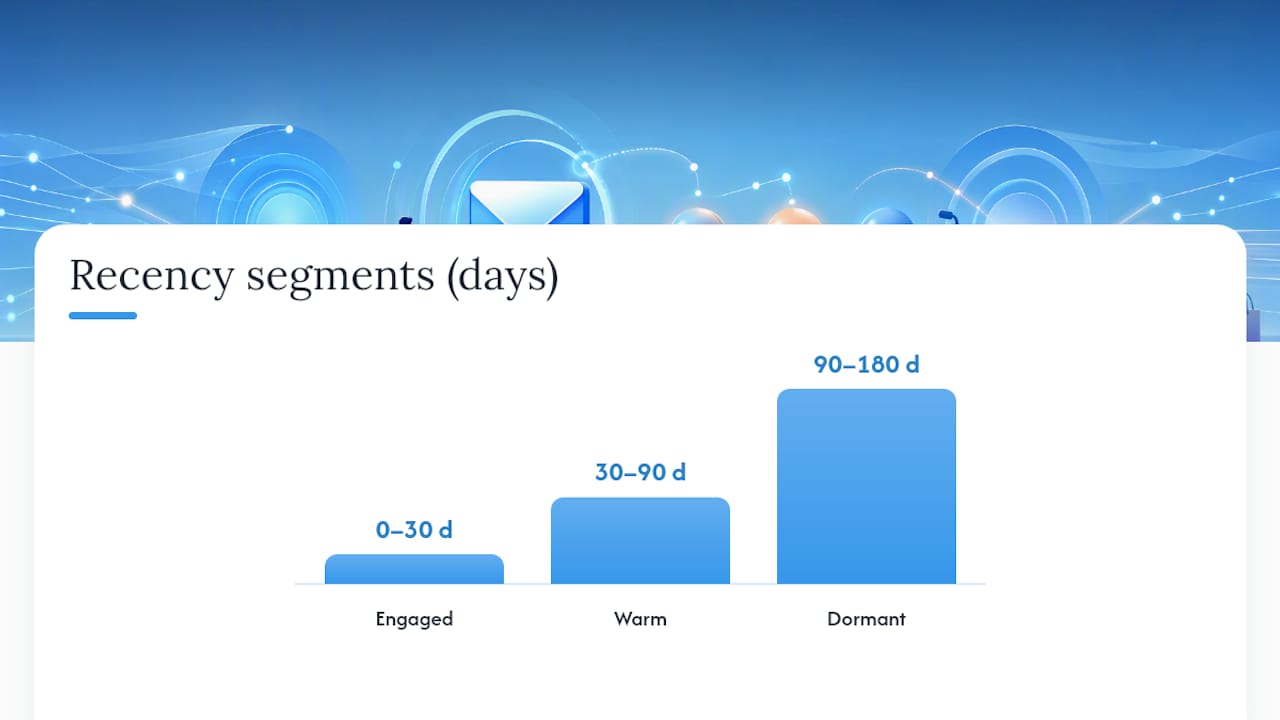
- Pull your dormant segment (no opens or clicks in 90 to 180 days) and send a small, low-frequency win-back series over several weeks.
- Never bulk-reactivate an entire dormant list in one send; mailbox providers read sudden volume to inactive addresses as a spam signal.
- Move non-responders to permanent suppression after the win-back series fails, rather than looping them through repeatedly.
Segment by recency first: engaged (opened or clicked in 30 days), warm (30 to 90 days), and dormant (90-plus days), with revenue-per-recipient tracked separately for each tier.
Gmail’s Postmaster Tools guidance recommends keeping user-reported spam rates low, with specific thresholds that affect eligibility for delivery mitigations. That threshold is the real ceiling ecommerce senders need to respect, not a vague “keep complaints low” rule of thumb.
How Should You Warm Up a New Domain or IP Before Peak Season?
Warming up means proving to mailbox providers, gradually, that you are a legitimate sender worth trusting with volume. Rushing this before Black Friday or a major launch is one of the most common ways ecommerce teams torch a quarter’s worth of deliverability.
- Start with your most engaged segment only — recipients who opened or clicked within the last 30 days.
- Increase daily volume gradually: roughly 500 to 1,000 messages on day one, then increase by 20% to 30% per day as opens and low complaints confirm a clean signal, reaching full volume over 10 to 14 days.
- Run pre-peak housekeeping two to three weeks out: suppress hard bounces, pause any active re-engagement campaigns, and confirm SPF, DKIM, DMARC, and PTR records all resolve correctly.
- Split peak sends across multiple days and hours rather than firing your entire list at 9:00 a.m. on Black Friday; staggered sends smooth the volume spike mailbox providers otherwise flag as suspicious.
- Watch for SMTP deferrals or a bounce-rate jump mid-send, and pause immediately if either climbs, since providers interpret sudden spikes as risk even from senders with a clean history.
Pro Tip: Build your peak calendar backward from your busiest send date and count 14 days back for warmup start. If that lands before you have engagement data on a new list segment, your timeline is too aggressive.
Does Email Content Actually Affect Inbox Placement?
Content and formatting choices feed directly into the machine-learning models mailbox providers use to classify mail, alongside authentication and reputation. Gmail’s spam filters weigh user feedback signals, including spam reports and read behavior, meaning content that irritates recipients into complaining hurts you even when your DNS is flawless.
- Every marketing message needs a working List-Unsubscribe header with one-click functionality, as defined in RFC 8058. This is not optional for bulk senders anymore.
- Avoid subject-line spam triggers (“free,” excessive punctuation, all-caps) and never use a display name that misrepresents who is sending.
- Prioritize sends by engagement recency rather than blasting your full list every time; mailing only recipients who opened or clicked recently keeps your complaint rate low and your sender reputation intact.
- Test subject lines and creative variants on a small segment first, and watch complaint rate specifically, not just open rate, since a high-open, high-complaint message still damages you.
How Do You Monitor Deliverability and Fix Common Errors?
Monitoring turns deliverability from guesswork into an operational routine you check weekly, not something you discover is broken after a campaign tanks.
- Gmail Postmaster Tools: domain reputation, spam rate, authentication pass rates, and IP reputation.
- Yahoo Sender Hub: DMARC status, placement and campaign performance feeds that show real inbox placement, which is often more accurate than your ESP’s acceptance logs.
- Your ESP’s own deliverability dashboard: bounce breakdowns, complaint rates, and send-level authentication results.
The table below breaks down the SMTP errors you will hit most often and what each one demands.
| Error Code | Type | What It Means | Response |
|---|---|---|---|
| — | Temporary defer | Receiving server is throttling or busy | Retry automatically; if repeated, slow send rate |
| — | Permanent failure | Mailbox does not exist | Suppress address immediately |
| — | Permanent failure | Policy rejection or blacklist hit | Investigate reputation; do not retry |
If inbox placement drops, work this order: check Postmaster Tools for a spam-rate spike, confirm DMARC alignment is still passing, pull your most recent list additions for quality issues, and pause any campaign to a dormant or purchased segment. Sender Hub’s error-code documentation is worth bookmarking for the exact remediation steps behind each 5xx code.
What Does an Agency-Level Deliverability Audit Actually Involve?
An audit worth commissioning, whether you run it in-house or brief an agency, follows a consistent sequence: build a full sender inventory, close authentication gaps, clean the list, rebuild segmentation based on recency, and stand up ongoing monitoring.
- Inventory every domain, subdomain, and third-party sender touching your brand’s mail.
- Fix SPF, DKIM, and DMARC gaps, and move DMARC toward enforcement once monitoring confirms clean alignment.
- Remove hard bounces and suppress chronic soft bounces.
- Rebuild segments around engagement recency instead of list-wide blasts.
- Set up Postmaster Tools, Sender Hub, and ESP dashboard tracking as a permanent routine, not a one-time check.
If you’re briefing a team internally, hand them this checklist directly. If you’re evaluating an agency’s email marketing capabilities, ask specifically how they sequence authentication fixes against list cleanup, since doing them out of order wastes the warmup period.
What Are Feedback Loops and How Do You Use Them?
A feedback loop (FBL) is a mechanism some mailbox providers offer that sends you a copy of every spam complaint filed against your mail, in near real time, instead of leaving you to infer complaint rates from aggregate reporting days later.
Yahoo runs a Complaint Feedback Loop that ecommerce senders should enroll in directly, since it feeds complaint data back to you at the individual message level. Yahoo’s own guidance recommends this enrollment alongside DMARC and DKIM as part of a baseline sending setup, not an advanced add-on.
The practical value is speed. Aggregate complaint-rate dashboards tell you something went wrong last week. An FBL tells you which specific send and which specific segment generated complaints, often within hours. That lets you pull a problematic campaign or fix a broken suppression list before the damage spreads to your next scheduled send.

Set up FBL processing as an automated rule, not a manual check: any address that generates a complaint through the loop should be suppressed immediately and permanently, no exceptions for “but they’re a repeat customer.” Mailbox providers do not distinguish between a complaint from a loyal buyer and a stranger. Every complaint counts equally against your rate, and repeat complaints from the same segment usually mean your win-back or re-engagement logic is too aggressive.
Route FBL data into whatever list-management workflow already handles hard bounces, so complaint suppression happens on the same automatic schedule rather than depending on someone remembering to check a separate report.
How Do You Prevent Blacklisting and Recover if It Happens?
Blacklisting happens when a spam-monitoring service (Spamhaus and similar operators are the ones ecommerce senders run into most) flags your sending IP or domain based on complaint volume, spam-trap hits, or sudden suspicious volume patterns. It is a symptom of an underlying reputation problem, not a random penalty.
Prevention comes down to the fundamentals covered above: authentication in place, transactional and marketing streams separated, complaint rates under the 0.10% threshold, and no sudden volume spikes to unengaged segments. Blacklisting rarely happens to senders with clean list hygiene and steady, gradual volume growth. It happens most often after a purchased list gets mailed, a re-engagement campaign goes out to a stale segment all at once, or a compromised account starts sending spam through legitimate infrastructure.
If you do get listed, the recovery sequence is consistent across most blacklist operators:
- Identify which list flagged you and read their specific delisting criteria; each one is different.
- Fix the underlying cause first (remove the offending segment, close the authentication gap, patch the compromised account) before requesting delisting.
- Submit a delisting request only after the fix is live, since a premature request that gets denied can extend the wait.
- Monitor your reputation through Postmaster Tools and your ESP dashboard for several weeks after delisting, since reputation recovery lags behind the technical fix.
Most blacklist recoveries take days to a couple of weeks. The bigger cost is usually the marketing send you have to pause during that window, which is exactly why prevention through clean list practices matters more than any recovery playbook.
Does Buying or Renting an Email List Hurt Deliverability?
Buying or renting an email list damages deliverability almost immediately, because every address on that list is unengaged with your brand by definition and some percentage will be spam traps planted specifically to catch senders doing this.
Purchased lists violate the core signal mailbox providers use to build sender trust: a history of engagement between a specific sender and a specific recipient. When you mail a purchased list, you are sending to addresses that have never opted in, never opened anything from your brand, and in many cases do not belong to anyone actively checking that inbox. Complaint rates spike, spam-trap hits trigger blacklisting, and the damage lands on your entire sending domain, not just that one campaign.
The reputation cost also does not stay contained to the purchased send. Because authentication and reputation operate at the domain and IP level, a single purchased-list blast can drag down deliverability for your transactional emails and your legitimate marketing list at the same time, undoing months of clean sending in one afternoon.
Build your list through permission-based growth tactics instead, such as on-site opt-in incentives, checkout capture, and clear consent at signup. It takes longer than buying a list of 50,000 names, but it is the only approach that does not put your entire sending infrastructure at risk for a short-term volume gain.
The Biggest Mistake Teams Make
Most ecommerce teams treat deliverability as a one-time setup task instead of a weekly discipline. That mindset is why reputation problems always seem to surface right before peak season, when volume spikes expose gaps nobody had been watching. If you fix one thing this week, publish DMARC p=none if you have not already, and set up Postmaster Tools so you have visibility before your next big send.
— Alex
Get a Deliverability Audit Without Hiring a Full-Time Team
Most ecommerce brands don’t need a full internal deliverability function, they need someone who can run the authentication fixes, stream separation, and list cleanup covered above without three months of trial and error. Some agencies fold email strategy, CRM management, and technical audits into one team, so you don’t need to coordinate between a DNS contractor, an ESP support ticket, and a freelance copywriter to get the same result.
A short audit engagement typically covers a sender inventory, an authentication gap check across SPF, DKIM, and DMARC, list-health review, and a monitoring setup so you can see problems the week they start instead of the month after a campaign underperforms. If your list management or CRM setup feels like it’s working against your deliverability goals rather than for them, a CRM built for ecommerce is often the missing piece behind segmentation that actually holds up at volume. Review Vertical Brands’s marketing and technical services and get in touch to scope what a short audit looks like for your list size and send volume.
FAQ
What Is the Difference Between SPF, DKIM, and DMARC?
SPF authorizes which servers can send mail for your domain, and DKIM cryptographically signs each message to prove it wasn’t altered. DMARC sits on top of both, telling receiving servers what to do when a message fails alignment, and Gmail requires at minimum SPF or DKIM plus a published DMARC record for bulk senders.
How Often Should I Clean My Email List?
Remove hard bounces immediately after every send, and run a broader review of soft bounces and dormant segments monthly. Quarterly, audit your full sender inventory and suppression rules to catch any drift in list quality.
What Spam Complaint Rate Should Ecommerce Senders Target?
Keep your complaint rate below 0.10%, and treat 0.30% as a hard ceiling you never want to approach. Gmail’s own Postmaster Tools guidance ties rates at or above that higher threshold to reduced eligibility for delivery mitigations.
Should I Use a Dedicated IP or a Shared IP for Ecommerce Email?
Shared IPs work fine below roughly 50,000 sends a month and require less setup, but your reputation is tied to every other sender on that IP. A dedicated IP can be beneficial when you have consistent sending volume and maintain steady sending to keep it warm.
Can Vertical Brands Help With an Email Deliverability Audit?
Yes. Vertical Brands offers email strategy and CRM management services that cover authentication fixes, list cleanup, and monitoring setup, detailed on its services page.
Recommended

Other posts

























































Stay ahead with better decisions.
Get business insights today.
