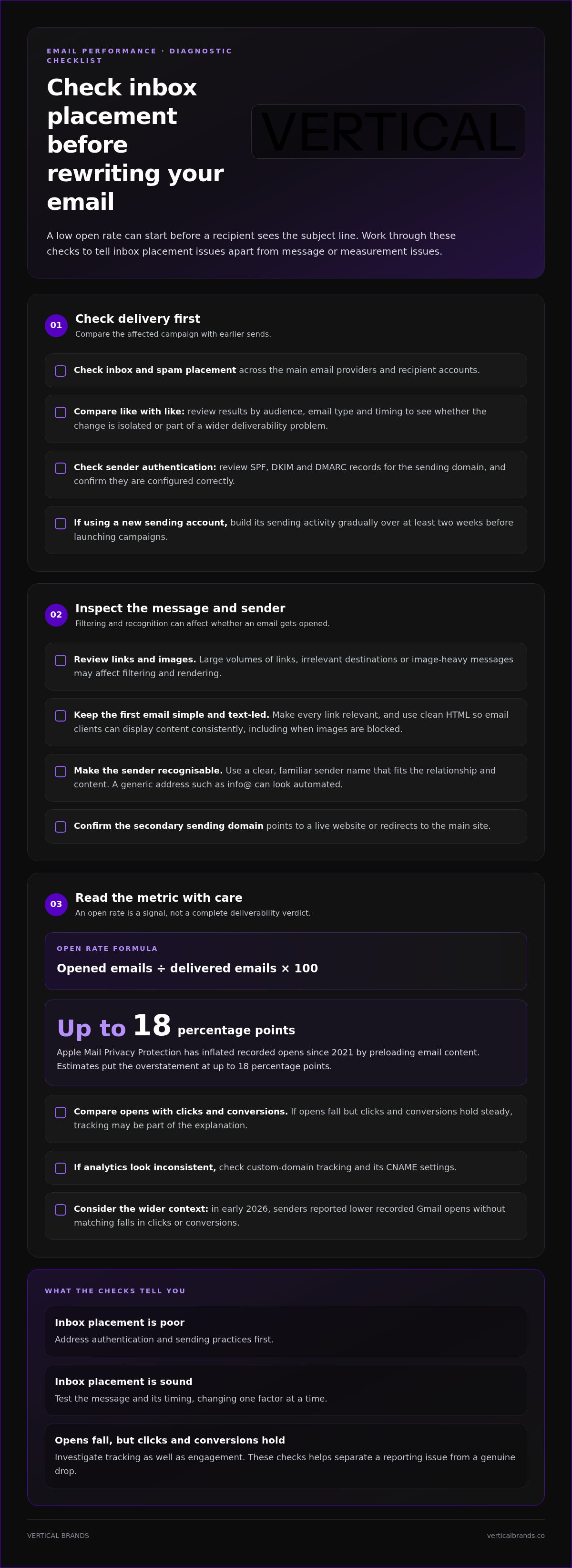
Reasons for Low Email Open Rates and What to Change
A disappointing open rate doesn’t automatically mean your email content is failing. Common reasons for low email open rates include weak subject lines, poor send timing, an unengaged or poorly segmented list, and personalisation that misses the mark. A broad guide is 20-30% across most industries, b...

A disappointing open rate doesn’t automatically mean your email content is failing. Common reasons for low email open rates include weak subject lines, poor send timing, an unengaged or poorly segmented list, and personalisation that misses the mark. A broad guide is 20-30% across most industries, but that figure needs context: Apple Mail Privacy Protection has inflated recorded opens since 2021, so the metric can overstate real engagement.
It’s reasonable to treat a falling rate as a warning, especially when clicks and conversions are slipping too. But open rate alone can give a misleading picture. This article explains how subject lines, preview text, sending patterns, list quality and personalisation affect performance, and what to adjust first. The right fix depends on where the problem starts, so compare like with like: the same audience segments, email types and time periods. That gives you a clearer basis for improving engagement without changing several parts of your strategy at once.
Key Takeaways
• Check whether emails reach the inbox, and review SPF, DKIM and DMARC authentication if deliverability is a concern.
• Make subject lines concise and relevant, then use preview text to give readers a clear reason to open.
• Test send times and frequency against your audience’s behaviour rather than relying on a universal schedule.
• Remove invalid or inactive contacts and compare engagement across meaningful subscriber segments.
• Use recipient behaviour to make messages more relevant. The most useful adjustments often starts with one clear test at a time.
Email deliverability and inbox placement
A low open rate can start before a recipient sees the subject line. If an email lands in spam or junk, it has reached a mail server but missed the inbox. Check inbox placement across the main email providers before rewriting campaign copy. Compare the affected campaign with earlier sends to see whether the change is isolated or part of a wider deliverability problem.
Start with sender authentication. Review SPF, DKIM and DMARC records for the sending domain, and check that each is configured correctly. A mismatch can weaken trust in the message’s origin. Also confirm that a secondary sending domain points to a live website or redirects to the main site. If you are using a new sending account, build its sending activity gradually over at least two weeks before launching campaigns.
Spam placement can reflect more than authentication. Large volumes of links, irrelevant destinations or image-heavy messages may affect filtering and rendering. For an initial email, use a simple, text-led format and reserve images or extra links for a follow-up if needed. Keep every link relevant to the message. Clean HTML also helps email clients display content consistently, including when they block images.
• Check inbox and spam placement across recipient accounts.
• Review SPF, DKIM and DMARC for the sending domain.
• Inspect links, images and HTML when placement or display changes.
• Compare campaign results by email type, audience and timing.
Sender identity matters too. A recognisable sender name and consistent brand identity help recipients connect a message with a business they know. A generic address such as info@ can look automated. Use a clear, familiar sender name that fits the relationship and content. If recipients don’t recognise who is writing, they may ignore or delete the email before opening it.
Open rate is calculated by dividing opened emails by delivered emails, then multiplying by 100. Treat it as a directional metric, not a complete deliverability verdict. Apple Mail Privacy Protection has inflated recorded opens since 2021 by preloading email content, and estimates put the overstatement at up to 18 percentage points. In early 2026, senders also reported lower recorded Gmail opens without matching falls in clicks or conversions.
To diagnose a weak result, compare inbox placement, opens, clicks and conversions by audience segment and email type. If opens fall but clicks and conversions hold steady, tracking may be part of the explanation. Check custom-domain tracking and its CNAME settings when analytics look inconsistent. These checks help separate a reporting issue from a genuine drop in engagement. If inbox placement is poor, address authentication and sending practices first. If it is sound, test the message and its timing.
2. Ineffective subject lines and preview text
A subject line has one job: make the message’s value clear enough to earn attention. “A quick update” gives little reason to open. “Your order is ready for dispatch” sets a specific expectation. A mismatch between promise and content is one of the reasons for low email open rates. Match the wording to the email itself, so readers know what they’ll find inside.
Keep subject lines under 50 characters, and aim for 40 or fewer when mobile readability matters. A shorter line is less likely to lose its key point on a small screen. Put the essential detail first: “Your weekend offer ends tonight” communicates more quickly than “A few things to know about our latest weekend offer”. Preview text adds context, rather than repeating the subject. For example, pair “New season, new essentials” with “Explore the pieces selected for cooler days”.
Urgency can help when it is genuine. Repeated capital letters, excessive punctuation and familiar spam-triggering words can make messages look untrustworthy. “FREE!!! Open now!!!” is less credible than “Free delivery on your next order”, provided the offer is real. Avoid making a subject line sound like a personal message if the email is a promotion. Clear, accurate wording builds recognition and sets the right expectation.
A strong subject line cannot solve every performance issue. Recipients also respond to sender recognition, message relevance, frequency and timing. If a campaign reaches the inbox but still attracts few opens, compare its subject and preview text with the audience’s interests. A product announcement sent to previous buyers may need different framing from a first introduction to new subscribers.
Test one change at a time. Compare a direct subject line with a curiosity-led version, while keeping the audience, preview text and send timing consistent. Then review the results for the same segment and email type. If you change wording, frequency and timing together, you won’t know which adjustment influenced the result. Record each test, its audience and the winning approach. A/B tests give clearer direction when each version changes only one element. This helps distinguish subject-line issues from other reasons for low email open rates.
• Put the most useful detail near the start.
• Use preview text to add information, not echo the subject.
• Make urgency accurate and avoid exaggerated wording.
• Test one variable against a consistent audience and schedule.
For sharper message concepts, UGC content can bring real customer language and product experiences into campaign creative. Use those insights to shape subject lines that sound specific to your audience, then test the wording against your existing approach.
3. Email send timing and frequency
A relevant campaign can still be overlooked if it arrives during a busy part of the day. Send timing affects when a message appears among competing emails, while frequency shapes how often subscribers see you. Treat these as separate variables. If opens fall after moving from fortnightly to weekly emails, test cadence before changing the subject line or audience.
There is no universal best time for every UK audience. Use recipient behaviour as your starting point, then test a schedule that fits the campaign. Mid-week sends often perform better than Monday or Friday sends. Early mornings and lunch hours can also suit some sectors. Schedule in the recipient’s time zone, especially if your list includes people across different regions.
Use broad timing windows to build a test, not as fixed rules. For e-commerce campaigns, test Tuesday, Thursday or Sunday, with sends at 10 am-1 pm or 7 pm-9 pm local time. For B2B and SaaS, compare Tuesday to Thursday at 9 am-11 am. A fashion or lifestyle brand could test Friday to Sunday, between 6 pm and 10 pm. These are starting points; audience habits should determine the schedule.
Frequency needs the same discipline. Test weekly, fortnightly or monthly sends, and monitor opens alongside clicks, unsubscribes and conversions. If weekly campaigns produce fewer opens and more unsubscribes than fortnightly messages, reduce the cadence and assess the next sends. A rise in inactive subscribers can also indicate that your schedule or content no longer feels relevant.
Change one timing factor at a time. Keep the message, segment and subject line consistent while testing a new send window. Then compare like-for-like campaigns, such as two weekly product emails sent at different local times. If you change the day, time and frequency together, you can’t isolate what affected performance. Record each test and its audience.
• Choose a cadence that matches the value and urgency of the content.
• Test send windows against the recipient’s local time.
• Compare the same campaign type and audience segment.
• Monitor engagement and unsubscribes before increasing frequency.
Mailing too often can weaken engagement and damage sender reputation; sending too rarely can make your brand less familiar. Use a consistent schedule, but adjust it when engagement trends change. A short test window makes comparisons easier when the audience and message remain stable. If a campaign is time-sensitive, such as a weekend offer, schedule it around when recipients can act, rather than relying on a generic weekday slot.
4. List cleaning and subscriber segmentation
A list built over time can contain invalid addresses, inactive subscribers and people with different interests. Those contacts affect the audience average, making a useful campaign look weaker than it is. Compare segments by source and engagement history. For example, customers who bought recently may respond differently from older leads who have never purchased.
List size alone doesn’t indicate quality. One comparison shows a 40% open rate for 150 active customers, against 15% for 30,000 leads collected over two years. Treat these figures as an illustration, not a universal benchmark. The age, source and activity of each group can change the result. A smaller, engaged audience may provide a clearer signal than a large, mixed list.
Set regular engagement checks using opens, clicks and recent activity. Because open tracking can be imperfect, don’t use recorded opens as the only reason to remove a contact. Create a sunset policy: define when inactive subscribers stop receiving regular campaigns, then consider a focused re-engagement message. If they remain inactive, suppress them from routine sends. This reduces repeated messages to people unlikely to respond.
Segmentation makes your strategy more relevant. Group subscribers by behaviour, purchase history, sign-up source or stated interests. A customer who bought running shoes could receive relevant care advice, whilst a new subscriber might need an introductory sequence. Compare each group’s results over time, by email type and audience source. That helps identify whether low engagement comes from one segment or the whole list.
In the UK, consent and data-protection requirements affect which contacts should receive marketing messages. Keep a clear record of how each person joined, and honour opt-outs promptly. Don’t assume that an address collected for one purpose is suitable for every campaign. Build your eligible audience from permission records before sending, and keep excluded contacts out of campaign segments.
Before uploading a lead list, verify addresses. Invalid contacts can cause bounces and harm sender reputation. Check the source and collection method, remove malformed addresses, and suppress known opt-outs. Then compare performance by list age and acquisition source. The 80/20 rule describes the idea that 80% of results come from 20% of the most engaged subscribers. Use it as a prompt to identify active groups, not as a reason to ignore the rest.
• Separate active customers, new subscribers and older leads.
• Review engagement by segment, email type and acquisition source.
• Verify addresses before uploading, and suppress opt-outs.
• Define inactivity criteria and use re-engagement selectively.
These signals reveal where list hygiene or targeting needs attention. A consistent review process makes campaign comparisons more meaningful and helps protect sender reputation.
5. Personalisation and audience segmentation
Personalisation makes a message more relevant by using information the subscriber has shared or actions they have taken. A first name alone rarely makes a generic campaign feel individual. Use behavioural data to shape the content: a recent purchase, browsed category or previous response can guide what appears. For example, send product-care advice to a buyer rather than another introductory offer.
Segment subscribers by meaningful differences, then match the message to each group. A new subscriber may need a welcome sequence, whilst a returning customer may value recommendations based on previous purchases. A lapsed customer could receive a re-engagement message tied to earlier interests. The aim is not to create more segments for their own sake. Each group should have a clear reason to receive different content.
Automation helps deliver that relevance consistently. Set a trigger for a meaningful action, such as signing up, purchasing or abandoning a basket, then define the message that follows. Automated emails have an average open rate of 51.05%, and triggered-email open rates are usually four times higher than newsletter open rates. These figures illustrate why timing and relevance matter in automated journeys.
Personalise the opening as well as the offer. An email to a business contact could refer to a recent achievement or a specific challenge. For a retail subscriber, the first line might connect a new product to a category they browsed. Use accurate details only. Incorrect names, stale preferences or a product recommendation unrelated to recent behaviour can undermine trust.
Measure each segment separately. Compare opens with clicks and conversions, and examine whether a particular trigger or message leads to meaningful engagement. A personalised campaign’s reported open-rate lift can reach 20-40% when combined with automation, re-engagement workflows and data-driven practices. Treat the figure as a reported result, not a forecast for every audience. A high open rate without follow-through may mean the content attracted attention but missed the subscriber’s need.
• Use purchase, browsing and sign-up behaviour to guide message content.
• Give each segment a distinct purpose and relevant campaign.
• Set automation triggers around actions that signal subscriber intent.
• Compare engagement and conversions by segment, not only across the whole list.
Customer-led creative can also make personalisation more specific. Use UGC content to bring real product experiences into relevant campaign messages. These signals gives you a practical starting point for refining what each audience sees.
Vertical Brands: Klaviyo Email Marketing
Vertical Brands provides Klaviyo Email Marketing and Email Marketing & CRM Management for businesses that need a more structured approach to campaign performance. If changes to subject lines, timing and audiences haven’t clarified the cause of weak opens, a review of your email strategy can help identify where to focus next.
Klaviyo Email Marketing connects campaign planning with subscriber behaviour, segmentation and automated messages. Email Marketing & CRM Management supports a broader view of how customer data and email activity work together. This is a practical next step when your team needs a consistent process for testing, monitoring and refining campaigns, rather than making disconnected changes. Better decisions start with clear performance signals and relevant audience groups.
Contact Vertical Brands to discuss your email marketing needs.
Turn email performance into a focused growth plan
Understanding the reasons for low email open rates matters when it informs your next decision. Choose the clearest issue, define what you want to improve, then make one controlled adjustment. This creates a practical learning cycle: assess the result, keep what works and use the evidence to shape the next test. Avoid changing several campaign elements at once, or it becomes harder to identify what influenced performance.
Vertical Brands offers Klaviyo Email Marketing, Email Marketing & CRM Management and Paid Social. These services can support businesses that want email activity managed alongside customer relationships and wider acquisition activity. If your team has identified a performance gap but needs a more structured way to turn observations into action, consider specialist support. Clear priorities often emerge from reviewing campaign performance in context, rather than treating each send as an isolated result.
Contact Vertical Brands today to discuss your email marketing priorities. A focused next step can help you build a stronger, more consistent programme.
Frequently Asked Questions
What is a Good Email Open Rate Across Industries?
A broad benchmark is 20-30%, but a useful target depends on what you send and whom you reach. A welcome message and a promotional campaign serve different purposes, so comparing their open rates directly can mislead. Start by comparing similar emails sent to similar audiences. Then assess whether clicks, conversions or replies support the same picture. A steady trend in your own campaigns can be more useful than a single industry average.
Need Help Improving Your Email Open Rates?
Vertical Brands offers Klaviyo Email Marketing and Email Marketing & CRM Management to help businesses improve how email campaigns and customer data work together. Support can be useful when your team has identified weak engagement but needs a clearer process for audience strategy, campaign execution and performance review. Bring a specific challenge, such as falling opens among repeat customers, to focus the discussion. The right next step is a structured review of the issue.
What is a good email open rate benchmark in the UK by industry?
There isn’t one reliable UK benchmark that applies across every industry and email type. A broad cross-industry reference is 20-30%, while newsletters often sit around 20-30% or more and promotional emails around 15-25%. Treat these as context, not a pass-or-fail test. Compare your results with campaigns serving a similar audience and purpose, then look for consistent changes in engagement rather than judging one send.
How do email open rates vary by campaign type and audience?
Campaign purpose can create a wide gap. Open rates can vary by campaign type, so welcome emails, promotional campaigns and newsletters are best assessed separately. Those figures describe different messages and shouldn’t be treated as directly comparable targets. Audience familiarity matters too. A new subscriber receiving a requested welcome message has a different relationship with the sender than an older contact receiving a broad offer. Track each campaign type separately.
How do subject lines and preview text affect email open rates?
They shape the first impression and help recipients decide whether a message deserves attention. For example, “Your guide to choosing a coffee machine” sets a clearer expectation than “News from us”. Preview text can then add a useful detail, such as what the guide covers. Keep both accurate: a mismatch between the inbox promise and the email content can reduce trust, even if the subject initially attracts opens.
How can email deliverability and spam filtering reduce open rates?
If a campaign lands in spam, recipients may never see it in their main inbox. Review authentication, bounce patterns and inbox placement across providers when opens fall sharply. Then compare clicks and conversions with recorded opens. If those outcomes remain stable, tracking may contribute to the apparent decline. If they also weaken, investigate both placement and message performance rather than assuming one cause.
How do inactive or outdated email lists affect open rates?
Inactive contacts can lower the average because they receive campaigns but rarely engage. Old or invalid addresses can also produce bounces, which may harm sender reputation. Review each contact’s source and recent behaviour before continuing regular sends. For example, separate recent customers from older leads who have never clicked. A targeted re-engagement message can test whether inactive subscribers still want to hear from you.
How does send frequency affect email open rates and unsubscribes?
Sending too often can make messages feel repetitive, prompting recipients to ignore them or unsubscribe. Sending infrequently may also reduce familiarity, particularly if a subscriber joined for regular updates. Monitor engagement and unsubscribes after each cadence change. If weekly sends draw less response than fortnightly ones, compare the same audience and campaign type before adjusting your schedule. A consistent pattern makes changes easier to assess, but audience preferences vary.

Other posts


























































Stay ahead with better decisions.
Get business insights today.
