Internal Linking Strategy That Ships With Every Post

A strong internal linking strategy helps search engines discover every page on your site, distributes ranking authority to the pages that matter most, and guides visitors toward conversion. The fastest way to see results is to run an internal link audit and fix orphan pages first. That single step typically surfaces pages search engines never found and gives you a clear, prioritized list of fixes to make.
TL;DR:
- Prioritize fixing orphan pages identified through an audit to improve crawlability and ensure all site pages are discoverable by search engines.
- Focus on building a topic cluster structure with pillar pages and supporting content, using descriptive anchor text to enhance topical authority.
- Regularly review crawl depth and inlink counts to ensure high-value pages are reachable within two to three clicks from the homepage.
- Incorporate internal linking into your publishing workflow by linking new content to existing relevant pages and updating older pages with new links.
- Larger or complex sites without dedicated resources should consider working with an agency to maintain a strong internal link structure over time.
Table of Contents
- What internal links are and how they work
- Why internal linking matters for SEO and user experience
- Step-by-step strategy: audit, map, link, and measure
- Best practices and common mistakes to avoid
- Audits, KPIs and maintenance cadence
- Tools and pragmatic workflows
- Vertical’s approach and a short case highlight
- When to DIY and when to hire an agency
- A managed path to a stronger link structure
- FAQ
- Sources
What internal links are and how they work
An internal link connects one page on your domain to another. Before building a strategy, it helps to know the different types you are working with:
- Contextual links: links placed inside body content that point to a related page, usually carrying the most topical relevance.
- Navigational links: menu, sidebar, and category links that help visitors move through your site structure.
- Footer links: links grouped at the bottom of a page, often used for secondary or legal pages.
- Breadcrumb links: a trail showing where a page sits within the site hierarchy, useful for both visitors and crawlers.
Search engines follow internal links to discover new pages and to understand how pages relate to one another. According to Google Search Central, linking is one of the primary ways Google finds new pages, and every page you care about should have at least one internal link pointing to it. When a page has no internal links at all, it becomes an orphan page, invisible to both crawlers and most visitors.
Anchor text, the clickable words in a link, also matters. Descriptive anchors (“read our guide to crawl budget” rather than “click here”) tell both readers and search engines what the linked page covers. Most internal links are followed by default, meaning they pass full crawl and relevance signals unless you deliberately mark them otherwise.
Why internal linking matters for SEO and user experience
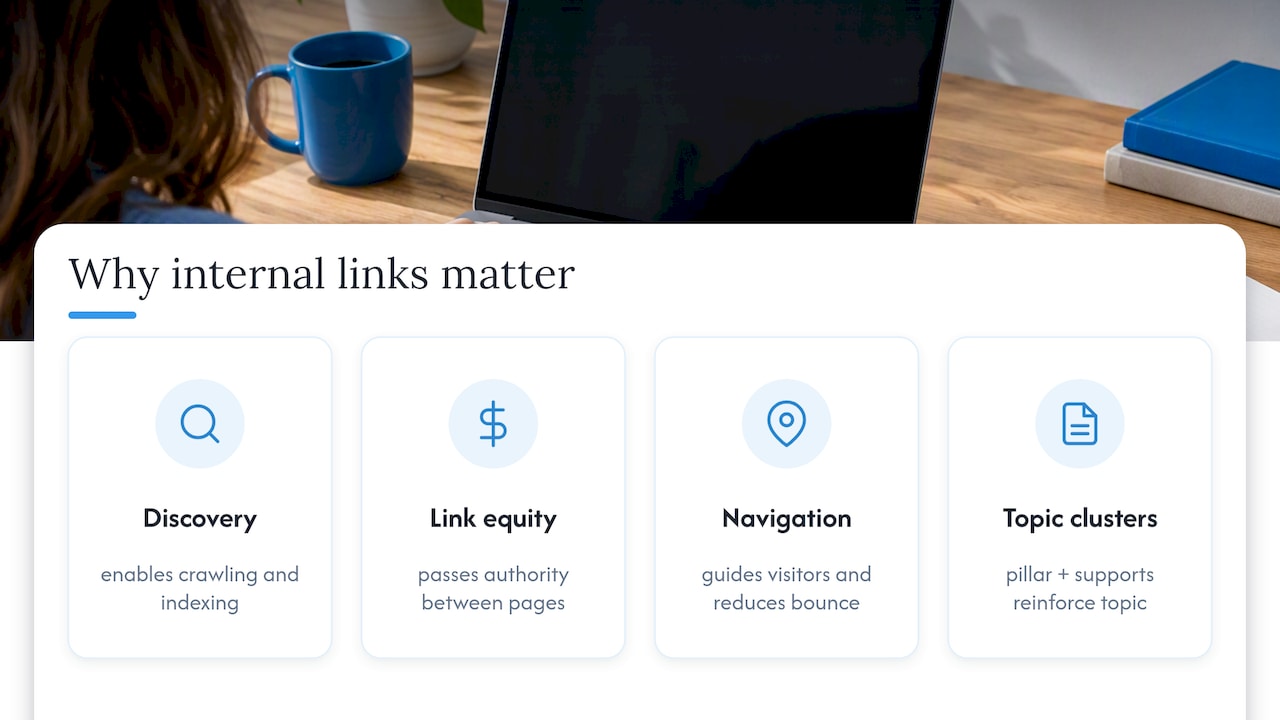
Internal linking does two jobs at once: it helps search engines find and understand your content, and it helps visitors get where they are going. Google’s own guidance confirms that internal links are a primary discovery mechanism, which means a page sitting with zero inlinks may never get crawled, no matter how good the content is.
Google Search Central states that every page worth ranking should have at least one internal link pointing to it, since crawlers rely heavily on links to find new content. A site with dozens of orphan pages is effectively hiding part of its own catalog from search engines.
Links also distribute what is often called link equity, a rough measure of authority passed from one page to another. Pages with many relevant inlinks tend to rank more easily for competitive terms than pages sitting at the edge of your site architecture with no internal support.
On the user side, internal links shape how visitors move through a site. Clear contextual links reduce bounce rates by offering a logical next step, and well-placed links into conversion pages, like a product or booking page, can shorten the path from interest to action.
Topic clusters amplify this effect. When a pillar page on a broad subject links out to several supporting articles, and those articles link back to the pillar and to each other, search engines read that cluster as a coherent, authoritative body of work on the topic, according to Search Engine Land’s internal linking guide. That structure benefits every page in the cluster, not just the pillar.
Step-by-step strategy: audit, map, link, and measure
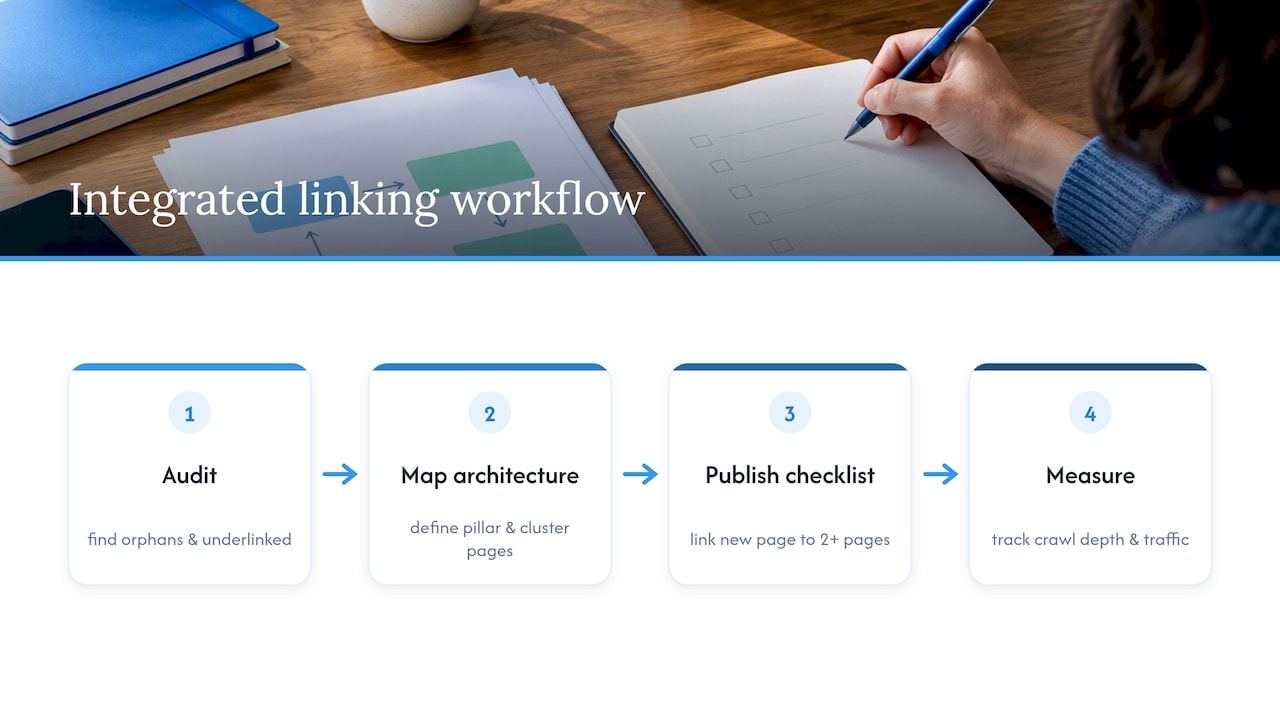
A workable internal linking strategy follows four stages: audit what exists, map what should exist, add links through editorial workflow, and measure the results. Here is how to run each stage without turning it into a quarterly fire drill.
- Audit your current link profile. Crawl your site with a tool such as Screaming Frog or a Semrush-style internal link report to pull inlink counts, crawl depth, and a list of orphan pages, those with zero internal links pointing to them.
- Map your architecture. Group pages into topic clusters built around a pillar page, the broadest, highest-value page on a subject, with supporting pages linking up to it and across to each other, a structure Search Engine Land ties directly to topical authority and crawl efficiency.
- Set priorities by business value, not just keyword difficulty. Rank pages by a combination of existing traffic, conversion value, and how underlinked they currently are, rather than chasing the hardest keyword first.
- Add links through your editorial workflow. Build a short checklist into your publishing process: every new article links to at least two to three relevant existing pages, and at least one existing page gets updated to link to the new content.
- Write anchor text that describes the destination. Follow the pattern Google’s own guidance recommends: specific, relevant phrases rather than generic ones like “click here” or “read more,” per the SEO Starter Guide.
- Avoid linking where it does not help the reader. Skip links inside legal disclaimers, login pages, or any page that offers no real next step for the person reading it.
- Scale through batches and CMS templates. For larger sites, roll out link additions in batches tied to a template (for example, every blog post automatically surfaces three related articles), and keep a change log so you can trace or reverse a batch if something breaks.
- QA before and after rollout. Run a staged crawl before publishing bulk link changes and another after, checking for broken links, redirect loops, or unintended drops in crawl depth for priority pages.
Pro Tip: Treat internal linking as part of your publishing checklist, not a separate project, so every new piece of content starts contributing to your link structure on day one.
This workflow mirrors advice from Carnegie Higher Ed’s publisher guidance, which recommends folding internal linking into standard production rather than treating it as a one-off cleanup. Sites that treat linking as a recurring editorial habit tend to avoid the backlog of orphan pages that builds up when it is left for an annual audit.
Best practices and common mistakes to avoid
Getting internal linking right is less about volume and more about relevance and balance.
- Prioritize contextual links over navigational ones: a link inside the body of a relevant paragraph carries more topical weight than one buried in a footer, according to Search Engine Land.
- Avoid overlinking: stuffing a page with a dozen internal links dilutes the value of each one and can confuse readers about which link actually matters.
- Use anchor text that matches the destination: a generic anchor like “this page” tells search engines and readers nothing about what they will find.
- Distribute equity instead of funneling everything to the homepage: spreading links across supporting pages strengthens the whole cluster rather than just the top of the funnel.
The most common mistake is ignoring crawl depth, letting important pages sit four or five clicks from the homepage, where crawlers and visitors are both less likely to reach them. A close second is treating internal linking as a one-time project rather than a recurring habit, which lets orphan pages accumulate every time new content goes live without a linking step attached. A third is adding links for the sake of hitting a quota rather than because the connection genuinely helps the reader.
Pro Tip: Before adding any internal link, ask whether a reader would actually click it because it helps them, not just because it exists for SEO.
Audits, KPIs and maintenance cadence
Internal linking loses value fast without a repeatable maintenance rhythm. A quarterly audit keeps the structure clean without demanding constant attention.
- List orphan pages: pages with zero internal inlinks, pulled from a fresh crawl.
- Review unique inlinks per page: flag priority pages that have fewer links than their traffic or conversion value warrants.
- Check crawl depth distribution: confirm your highest-value pages sit within two or three clicks of the homepage.
- Audit anchor text variety: look for repeated generic anchors that could be made more descriptive.
Track a small set of KPIs alongside each audit: pages indexed, organic traffic to priority pages, unique inlinks per page, and average crawl depth across the site. These four numbers, tracked quarter over quarter, show whether your linking structure is improving or quietly decaying as new content gets added.
For teams managing larger sites, scheduled crawls and a simple watchlist of priority pages make this cadence easier to sustain, flagging any page whose inlink count drops below a set threshold so it gets addressed before the next full audit.
Tools and pragmatic workflows
Running the audit is only useful if you can act on what it finds. A few tools cover most of the work.
- Google Search Console’s Links report shows your most linked pages and, by comparison, which priority pages are underlinked relative to their importance.
- Screaming Frog (or a similar crawler) surfaces orphan pages, crawl depth, and full inlink counts across the site, the core data Search Engine Land recommends for prioritizing fixes.
- A simple prioritization score, traffic multiplied by conversion value multiplied by link deficit, helps order fixes so you address the pages with the most upside first, an approach detailed in Similarweb’s internal linking guide.
- A CMS editorial checklist that requires every new post to link to and from existing content keeps the structure growing instead of degrading as volume scales.
For teams without in-house development resources to implement structural changes like breadcrumb templates or automated related-content modules, a web development partner such as BasicBS can handle the technical build while your editorial team manages the linking itself.
Vertical’s approach and a short case highlight
We build internal linking into the same workflow used for content production and development, not as a separate pass after launch. Our process runs an audit to find orphan and underlinked pages, maps the results into a clear architecture with defined pillar and cluster pages, and adds a publish-time checklist so every new piece of content links to and from relevant existing pages.
Our client FACEGYM saw a 50% increase in purchases and a 41% rise in bookings after we paired this kind of integrated technical and content work with the rest of our marketing program. We treat this as a proof point for combining structural fixes with ongoing content strategy rather than running them separately.
A short version of our checklist: audit quarterly, map clusters before writing, link every new page to at least two existing ones, write descriptive anchors, and track crawl depth alongside traffic.
— Alex
When to DIY and when to hire an agency
A small site with a handful of clear topic areas and an in-house SEO who already understands crawl depth and anchor text is usually a good candidate for managing internal linking directly, especially on a simple CMS where editorial checklists are easy to enforce.
Larger or multi-language sites, active migrations, or teams without the bandwidth to run quarterly audits on top of regular publishing are better signals to bring in outside support. An agency engagement typically includes an initial audit and architecture map, a prioritized list of fixes, implementation support, and a recurring measurement cadence so the structure keeps improving rather than drifting back toward orphan pages within a year.
A managed path to a stronger link structure
We know that fixing internal linking across a growing site takes more than a one-time crawl. We combine the audit, the architecture map, and the ongoing publishing checklist into one engagement, so the work keeps happening instead of stalling after the first report.

If you would rather hand this off than run it in-house, our services page outlines how we approach internal linking audits, prioritized fixes, and the recurring cadence that keeps a site’s structure working for both search engines and visitors.
FAQ
What is the 80/20 rule in SEO?
The concept in SEO generally refers to focusing the bulk of your effort on the small share of pages or keywords that drive most of your traffic or conversions. Applied to internal linking, it means prioritizing links to and from your highest-value pages before spending time on lower-impact content.
What is the difference between internal and external links?
An internal link points from one page to another page on the same domain, while an external link points to a page on a different domain. Internal links help search engines discover and understand your own site’s structure, as Google Search Central notes, while external links connect your content to the wider web.
How do I create an internal link?
You create an internal link by adding a hyperlink within your content that points to another URL on your own site, using descriptive anchor text that reflects what the linked page covers. Most CMS platforms let you insert this directly in the content editor, and it is good practice to link to at least two or three relevant existing pages every time you publish something new.
What are the benefits of internal linking in SEO?
Internal linking helps search engines discover and crawl every page on your site, since Google’s own guidance treats links as a primary discovery mechanism. It also distributes ranking authority across related pages, strengthens topical authority within content clusters, and improves navigation so visitors find relevant content more easily.
Sources
- SEO Link Best Practices for Google | Google Search Central
- Internal Linking for SEO: Types, Strategies & Tools | Search Engine Land
- The Complete SEO Guide to Internal Linking | Similarweb
- SEO Starter Guide: The Basics | Google Search Central
Recommended

Other posts




























































Stay ahead with better decisions.
Get business insights today.
