Analysts and Engineers: transaction_id Is Your GA4 Ecommerce Contract

GA4 does not track ecommerce activity by default. You have to send the recommended events (view_item, add_to_cart, begin_checkout, purchase, and the rest) with item-level parameters attached to each one. Your first move should be a short tracking specification: which events fire, what the item schema looks like, how transaction_id gets assigned, and whether GTM, gtag.js, or a platform integration sends the data. Validate every event in DebugView and Tag Assistant before you trust a single report.
TL;DR:
- Core GA4 ecommerce tracking requires sending specific events with item-level parameters, validated through DebugView before reporting.
- The purchase event must include a unique transaction_id, consistent item identifiers across the funnel, and correct value and currency information.
- Shopify and other platform integrations cover basic funnel events but often miss refund and remove_from_cart events, requiring manual audit.
- Using GTM or server-side tagging can reduce maintenance workload and improve data control, but always start with a core set of reliable events.
- Proper reconciliation and testing in BigQuery are essential for verifying data accuracy and ensuring GA4 reports match backend sales figures.
Table of Contents
- Core GA4 Ecommerce Events and Recommended Item Schema
- Implementation Approaches: gtag.js, GTM, and Platform Integrations
- Purchase Event: Exact Payload, Transaction ID Policy, and Common Pitfalls
- Promotions and Refund Tracking Best Practices
- Custom Parameters, Scopes, and Registering Custom Definitions
- Testing, Debugging, and Auditing Ecommerce Data
- Reporting: What Appears in GA4, Explorations, and When to Use BigQuery
- How Vertical Runs a GA4 Ecommerce Tracking Project
- Why Transaction ID Discipline Beats Chasing Every Event
- Get Your GA4 Ecommerce Tracking Audited Before You Trust the Data
- Sources
- FAQ
Core GA4 Ecommerce Events and Recommended Item Schema
GA4 ecommerce tracking runs on a defined set of events, and Google’s own guidance is blunt about it: these events exist because your product and transaction context has to travel with them, not because GA4 infers anything on its own. The Measure ecommerce developer documentation lays out the full event list, and most GA4 ecommerce setup work starts by mapping each funnel step to one of these events.
Here is the practical order most storefronts need, along with when each one fires:
- view_item_list — fires when a shopper views a category page, search results, or any list of products.
- select_item — fires when a shopper clicks a product from that list.
- view_item — fires on the product detail page.
- add_to_cart — fires the moment an item enters the cart.
- view_cart — fires when the shopper opens the cart page.
- begin_checkout — fires when checkout starts.
- add_shipping_info — fires once shipping method is selected.
- add_payment_info — fires once a payment method is chosen.
- purchase — fires after a transaction completes successfully.
- refund — fires when an order or line item is refunded.
- view_promotion and select_promotion — fire when a shopper sees or clicks a banner, coupon, or featured deal.
Every one of these events depends on an items array, and that array has its own schema. Each item object should carry item_id, item_name, price, quantity, item_brand, and item_category (GA4 supports category fields up to item_category5 for deeper taxonomy), plus item_variant and item_list_id where relevant. The Analytics Help documentation on setting up ecommerce events confirms GA4 allows up to 27 custom parameters inside that items array, which gives you real room to extend the schema without inventing new events.
Two rules matter more than the rest. First, value is calculated as the sum of price multiplied by quantity across all items. It should never include tax or shipping. Second, if you send value, you must also send currency, or your revenue metrics will be unreliable. Get sloppy on either point and every downstream ecommerce analytics GA4 report inherits the error.
Promotion tracking depends on consistency more than complexity. Use the same promotion_id or promotion_name string every time that promotion appears, from the first view_promotion event through to purchase. Inconsistent naming is the single most common reason promotion attribution falls apart in GA4 ecommerce reporting.
Implementation Approaches: gtag.js, GTM, and Platform Integrations
You have three real paths to get ecommerce events into GA4, and the right one depends on your engineering setup, not personal preference.
gtag.js sends events directly from your site’s code to GA4. It works well for simple sites with a developer who can edit templates directly, but every event change means a code deploy. Google Tag Manager pushes events into a data layer first, then GTM’s GA4 event tags read from that layer and send it along. The Analytics Help guide on ecommerce events recommends this pattern for most custom sites because it separates tracking logic from your codebase, letting marketers adjust tags without touching production code. Platform integrations (Shopify, WooCommerce, and similar) ship with pre-built GA4 tracking that requires minimal setup, but the coverage is rarely complete.
Shopify is the clearest example. Its built-in GA4 integration sends the core funnel events, including view_item, add_to_cart, begin_checkout, add_payment_info, and purchase, but it does not reliably cover remove_from_cart or refund events, according to Shopify’s own guidance on GA4 ecommerce tracking. If your business depends on accurate refund reporting for net-revenue analysis, a platform integration alone will not get you there. This is exactly why auditing platform coverage against the full recommended-event list has to be step one, not an afterthought.
There is a fourth option worth knowing even if you are not ready for it: server-side tagging through a GTM server container. It gives you a single point of control for deduplication logic, lets you enrich events with backend data before they hit GA4, and reduces the amount of tracking code exposed client-side. Pairing server-side tagging with a BigQuery export gives you both cleaner event delivery and a raw dataset for reconciliation.
The engineering tradeoffs come down to three things:
- Maintenance burden. Direct gtag.js implementations require a developer for every tracking change; GTM shifts most changes to configuration.
- Multi-vendor routing. If you run GA4 alongside other pixels, GTM’s single dataLayer push feeding multiple tags avoids duplicate event-firing logic scattered across your codebase.
- Long-term governance. Whoever owns the tracking spec should also own the GTM container or code repository. Split ownership is where GA4 tracking implementation quietly rots over six months.
Pro Tip: Before you write a single line of tracking code, audit exactly which of the twelve recommended events your platform integration already sends. Most teams discover they are missing refund and promotion events, which are the two that break reporting most often.
Purchase Event: Exact Payload, Transaction ID Policy, and Common Pitfalls
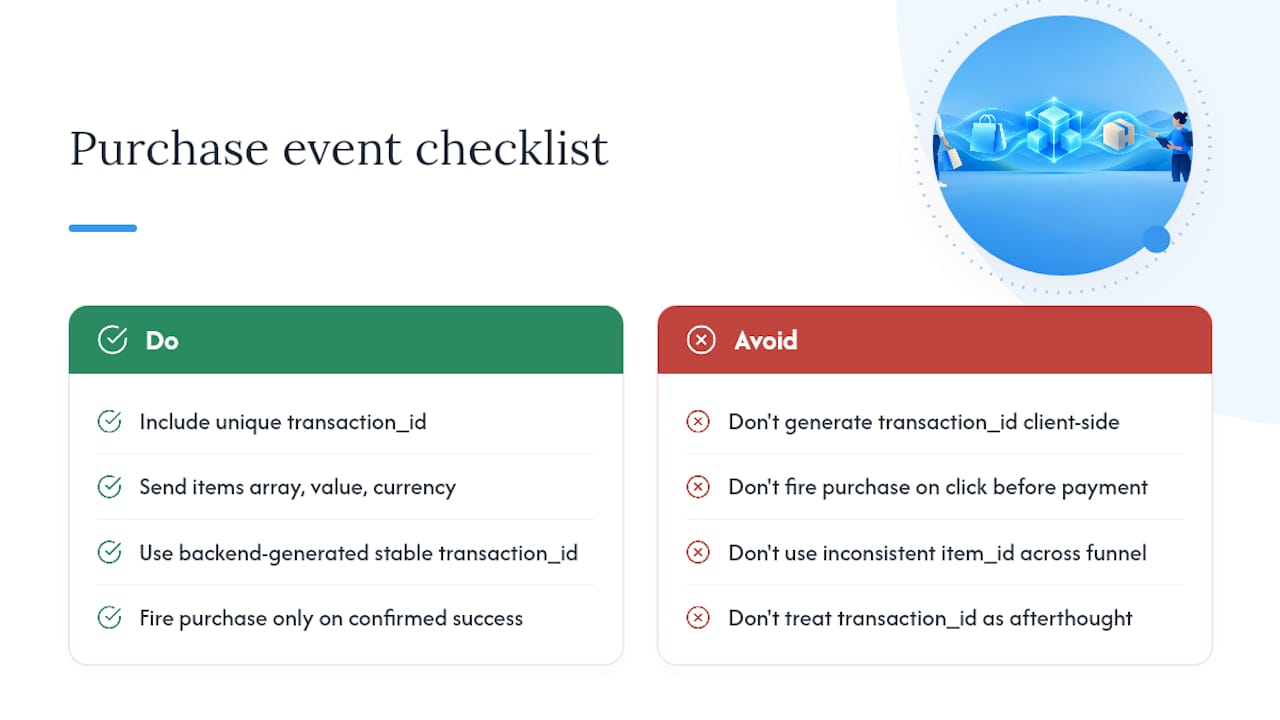
The purchase event carries the most weight of any event in your GA4 ecommerce setup, and it is also the one most commonly implemented wrong. According to the Recommended events reference, the purchase payload must include a unique transaction_id, the items array, value, and currency. Optional but valuable fields include tax, shipping, and coupon at the event level.
transaction_id deserves its own policy, not an afterthought. It should be the authoritative order number generated by your backend system, the same number that shows up in your order management or CRM. It must stay stable across page reloads, because GA4 relies on that identifier to prevent the same purchase from being counted twice.
The transaction_id is the single most important reliability control in the entire GA4 purchase event. Treat it as the canonical order number from your backend, never a client-generated value that can regenerate on a page refresh.
Two mistakes account for most of the broken purchase data analysts encounter. The first is firing the purchase event on a button click, before the payment gateway confirms success. A shopper who clicks “Place Order” and then has their card declined still triggers a false purchase event under this pattern. The safer approach, confirmed in Google’s guide to setting up a purchase event, fires purchase only from an authoritative success response or a dedicated confirmation page, using the stable order-based transaction_id.
The second mistake is inconsistent item_id values across the funnel. If your product detail page sends item_id: "SKU-1024" but your cart sends item_id: "1024", GA4 treats them as two different products. Every event in the funnel, from view_item through refund, needs to reference the same canonical SKU or product identifier, a discipline the ecommerce developer documentation treats as foundational rather than optional.
Promotions and Refund Tracking Best Practices
Promotion attribution and refund accuracy are the two areas of GA4 ecommerce reporting that break silently. Nothing throws an error. The data just quietly stops matching your backend numbers, and nobody notices until finance asks why revenue reconciliation is off.
Four practices keep both intact:
- Use one consistent promotion identifier. Whether you rely on
promotion_idorpromotion_name, pick one and use the exact same string inview_promotion,select_promotion, and any purchase that follows exposure to that promotion. Item-level promotion parameters take precedence over event-level ones for item promotion dimensions, so decide which scope you are using and stick with it. - Always send full item detail with refund events. A
refundevent needs thetransaction_idplus every refunded item in theitemsarray, not just a transaction-level total. Skipping item detail on refunds is one of the most under-implemented parts of GA4 ecommerce tracking, and it is the reason product-level net-revenue metrics fail for so many stores. - Test partial refunds separately from full refunds. A customer returning two of five items in an order needs a refund event carrying only those two items with their correct quantities and prices, not the full order value.
- Run a promotion-to-purchase test scenario before launch. Click through a promoted banner, add the promoted item to cart, and complete checkout. Confirm the promotion identifier survives from
view_promotionall the way to thepurchaseevent’s item parameters.
Missing item details in a refund event does not just create a smaller reporting gap. It breaks the entire concept of net revenue per SKU, because GA4 has no way to subtract a refunded item’s value from that item’s gross revenue if it never received the item in the first place.
Custom Parameters, Scopes, and Registering Custom Definitions
Reach for a custom parameter only after confirming GA4 has no predefined dimension that already covers what you need. Recommended events automatically populate GA4’s built-in ecommerce dimensions and metrics; custom events and parameters do not get that same automatic reporting support, according to Google’s custom definitions documentation.
When you do need a custom parameter, scope matters more than the parameter itself:
- Item-scoped parameters describe a product attribute, like a material type or a warranty tier, that belongs to the item regardless of when it appears in the funnel.
- Event-scoped parameters describe context specific to a single step, like a checkout step number or a filter applied on a listing page.
- User-scoped parameters describe something persistent about the visitor, like a loyalty tier or account age.
Registering a custom parameter happens in GA4 Admin under Data display, then Custom definitions, where you set the parameter name, scope, and description. Misspell the parameter name in your tag configuration, or register it under the wrong scope, and the data arrives but never surfaces correctly in reports. This is one of the most common silent failures in custom GA4 tracking implementation, and it is nearly invisible until someone tries to build a report against a dimension that never populates.
Keep your tracking spec and your Admin-level custom definitions under version control together. When an engineer renames a parameter in code six months from now without checking the spec, that is how item-scoped attributes quietly vanish from Explorations.
Testing, Debugging, and Auditing Ecommerce Data
No GA4 ecommerce tracking implementation should go live without a structured QA pass, and the workflow is more mechanical than most teams expect.
- Simulate every funnel step in order. Browse a category, click a product, add it to cart, start checkout, add shipping and payment info, and complete a test purchase.
- Open DebugView and confirm each event fires with the right name and parameters. Check that the
itemsarray is populated,valuematches your expected calculation, andcurrencyis present. - Verify transaction_id stability. Reload the confirmation page and confirm the purchase event does not fire twice with the same order.
- Use Tag Assistant alongside DebugView to confirm the tag itself triggered correctly, not just that GA4 received something.
- Run edge-case scenarios deliberately. Test a failed payment (purchase should never fire), a duplicate confirmation page load (transaction_id should prevent double counting), and a multi-item order with a discount and a subsequent partial refund.
- Pull the raw event data from BigQuery once the export is live, and reconcile item-level totals against your order management system.
Standard GA4 reports can take between 24 and 48 hours to fully populate, which is exactly why DebugView exists as a separate, realtime verification layer. Do not judge a fresh implementation by what the standard Ecommerce purchases report shows on day one.
DebugView catches the obvious breaks. It will not catch a duplicate purchase that GA4’s own deduplication logic quietly absorbed, or a refund that landed with the wrong transaction_id. That reconciliation work belongs in BigQuery, where you can query raw events directly and match them against your actual order ledger line by line.

Reporting: What Appears in GA4, Explorations, and When to Use BigQuery
Once events are flowing correctly, the Monetization section of GA4’s standard reports gives you the Ecommerce purchases report, built on dimensions like item name, item category, and item brand, paired with metrics including item revenue, items purchased, and purchase-to-view rate. This is the fastest place to spot whether your item schema is populating as expected.
Explorations is where deeper GA4 funnel exploration work happens. A funnel exploration lets you build the exact view_item to add_to_cart to purchase path and see drop-off at each step, something the default reports do not surface directly. Item-level exploration reports also let you segment revenue by custom dimensions you registered earlier, assuming the scope was set correctly.
BigQuery becomes necessary in three specific situations:
- Deduplication audits, where you need to confirm no purchase event fired twice for the same transaction_id.
- Refund reconciliation, where you are matching GA4’s refund events against your actual returns database.
- Joining GA4 data with your order system or CRM, which lets analysts tie ecommerce events to customer lifetime value, something GA4’s standard interface cannot do on its own. This kind of join is exactly where CRM data and ecommerce tracking need to line up cleanly.
When reconciling GA4 revenue against backend sales figures, check three things before assuming there is a tracking bug: whether both systems define “revenue” the same way (pre-tax versus post-tax), whether currency conversion is happening consistently, and whether you are comparing the same time window in the same time zone. Mismatches on any of those three account for most of the “GA4 doesn’t match our books” complaints analysts field.
How Vertical Runs a GA4 Ecommerce Tracking Project
A GA4 ecommerce tracking project only earns trust once it is verified end to end, not just implemented. Vertical Brands treats analytics as a component of a client’s broader growth strategy, not a standalone technical checkbox.
A typical engagement includes:
- A written tracking specification covering every event, item field, and transaction_id rule before any code ships.
- Implementation through GTM or gtag.js, matched to the client’s existing platform and engineering setup.
- A structured QA pass across DebugView, Tag Assistant, and live-order verification.
- BigQuery export configuration for ongoing auditing and reconciliation with order systems.
- Custom Exploration and report builds so the client’s team can actually use the data once it is flowing.
The value shows up downstream. Clients have seen significant increases in purchases and bookings after accurate measurement was paired with ongoing optimization, a result that depends on reliable tracking data. That is the real point of GA4 conversion tracking done properly: it becomes the foundation media and CRO decisions can stand on, feeding directly into the kind of post-purchase optimization work that turns clean data into revenue.
Why Transaction ID Discipline Beats Chasing Every Event
Most teams treat GA4 ecommerce tracking as a completeness contest, trying to wire up every recommended event on day one. That instinct is backwards. A tight core of five events (view_item, add_to_cart, begin_checkout, purchase, and refund) with rock-solid transaction_id discipline will tell you more than a full twelve-event implementation riddled with duplicate purchases and inconsistent item IDs.
Expand event coverage only after your core set survives a real QA pass and reconciles cleanly against BigQuery. Engineering time is finite, and a promotion-tracking feature is worthless if your purchase numbers cannot be trusted in the first place. Build the foundation first. Everything else is easier to add once transaction_id actually means something.
— Alex
Get Your GA4 Ecommerce Tracking Audited Before You Trust the Data
Most teams that “have GA4 set up” have never verified it against a real order.

The engagement typically covers:
- A tracking specification mapped to your exact platform, whether that’s Shopify, WooCommerce, or a custom build.
- GTM or gtag.js implementation with item-level schema built to match your product catalog.
- A full QA pass across DebugView, Tag Assistant, and live transactions before anything goes live.
- BigQuery export setup for ongoing reconciliation against your order system.
If you want a second set of eyes on your current setup, or a project built from scratch, request an audit through Vertical’s services page and start with a conversation about where your ecommerce data actually stands today.
Sources
For implementation, keep these open in a tab: the Measure ecommerce developer guide, the recommended events reference, the debug and troubleshoot guide, and for advanced traffic attribution questions, this breakdown of tracking LLM traffic in GA4.
- Measure ecommerce | Google Analytics | Google for Developers
- GA4 Set up ecommerce events - Analytics Help
FAQ
How Do I Set Up GA4 for Ecommerce?
Start by adding the Google tag to your site through gtag.js or GTM, then send the recommended ecommerce events (view_item, add_to_cart, begin_checkout, purchase, and refund at minimum) with a populated items array on each one. Validate every event in DebugView before trusting any report, since standard reports can lag 24 to 48 hours behind real activity.
What Is Ecommerce Tracking?
Ecommerce tracking is the practice of capturing structured data about product views, cart activity, checkout steps, and completed transactions so a platform like GA4 can report on revenue, conversion rates, and product performance. In GA4 specifically, this means sending a defined set of events with consistent item and transaction parameters rather than relying on generic pageview data.
How Much Does GA4 Cost to Use?
GA4’s standard version is free to implement and use, with no license fee for the core platform. Vertical Brands does not publish fixed pricing for GA4 ecommerce tracking implementation work; current rates for tracking specification, implementation, and QA services are available by requesting a quote through the services page.
What Are the Best Analytics Tools for Ecommerce?
GA4 remains the standard free option for ecommerce analytics GA4 tracking, paired with BigQuery for raw-event auditing and reconciliation once transaction volume grows. Platform-native tools like Shopify’s built-in GA4 integration cover the core funnel but require auditing against the full recommended-event list, since gaps like refund and remove_from_cart tracking are common.
Why Isn’t My GA4 Purchase Data Matching My Backend Sales?
The most frequent causes are a purchase event firing before payment confirmation, an unstable or client-generated transaction_id that duplicates on page reload, or a mismatch in how “revenue” is defined between GA4’s value field and your backend’s totals (pre-tax versus post-tax). Checking transaction_id policy and value calculation first resolves most of these mismatches.
Recommended

Other posts































































Stay ahead with better decisions.
Get business insights today.
