How to improve email marketing deliverability and inbox placement
A delivered email can still miss the inbox. To understand how to improve email marketing deliverability, separate delivery from inbox placement: delivery means the recipient’s mail server accepts a message; deliverability means it reaches the inbox rather than spam or junk. A strong inbox-placement...

A delivered email can still miss the inbox. To understand how to improve email marketing deliverability, separate delivery from inbox placement: delivery means the recipient’s mail server accepts a message; deliverability means it reaches the inbox rather than spam or junk. A strong inbox-placement benchmark is at least 95% of emails reaching subscribers’ primary inboxes.
A campaign can be accepted by a mail server yet still be filtered into spam, so a headline delivery figure may hide the real problem. Deliverability depends on more than your sending platform or subject line. Sender and IP reputation, authentication, list quality and subscriber engagement all affect where messages land. Use performance data to identify where to focus, from rising bounces to weak clicks or spam complaints.
This guide explains the mechanics and practical fixes. You’ll learn how SPF, DKIM and DMARC support sender verification, how to clean and segment a list, when to re-engage inactive subscribers, and how to assess marketing and transactional email separately. It also explains how consistent, relevant sending can protect reputation over time, so you can make decisions based on inbox placement and engagement, not delivery rate alone.
Key Takeaways
• Align SPF, DKIM and DMARC settings with your sending domain to support sender authentication.
• Remove hard bounces and suppress contacts who no longer engage, rather than continuing to email the entire list.
• Use a focused re-engagement campaign to identify inactive subscribers, then adjust your audience based on their response.
• Track inbox placement alongside engagement, bounces and spam complaints to spot reputation issues sooner.
• Review marketing and transactional email performance separately; each serves a different purpose and needs its own assessment.
1. What role do sender reputation and IP reputation play in deliverability?
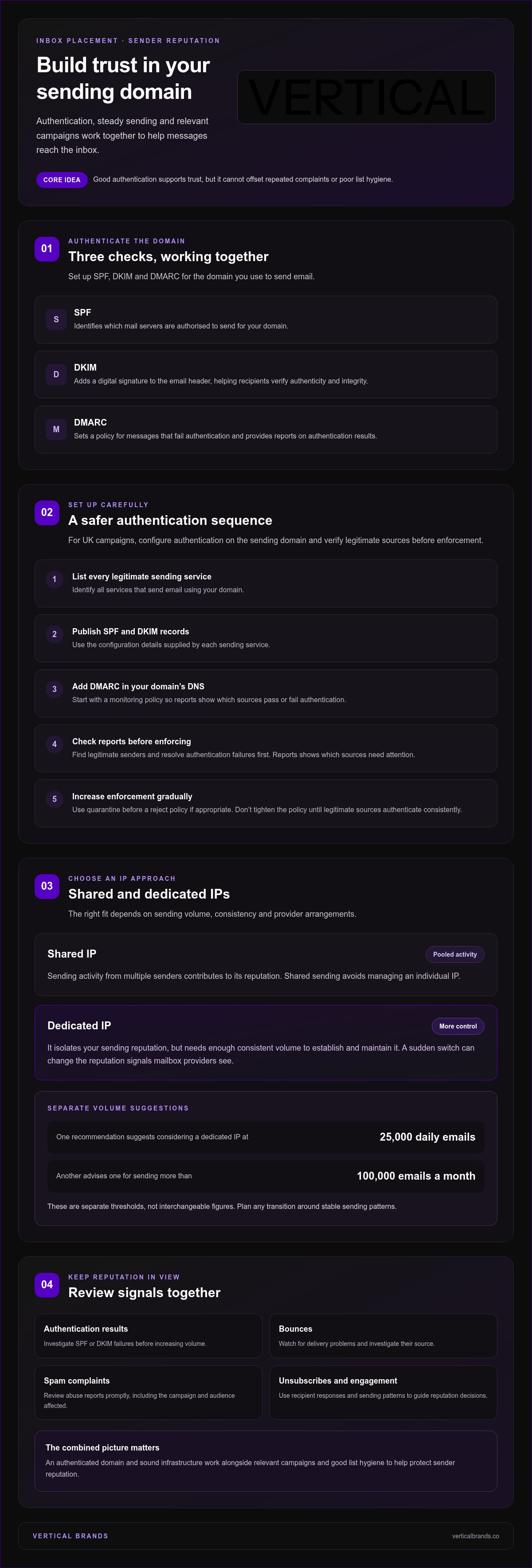
Mailbox providers assess the sending domain and IP when deciding whether campaigns reach inboxes. Authentication helps establish who sent a message, while recipient responses and sending patterns shape reputation over time. Strong authentication supports trust, but it cannot make up for irrelevant campaigns, repeated complaints or poor list hygiene.
Configure SPF, DKIM and DMARC for the domain you use to send email. Connecting a sending domain with SPF and DKIM records helps filters verify domain ownership. SPF identifies which mail servers are authorised to send for that domain. DKIM adds a digital signature to the email header, helping recipients verify the message’s authenticity and integrity.
DMARC builds on those checks. It lets a domain owner set a policy for messages that fail authentication and receive reports on authentication results. Together, SPF, DKIM and DMARC are common standards for authenticating email senders. Correctly aligned records help mailbox providers assess whether a message is genuinely associated with the stated domain.
For UK campaigns, configure SPF, DKIM and DMARC on the sending domain. First, identify every legitimate sending service. Then publish SPF and DKIM records using each service’s configuration details. Add DMARC to the domain’s DNS, starting with a monitoring policy so reports show which sources pass or fail authentication.
Before enforcing DMARC, review reports, identify legitimate senders and resolve authentication failures. Then increase enforcement gradually, using quarantine before a reject policy if appropriate. This reduces the risk of blocking legitimate messages while helping expose unauthorised sending. Don’t apply a stricter policy until legitimate sources authenticate consistently.
Shared IPs pool sending activity, so their reputation reflects the behaviour of multiple senders. A dedicated IP isolates your sending reputation but requires enough consistent volume to establish and maintain it. Shared sending avoids the need to manage an individual IP. Dedicated sending offers more control, but suitability and cost depend on volume, consistency and provider arrangements.
Volume guidance differs: one recommendation suggests considering a dedicated IP at 25,000 daily emails; another advises one for more than 100,000 emails a month. Treat these as separate thresholds, not interchangeable figures. A sudden shift to a dedicated IP can also change the reputation signals mailbox providers see, so plan the transition around stable sending patterns.
Track authentication results alongside bounces, spam complaints, unsubscribes and engagement. Review abuse reports promptly and investigate the affected campaign, audience and sending source. If messages fail SPF or DKIM, correct the configuration before increasing volume. Sound infrastructure, an authenticated domain and relevant campaigns work together to protect sender reputation.
Frequently Asked Questions
What is email deliverability?
Email deliverability describes whether a message reaches a recipient’s inbox rather than spam or junk. It explains why a campaign can be accepted by a mail server yet remain hard for subscribers to find. For example, compare inbox placement with clicks by mailbox provider. If placement is stable but clicks fall, investigate relevance and calls to action, not just sending infrastructure.
How often should I clean my email list?
Review list quality regularly, and run a re-engagement campaign every 6-12 months for inactive subscribers. Also check new sign-ups and imported contacts before a major campaign. A sudden rise in invalid addresses after an import calls for an immediate source review, not waiting for the next scheduled clean-up. Remove permanent failures promptly, and suppress contacts who remain inactive after re-engagement.
What is a good bounce rate?
For hard bounces, below 0.3% is classified as excellent, while 0.3%-0.7% is classified as good. Soft bounces below 1% are classed as excellent; 1%-2% is classed as good. Treat these as separate measures because a temporary full inbox differs from an invalid address. Review the bounce type and provider before deciding whether to retry or suppress an address.
What role do sender reputation and IP reputation play in deliverability?
Sender reputation helps mailbox providers assess whether to trust messages from a domain or IP. Shared IP activity reflects multiple senders, while a dedicated IP isolates sending reputation and requires consistent volume. A sudden campaign spike after a quiet period, for example, may change sending patterns. Review reputation signals alongside complaint, bounce and engagement trends before changing your IP strategy.
What's a good deliverability rate?
It depends on the metric. A good deliverability rate depends on how it is measured, and strong inbox placement means messages reach subscribers’ primary inboxes. For marketing email, 90% or higher is described as great, and good transactional email deliverability is 95% or higher. State whether you’re measuring server acceptance or inbox placement before comparing campaigns, providers or targets.
What does email deliverability mean, and how is it different from email delivery?
Email delivery records whether the recipient’s server accepted a message. Deliverability focuses on whether it reached a useful inbox location. Think of delivery as getting through a building’s entrance, and inbox placement as reaching the intended desk rather than a holding area. This distinction matters when a dashboard shows successful delivery but subscribers can’t find the campaign in their inbox.
How can you check email deliverability, sender reputation and inbox placement?
Check authentication results, provider-level delivery reports, hard and soft bounces, complaints, clicks and unsubscribes. Use seed addresses across mailbox providers to see where test messages appear, then compare those results with real campaign behaviour. Seed testing can’t reproduce subscriber engagement, so treat it as one diagnostic. To understand how to improve email marketing deliverability, compare these signals by provider and campaign.
How should you build and maintain an email list to avoid spam complaints and invalid addresses?
Collect addresses through clear sign-up forms, record each subscription source and use confirmed opt-in to validate interest and ownership. Make sure the promised content matches the emails you send. Someone who requests product updates, for example, shouldn’t automatically receive unrelated campaigns. Offer preference choices and a visible unsubscribe route, then remove hard bounces and investigate invalid sign-up sources.
3. Email list hygiene
A clean list gives campaigns a more relevant audience and reduces avoidable delivery failures. Start with the source of each contact: record when and how they subscribed, what content they agreed to receive, and which sign-up form collected their address. Permission-based sending helps establish trust with recipients and mailbox providers. In a ZeroBounce survey, 54% of respondents said they report a message as spam when the sender hadn’t asked permission to email them.
Use confirmed opt-in to validate that an address belongs to the subscriber and that they want your emails. Double opt-in adds a confirmation step after sign-up, helping catch fake or misspelt addresses before they enter the active list. CAPTCHA on forms can also deter automated sign-ups. Keep consent information attached to each contact so an audience export doesn’t lose the context behind permission.
Remove hard bounces immediately. A hard bounce signals a permanent delivery failure, such as an invalid address, so repeated attempts have no practical value. Treat soft bounces differently: a full inbox or temporary server issue may clear, so review patterns before suppressing an address. Check new imports and campaign reports for repeated failures, misspellings and duplicate contacts. Each step makes your next send more precise.
Segment by engagement and subscriber behaviour instead of sending every message to your entire database. For example, separate recent purchasers, readers who click product updates, and contacts who signed up only for a guide. Match each group’s subject line and content to its interests. Suppress graymail, meaning messages sent to contacts who rarely engage, from broad campaigns. This makes relevance an operational choice, not a last-minute copy edit.
Set a defined review cycle for inactive subscribers. A practical recommendation is to run a re-engagement campaign every 6-12 months, then remove contacts who don’t respond. Before that campaign, decide what counts as inactive and offer a clear action, such as choosing email preferences or confirming continued interest. A preference centre lets subscribers select the types and frequency of messages they want, which can reduce unwanted sends.
Make unsubscribing straightforward. In a ZeroBounce survey, 49% of respondents said they would submit a spam complaint if marketing emails offered no way to unsubscribe. Include a visible unsubscribe option and honour the choice by suppressing that address from future marketing sends. List success isn’t measured by size alone. Review engagement, bounces, complaints and unsubscribes together; if clicks fall after a broad send, tighten the segment before the next campaign.
4. Re-engagement campaigns
An inactive subscriber is not automatically a lost subscriber. Define inactivity using behaviour, not an arbitrary guess. Six months without an open or click is one example, while Litmus recommends a re-engagement email at the 60-day mark for subscribers who aren’t interacting. These are alternative planning points, not a universal timetable. Choose a definition that reflects your sending cadence and campaign purpose.
Create a separate audience for inactive contacts, then send a focused message that gives them a reason to respond. A subject line such as “Still want these updates?” makes the decision clear. Offer a useful next step: click to keep receiving a specific content type, update preferences or unsubscribe. Keep the message aligned with the original subscription rather than introducing an unexpected offer.
Measure responses through clicks, unsubscribes, complaints and subsequent engagement. Opens can add context, but don’t treat them as the only proof that a subscriber saw or valued a message. A click on a preference link is a direct action. A complaint or unsubscribe is a negative signal. Track both by campaign and mailbox provider to see whether a particular audience or subject line is prompting poor responses.
Email engagement contributes to sender reputation. Mailbox providers can consider recipient behaviour alongside other signals when deciding how to handle future messages. If a re-engagement campaign attracts complaints, stop sending to the unresponsive segment and review the message, audience and sending history. If subscribers click to stay, keep them in the relevant segment and make the next campaign reflect their stated interest.
Set a clear end point before sending. Campaign Monitor recommends re-engaging subscribers who haven’t opened anything in a year, then removing dormant contacts. That approach differs from Litmus’s 60-day recommendation, so use your own cadence and engagement history to choose a suitable trigger. Don’t keep extending the window simply to preserve list size. A smaller, responsive audience gives campaign results a more useful signal.
Optimove reported that 70% of survey respondents had unsubscribed from at least three brands in the previous three months because of email overload. Reduce that pressure by controlling frequency and letting subscribers choose relevant content. After a re-engagement send, suppress contacts who don’t respond, honour every unsubscribe, and compare complaint and click patterns with the campaign’s intended audience. The process is only successful if it protects subscriber choice as well as future engagement.
5. Marketing and transactional email performance
Marketing and transactional messages serve different purposes, so assess them separately. Marketing campaigns promote products, content or offers to subscribers. Transactional messages respond to an individual action, such as an order or account update. A weak promotional campaign may point to an audience or content issue. A delayed order confirmation raises a different operational concern and needs separate investigation.
Use distinct benchmarks for each stream. A great marketing email deliverability rate is 90% or higher, while good transactional email deliverability is 95% or higher. These figures describe different message types, not interchangeable targets. If marketing results fall below 90%, review audience selection, sending cadence and content. If transactional results miss their benchmark, inspect the message flow and sending infrastructure.
Separate the two streams in your reporting and review delivery, inbox placement, bounces, complaints and engagement for each. A combined dashboard can conceal problems: strong order updates might mask weak campaign placement, or a promotional spike in complaints might distort transactional results. Compare trends over consistent periods, then break them down by mailbox provider, campaign type and sending domain.
Complaint rates deserve close attention. Keep the spam complaint rate below 0.1%, and investigate promptly if a provider reports an increase. Check which audience received the message, whether the subject line matched the content, and whether the sending frequency changed. High bounce rates, complaints and unsubscribes can damage reputation. Review these alongside clicks and inbox placement, rather than treating a high delivery figure as proof of success.
Interpret bounce types accurately. A soft bounce is a temporary failure, such as a full inbox, and may resolve later. A hard bounce is permanent, not a temporary obstacle. Compare bounce rates by provider and message type. If a transactional stream suddenly produces soft bounces, investigate capacity or recipient-side issues. If marketing bounces rise after an import, inspect the audience source.
Authentication supports both streams, but it doesn’t replace sound sending practices. Keep promotional content relevant, make unsubscribe options clear, and ensure transactional messages contain the information that prompted them. Providers may filter messages using sender and recipient signals alongside authentication. No single metric explains every outcome, so use a range of indicators to locate the cause and prioritise fixes. The separate results show where action matters most.
Reviewing those performance patterns across campaign and transactional flows can expose gaps in measurement and execution. Strengthen your email performance with a structured review of sending practices, provider-level results and campaign data.
Vertical Brands: Klaviyo Email Marketing
Vertical Brands provides Klaviyo Email Marketing and Email Marketing & CRM Management to help businesses strengthen campaign performance. Turn to this support when inbox placement is inconsistent, engagement is falling, or your team needs a clearer process for audience segmentation and performance reviews.
A focused review of your sending setup, subscriber segments and campaign results can show where to concentrate effort. You can then make informed adjustments to targeting and email activity, and assess performance against the metrics that matter to your programme. The goal is a more disciplined approach, not a promise of guaranteed inbox placement.
To discuss Klaviyo Email Marketing and email performance support, contact Vertical Brands.
Make deliverability part of your growth process
Inbox placement works best as an ongoing operational priority, not a one-off technical fix. Decide who owns email performance, where campaign results are reviewed and how changes are recorded. This creates a clear distinction between a deliverability issue and a change in audience, content or sending activity. A consistent process depends on clear ownership and useful reporting.
When deciding how to improve email marketing deliverability, turn your findings into a focused plan. Choose the most pressing issue, assign an owner and define what evidence will show whether the adjustment helped. Avoid changing several parts of a campaign at once. A controlled approach informs the next decision and keeps improvement tied to business priorities.
Vertical Brands offers Klaviyo Email Marketing, Email Marketing & CRM Management and Paid Social. These can support a joined-up view of email activity and wider acquisition. If you’re ready to discuss your email programme, contact Vertical Brands. Take the next step with a clear direction and a more disciplined approach to growth.
2. What is email deliverability?
Email delivery and inbox placement measure different stages. Delivery means the recipient’s mail server has accepted the message. Deliverability asks whether it reaches an inbox rather than spam or junk. That difference matters: a sender can report successful delivery while subscribers still struggle to find the email.
For example, a 99% delivery rate can coexist with a 70% inbox deliverability rate. One figure records server acceptance; the other shows where accepted messages land. Excellent inbox placement means at least 95% of emails reach subscribers’ primary inboxes. Around 85% was the global average inbox placement rate in early 2025.
No single metric captures the full picture. Mailbox providers don’t report exactly where every accepted message is placed. Monitor inbox placement alongside delivery, clicks, bounces, unsubscribes and spam complaints. Compare these metrics regularly by provider, such as Gmail and Yahoo. A sharp drop with one provider can point to a specific filtering or audience issue.
Testing can help locate the problem. Send test messages to seed addresses across mailbox providers, then inspect whether they appear in the inbox, spam folder or another tab. Check how the email displays on different devices and in different email clients, too. Rendering tests reveal layout problems, but don’t show whether real subscribers will engage.
Seed addresses have another limitation: they don’t open, click or otherwise behave like subscribers. Providers can consider recipient behaviour when determining placement, so seed results can’t reproduce every real-world signal. Use them as a diagnostic, then compare with actual campaign activity. If placement drops for one provider, review recent changes to the audience, content and sending pattern.
Content can affect both filtering and recipient response. Make the subject line accurately reflect the message, use recognisable links, and balance text with images. Avoid excessive promotional language and make the unsubscribe option easy to find. A campaign that sets clear expectations is less likely to frustrate recipients. Use provider-level reports to guide how you optimise each element.
A practical answer to how to improve email marketing deliverability is to test before sending, then compare placement with real engagement afterwards. Record changes to the subject line, links, images and audience, so you can see which adjustments matter. The results help distinguish a display issue from a placement problem. For teams refining campaign processes, email marketing and CRM management can support a more consistent approach.

Other posts



























































Stay ahead with better decisions.
Get business insights today.
