7 Day Technical SEO Audit for Marketers: Fix Crawl, Index, AI Access

Technical SEO means making sure search engines and AI systems can crawl, render, index, and cite your pages. If none of that happens, your content doesn’t rank, no matter how well it’s written. The single action to take first: confirm crawl and index access on your priority pages before touching anything else. This guide covers the checks and fixes that follow, in the order that actually matters.
TL;DR:
- Ensuring crawl and index access on your priority pages must come before content creation or link building, as blocked or broken pages prevent ranking regardless of quality.
- Regularly review robots.txt and XML sitemaps to prevent accidental blocking or indexing of non-canonical URLs, especially after site redesigns or migrations.
- Critical content should be visible without JavaScript execution, and testing with JavaScript disabled helps identify rendering issues that could harm indexing.
- Fix Core Web Vitals issues at the origin level first, since large-scale template problems with slow loading, responsiveness, or layout shifts impact thousands of pages simultaneously.
- Mobile site parity, HTTPS security, accurate structured data, and proper handling of duplicate content and redirects are non-negotiable for maintaining search visibility in 2026.
Table of Contents
- What Are the Technical SEO Basics That Matter Most Right Now?
- Crawling: Robots.Txt, XML Sitemaps, and Crawl Budget
- Rendering and JavaScript: Can Search Engines See Your Content?
- How Do Indexing and Canonicalization Actually Work?
- Site Architecture: How Deep Should Pages Be Buried?
- What Are Core Web Vitals and Which One Should You Fix First?
- Mobile-First Indexing: Does Your Mobile Site Match Desktop?
- Why Does HTTPS Still Matter for SEO in 2026?
- Structured Data: Which Schema Types Should Beginners Prioritize?
- Quick Wins: What Should You Fix This Week?
- Which Tools Do You Actually Need to Audit Your Site?
- How Vertical Brands Approaches a Technical SEO Audit
- How Do You Handle Duplicate Content Beyond Just Canonical Tags?
- What Makes an XML Sitemap Actually Useful to Search Engines?
- How Should You Manage Pagination and Faceted Navigation?
- Do You Need Hreflang Tags for International SEO?
- Is AMP Still Worth Implementing in 2026?
- What Do 404, 301, 302, and 5xx Status Codes Actually Mean?
- When Should You DIY Technical SEO and When Should You Hire an Agency?
- Get a Technical SEO Audit Built Around Your Site, Not a Template
- Authoritative Resources Worth Bookmarking
- Sources
- FAQ
What Are the Technical SEO Basics That Matter Most Right Now?
Technical SEO is the prerequisite for everything else in your marketing stack. Content can’t rank, and it can’t get cited by an AI system, if the underlying page is blocked, broken, or invisible to crawlers. That’s the uncomfortable truth a lot of beginners skip past: you can write the best article on the internet, but if a stray noindex tag or a broken redirect chain sits underneath it, none of that work counts.
Technical work should come first when the problem is structural, not creative. A page with strong content but blocked access will lose every time to a mediocre page that search engines can actually reach. The Michigan Tech University overview of technical SEO frames this clearly: crawlability, indexability, site architecture, page speed, mobile usability, structured data, and security all sit underneath content strategy, not beside it.
How do you know when technical issues deserve priority over new content or backlinks? Watch for these signals:
- A sudden, unexplained drop in organic traffic across a template or section of the site
- Mass “Excluded” reasons piling up in Google Search Console’s Pages report
- Core Web Vitals failing at the origin level, not just on a handful of pages
- Recent deploys or migrations with no post launch crawl check
Any one of those points to a foundational problem. Fix it before spending another dollar on content production.
Crawling: Robots.Txt, XML Sitemaps, and Crawl Budget
Crawlers can only index what they can reach, and reaching your pages starts with three files most site owners never look at twice: robots.txt, your XML sitemap, and whatever is generating URL bloat behind the scenes.
Robots.txt tells crawlers where they’re welcome and where they’re not. The most common accident in technical SEO is shipping a staging Disallow: / directive to production, or leaving a blanket noindex meta tag active after launch. It happens constantly during redesigns and migrations, and it can silently wipe out an entire site’s visibility because staging robots blocks and accidental noindex tags are one of the most frequent causes of sudden ranking collapse.
Run through crawl access in this order:
- Open robots.txt directly in a browser and read every line. Look for
Disallow: /or blocks on/wp-admin/style paths that might be catching more than intended. - Check your XML sitemap for canonical, indexable URLs only. Redirected, noindexed, or duplicate URLs in a sitemap waste crawl attention and confuse search engines about which version you want indexed.
- Submit the cleaned sitemap in Google Search Console and monitor the coverage report weekly for the first month.
- Audit crawl budget waste. Faceted navigation (color, size, price filters) and parameter permutations (
?sort=,?utm_source=) can generate thousands of near duplicate URLs that eat crawl budget without adding value. - List which AI crawlers you want to allow or block. Bots like GPTBot and others increasingly determine whether your content shows up in AI generated answers, and the Semrush technical SEO checklist recommends treating AI crawler access as its own audit line item, separate from traditional search bots.
Pro Tip: Google Search Central’s SEO Starter Guide is the most reliable place to confirm how Google actually reads sitemap and robots directives. Skip the SEO forum debates and go straight to the source when you’re unsure.
Rendering and JavaScript: Can Search Engines See Your Content?
Google indexes most pages in two waves: an initial crawl of the raw HTML, followed later by a render pass that executes JavaScript. If your important content only appears after JavaScript runs, you’re betting on that second wave happening quickly and correctly. It doesn’t always.
The safest assumption for a beginner: critical content, headlines, body text, and internal links should be visible without JavaScript whenever possible. That doesn’t mean avoiding JavaScript altogether. It means not hiding what matters behind client-side rendering that depends on a browser executing scripts correctly before a crawler gives up.
Three quick tests reveal whether you have a rendering problem:
- Disable JavaScript in your browser (Chrome DevTools makes this easy) and reload the page. If your main content vanishes, so does a search engine’s ability to read it on the first pass.
- Use the URL Inspection tool in Search Console and view the rendered HTML. Compare it against what a logged out visitor actually sees.
- Compare the rendered DOM against the raw server response using your browser’s “view source” versus “inspect element.”
When rendering fails, the fix usually falls into one of three categories: server side rendering (SSR), pre-rendering static versions of key pages, or selective hydration that loads critical content first and defers the rest. None of these require a full rebuild. Most JavaScript frameworks now support SSR as a configuration option, not a rewrite.
How Do Indexing and Canonicalization Actually Work?
Indexing is the decision layer: once a page is crawled and rendered, search engines decide whether it belongs in the index at all, and if so, under which URL. Two tools control that decision, and both get misused constantly by beginners.
The robots meta tag (<meta name="robots" content="noindex">) tells search engines to skip a page entirely. The accidental version of this shows up after CMS migrations, when a “noindex staging” setting gets toggled but never reverted, or when a plugin defaults to noindex on new page types without anyone noticing.
The canonical tag tells search engines which URL is the authoritative version when multiple URLs show similar or identical content. Get this wrong and you split ranking signals across duplicates instead of consolidating them into one strong page.
Follow this order when auditing indexing:
- Pull every URL in your Search Console “Excluded” report and sort by reason. “Noindex” and “Duplicate, submitted URL not selected as canonical” are the two to fix first.
- Check that canonical tags point to the actual preferred version, not a random duplicate, an old URL, or worse, the homepage by default (a common templating mistake).
- Map out redirect chains. A single 301 redirect passes link value efficiently. Three or four redirects stacked in sequence lose value at each hop and slow down crawling.
- Consolidate multi-hop redirects into single hop 301s pointing directly at the final destination.
Getting this right reclaims link equity that’s currently leaking through chains and duplicate URLs nobody’s tracking. If you’re mid migration, a site migration SEO checklist walks through exactly how robots, sitemaps, and canonicals interact during a domain or platform change.
Site Architecture: How Deep Should Pages Be Buried?
Site structure determines how quickly crawlers, and users, find your most important pages. The rule of thumb: priority pages should sit no more than three clicks from the homepage. Every additional click deeper reduces the frequency crawlers visit that page and the authority it receives from internal links.
A hub and spoke model solves this at scale. One hub page covers a broad topic and links out to a cluster of related, narrower pages, which link back to the hub. This gives crawlers a clear map of topical relationships instead of a flat pile of disconnected pages competing with each other for the same keywords.
Internal linking is the mechanism that distributes authority across that structure:
- Link to new content from existing high-authority pages within the first few days of publishing
- Use descriptive anchor text that tells both users and crawlers what the destination page covers
- Audit for orphan pages, pages with zero internal links pointing to them, at least quarterly
- Avoid burying priority pages inside deep category nesting more than two or three levels
Breadcrumbs reinforce this structure for both machines and people. A breadcrumb trail like Home > Services > Website Design tells a crawler exactly where a page sits in your hierarchy, and it gives users an easy way back up the structure without hitting the back button. Pair that with descriptive URL slugs (/services/website-design instead of /page?id=4471) and you’ve given search engines two independent signals pointing at the same organizational logic.
What Are Core Web Vitals and Which One Should You Fix First?
Core Web Vitals measure three things: how fast your main content loads (Largest Contentful Paint, or LCP), how quickly your page responds to interaction (Interaction to Next Paint, or INP), and how much your layout jumps around while loading (Cumulative Layout Shift, or CLS). Google evaluates all three using real user data collected through the Chrome User Experience Report, known as CrUX, measured at the 75th percentile of actual visits.
That detail matters more than most guides admit. Google confirmed site speed as a ranking factor on desktop back in 2010 and mobile since 2018, and it functions primarily as a tiebreaker between pages of similar relevance. It’s field data, not a lab score, that decides whether you pass.
The threshold that trips up most sites: Google requires the bulk of a site’s real page views to meet all three CWV thresholds, and INP has proven the hardest metric to pass since replacing First Input Delay, largely because it measures responsiveness across an entire session rather than a single moment.
INP failures almost always trace back to long JavaScript tasks and bloated third-party scripts, things like chat widgets, ad tags, and analytics snippets all competing for the same main thread. The fix is breaking up long tasks and deferring anything that isn’t critical to the first interaction.
Common root causes and their fixes:
- Slow LCP: oversized hero images, unoptimized fonts, slow server response times. Fix with image compression, proper sizing, and preloading the LCP element directly.
- Poor INP: heavy JavaScript execution, too many third party scripts. Fix by deferring non critical scripts and breaking long tasks into smaller chunks.
- High CLS: images or ads loading without reserved space, causing content to jump. Fix by setting explicit width and height attributes on every image and embed.
Prioritize by scope, not by page count. A PageSpeed Matters insight worth remembering: most Core Web Vitals failures are template or origin level problems, meaning one fix to a shared header, footer, or component library often resolves thousands of pages at once. Fix the template before you chase individual URLs.
Mobile-First Indexing: Does Your Mobile Site Match Desktop?
Google indexes the mobile version of your site as the primary version, full stop. If your mobile page hides content that appears on desktop, collapses navigation into something crawlers can’t parse, or renders differently under mobile CPU constraints, you’re being judged on the weaker version.
Start by checking parity: does the mobile page contain the same text, links, and structured data as desktop? Mobile navigation patterns (hamburger menus, accordions) sometimes hide content from crawlers if implemented poorly, even though it displays fine for the human visitor tapping the menu open.
Beyond parity, a few small checks catch most mobile problems:
- Confirm your viewport meta tag is set correctly (
width=device-width, initial-scale=1) so the browser doesn’t render a desktop layout squeezed onto a small screen - Check tap target sizing. Buttons and links smaller than roughly 44 by 44 pixels frustrate real users and hurt engagement signals
- Test for horizontal scroll on actual devices, not just a resized browser window. Emulators miss real world rendering quirks
- Use semantic HTML (proper heading tags,
<nav>,<button>elements instead of styled<div>s) so both screen readers and crawlers understand page structure - Add descriptive alt text to images. It’s an accessibility requirement first, and a secondary signal for image search and AI systems second
None of these are exotic fixes. They’re the kind of thing a quick device test catches in twenty minutes, but they get skipped constantly because they don’t feel urgent until traffic already shows the damage.
Why Does HTTPS Still Matter for SEO in 2026?
HTTPS is the baseline, not a bonus point. A site running on an expired or misconfigured certificate sends a trust signal failure to both browsers and search engines, and mixed content (HTTP resources loading on an HTTPS page) triggers browser warnings that scare off visitors before they even read your headline.
The checks here are quick:
- Confirm your SSL certificate is valid and auto renewing. Let’s Encrypt issues free certificates and has become the default for a huge share of the web precisely because it automates renewal instead of requiring manual updates every year.
- Scan for mixed content: any image, script, or stylesheet still loading over HTTP on an HTTPS page.
- Verify HTTP to HTTPS redirects happen in a single hop, not chained through multiple intermediate redirects.
- Align your canonical tags to the HTTPS version consistently. A canonical pointing to an HTTP URL while the live page serves HTTPS sends a contradictory signal that search engines have to guess their way through.
Get this wrong and you’re not just risking a ranking penalty. You’re risking the browser warning that makes a visitor bounce before your content ever gets a chance.
Structured Data: Which Schema Types Should Beginners Prioritize?
Structured data, written in JSON-LD format, gives search engines and AI systems an explicit, machine-readable description of what’s on the page instead of forcing them to infer it from surrounding text. For most sites, a handful of schema types cover the vast majority of value:
- Organization schema: establishes your business identity, logo, and contact details across every page that needs it
- BreadcrumbList schema: mirrors your visible breadcrumb trail in structured format, reinforcing site hierarchy
- Article or Product schema: depending on your site type, this marks up headlines, publish dates, authors, prices, or availability
- FAQPage schema: structures question and answer content for potential rich result display
The rule that keeps beginners out of trouble: whatever you mark up in JSON-LD has to match what’s actually visible on the page. Marking a product as “in stock” in your schema while the visible page says “sold out” isn’t a minor inconsistency. It’s the kind of mismatch that risks a manual action, because search engines treat structured data as a promise about visible content, not a separate creative space.
Pro Tip: Run every new schema implementation through Schema.org’s validator before pushing to production, then check the Enhancements section in Search Console weekly for the first month to catch errors early.
Quick Wins: What Should You Fix This Week?
Beginners don’t need a six month roadmap to start seeing results. Most of the highest impact fixes take an afternoon, or a short brief to a developer. Run through this order:
- Access first. Check robots.txt for accidental blocks, confirm your sitemap only lists canonical indexable URLs, and run URL Inspection on your five most important pages.
- Indexing cleanup. Remove any accidental noindex tags, resolve canonical conflicts, and collapse redirect chains into single hop 301s.
- Performance basics. Compress and resize images, set explicit width and height attributes on every image tag, and defer non critical JavaScript that isn’t needed for the initial render.
- Schema and security. Add Organization and BreadcrumbList JSON-LD to your core templates, and confirm HTTPS is consistent site wide with no mixed content warnings.
- Monitoring. Set up Google Search Console if you haven’t already, configure alerts for Core Web Vitals regressions, and sample your server log files monthly to see how bots actually behave on your site.
| Priority | Focus area | Typical time to fix |
|---|---|---|
| 1 | Robots.txt and sitemap access | Under 1 hour |
| 2 | Accidental noindex and canonical conflicts | 1 to 3 hours |
| 3 | Redirect chain cleanup | 2 to 4 hours |
| 4 | Image compression and dimension attributes | 1 day, template dependent |
| 5 | JSON-LD on core templates | 1 to 2 days |
| 6 | Search Console monitoring setup | Under 1 hour |
A more detailed walkthrough of this sequence, including how to brief a developer on each item, lives in Vertical Brands’ technical SEO audit guide.
Which Tools Do You Actually Need to Audit Your Site?
You don’t need an expensive toolset to run a competent technical audit. You need the right sequence, and a small number of tools used correctly.
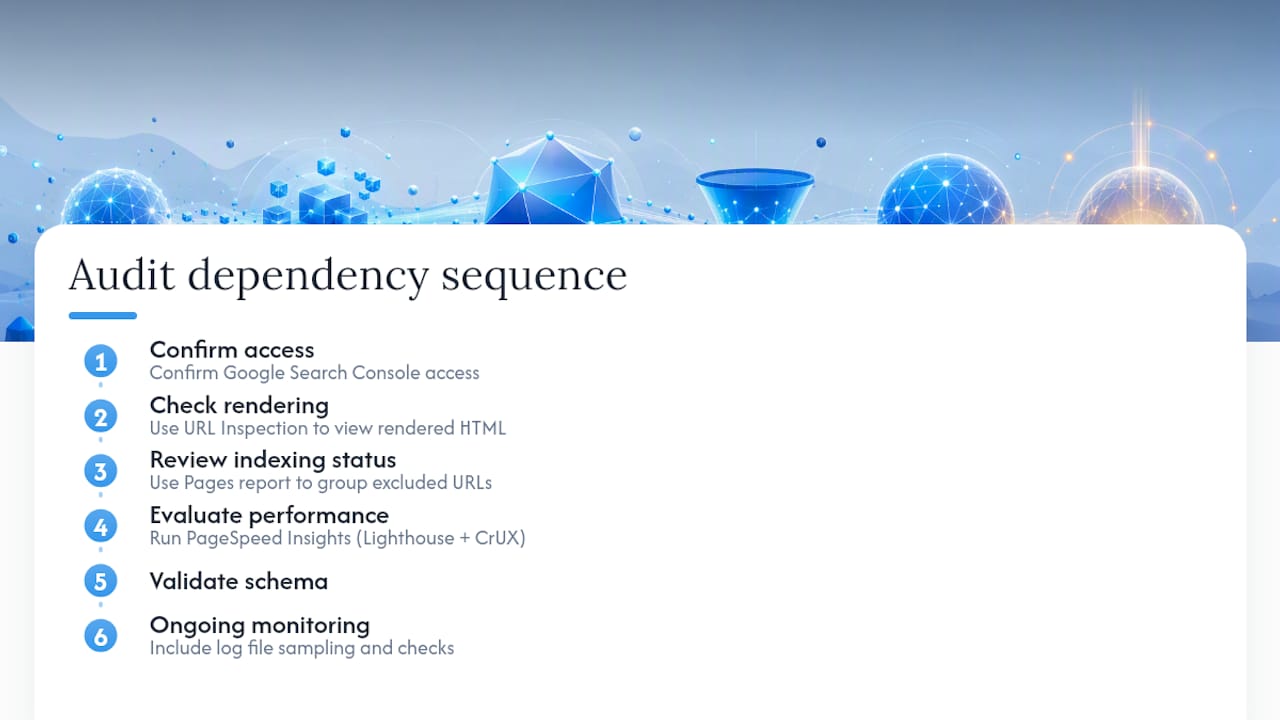
Start with Google Search Console. The URL Inspection tool shows exactly how Googlebot sees a specific page, including its rendered HTML and indexing status. The Pages report groups every excluded URL by reason, which is the fastest way to spot a mass noindex or crawl problem across a whole section of the site.
For performance, PageSpeed Insights gives you both lab data (a Lighthouse audit run in a controlled environment) and, when enough traffic exists, real field data pulled from CrUX. Lighthouse is useful for diagnosing specific issues on a single page load. CrUX is the metric that actually determines your Core Web Vitals standing, because it reflects real visits across real devices and connections, not one simulated session.
Beyond Search Console and PageSpeed Insights, a site crawler (there are several free and paid options) maps your entire URL structure, flags broken links, and surfaces duplicate title tags at scale. Pairing that with basic log file sampling, reviewing a slice of your raw server logs to see which bots are actually visiting and how often, reveals crawl behavior that no dashboard tool shows you directly.
A sensible audit follows this sequence: confirm access, check rendering, review indexing status, evaluate performance, validate schema, then set up ongoing monitoring. Following that dependency order, rather than jumping straight to performance fixes, keeps you from optimizing a page that’s blocked from indexing in the first place.
How Vertical Brands Approaches a Technical SEO Audit
An integrated audit doesn’t stop at a list of errors. An integrated technical SEO audit runs through stages: a full audit that maps crawl, index, and performance issues; a prioritized roadmap that ranks fixes by impact and effort; and a remediation sprint where fixes get implemented and validated against real data, not just a checklist.
That structure produced measurable results for FACEGYM, where the work contributed to a 50% increase in purchases and a 41% rise in bookings. Numbers like that come from treating technical fixes as connected to conversion outcomes, not as an isolated developer task.
A few things matter most when coordinating remediation across teams:
- Loop in developers early with a clear, prioritized brief rather than a raw error export
- Involve product teams on any fix that touches navigation, templates, or page structure
- Have analytics confirm the fix actually resolved the underlying signal, not just the symptom, before marking it closed
Alex holds extensive expertise in technical SEO, emphasizing the role of AI search engines in modern SEO to ensure crawlable, AI-friendly content and improved indexing.
How Do You Handle Duplicate Content Beyond Just Canonical Tags?
Canonical tags solve one slice of duplicate content: telling search engines which version of a near identical page to index. They don’t solve every version of the problem, and beginners often stop there when they shouldn’t.
Session IDs, tracking parameters, and print friendly page versions all generate technical duplicates that a canonical tag can clean up, but the underlying cause, why those URLs exist in the first place, often needs a structural fix. If your CMS generates a new URL every time a session parameter changes, no amount of canonical tagging fixes the crawl budget waste of Google repeatedly hitting near identical URLs.
For content level duplication, syndicated articles, boilerplate product descriptions repeated across variants, or near duplicate location pages for a multi-location business, the fix usually isn’t canonicalization at all. It’s consolidation. Merge thin, overlapping pages into one stronger page wherever the content genuinely serves the same search intent.
Where duplication is intentional, syndicating content to a partner site, for example, use a cross domain canonical tag pointing back to your original, and confirm the partner site respects it rather than assuming.
For internal duplicates specifically, three checks catch most problems:
- Search your own site for exact phrase matches across multiple URLs
- Check whether your CMS auto generates category and tag pages with overlapping content
- Confirm parameter handling in Search Console isn’t creating dozens of indexable variants of the same page
Handled well, this consolidates ranking signals into fewer, stronger pages instead of splitting them across a dozen weak ones competing with each other.
What Makes an XML Sitemap Actually Useful to Search Engines?
A sitemap’s job is simple: tell search engines which URLs you consider canonical and worth crawling. Most sitemaps fail at this by including URLs that shouldn’t be there at all.
Every URL in your sitemap should be indexable, canonical, and return a 200 status code. That excludes redirected URLs, noindexed pages, and duplicate parameter variants. Including them doesn’t help your crawl priority. It actively dilutes it, because you’re asking crawlers to spend attention verifying URLs you’ve already told them, through other signals, not to index.
The lastmod date matters more than most sites treat it. If your sitemap shows the same lastmod timestamp across thousands of URLs regardless of whether the page actually changed, search engines learn to distrust that field entirely, and it stops influencing recrawl frequency at all. Update it accurately, only when content actually changes.
Priority and changefreq tags, once considered standard sitemap fields, carry little to no weight with Google today. Don’t spend time fine-tuning them. Spend that time instead making sure the URL list itself is clean.
Split large sites into multiple sitemaps organized logically, by content type or section, rather than one enormous file. A sitemap index file referencing separate sitemaps for products, blog posts, and category pages makes errors easier to isolate when something breaks.
Check the Sitemaps report in Search Console regularly. It flags specific errors, a URL that returns a 404, a redirect where a 200 was expected, individually, which is far faster than guessing which part of a 50,000 URL sitemap has gone stale.
How Should You Manage Pagination and Faceted Navigation?
Paginated series (page 2, page 3 of a blog archive or product category) and faceted navigation (filters for color, size, price range) both generate large numbers of URLs from a small amount of underlying content. Handled carelessly, both waste crawl budget and dilute ranking signals across near duplicate pages.
For pagination, each page in a series should be self canonical, meaning page 2 canonicals to itself, not back to page 1. Collapsing an entire paginated series onto a single canonical URL tells search engines to ignore all the content on pages 2 through 10, which usually isn’t what you want if that content is genuinely unique.
Faceted navigation needs a different approach. Most filter combinations, like “red shirts under $30 in size medium,” aren’t worth indexing individually. They fragment authority across thousands of thin, near duplicate pages. The fix is selective: decide which facet combinations actually have search demand and deserve indexable, canonical URLs, and block the rest through robots.txt or a noindex tag rather than letting your CMS generate an indexable URL for every possible filter permutation.
A simple rule of thumb: if a facet combination wouldn’t make sense as a standalone landing page for someone arriving from search, it doesn’t need to be indexed. Let crawlers focus their attention on the combinations that do.
Do You Need Hreflang Tags for International SEO?
Hreflang tags tell search engines which language and regional version of a page to show a given user. If you run separate pages for different countries or languages, English for the US, English for the UK, French for France, hreflang is how you tell Google these aren’t duplicate content. They’re intentional variants for different audiences.
Get the implementation wrong and you risk two outcomes: search engines showing the wrong regional version to users, or worse, treating your international pages as duplicate content and suppressing all but one version.
Each page needs a self referencing hreflang tag pointing to itself, alongside tags pointing to every other language and region variant. Every page in the set needs to reference every other page, including itself, in a fully reciprocal set. A one-way hreflang tag that isn’t matched by a return reference on the target page is one of the most common implementation errors and effectively breaks the whole signal.
Use ISO language codes paired with ISO country codes where relevant (en-us, en-gb, fr-fr), and confirm each hreflang URL returns a 200 status, not a redirect. Test the implementation directly in Search Console’s International Targeting report, or through a crawler that flags hreflang errors, since mismatched or broken reciprocal tags are easy to miss by eye across dozens of pages.
Is AMP Still Worth Implementing in 2026?
Accelerated Mobile Pages, a stripped down HTML framework Google introduced to speed up mobile page loads, has lost most of its relevance since Google removed the AMP requirement for top stories carousel eligibility. For the vast majority of sites building or evaluating technical SEO priorities in 2026, AMP isn’t a first choice anymore.
The original appeal was straightforward: a heavily restricted HTML and JavaScript framework that guaranteed fast load times by limiting what a page could include. That worked, but it also meant maintaining two versions of every page, your standard site and a stripped down AMP version, which creates ongoing canonicalization complexity and duplicate maintenance overhead.
With Core Web Vitals now measuring real world speed directly, a well optimized standard page can hit the same performance thresholds AMP used to guarantee, without the dual maintenance burden. Modern frameworks with server side rendering and proper image optimization routinely match or beat AMP page speeds while giving you full control over design and functionality.
If you already run AMP and it’s performing well, there’s no urgent reason to rip it out. But for a beginner starting fresh, the better use of your time is applying the same discipline, minimal JavaScript, optimized images, deferred non critical scripts, to your standard pages instead of maintaining a separate framework that’s increasingly optional in Google’s own ecosystem.
What Do 404, 301, 302, and 5xx Status Codes Actually Mean?
Every page request returns a status code, and misreading or mishandling these codes causes some of the most common technical SEO problems on the web.
A 404 means the page doesn’t exist. That’s fine when a page genuinely should be gone, but a site with hundreds of unexpected 404s, often from old URLs that used to work, signals decay to both users and crawlers. Redirect meaningful 404s to their closest live equivalent rather than leaving them broken.
A 301 is a permanent redirect, and it passes the vast majority of a page’s ranking signals to its destination. Use 301s for anything permanent: URL restructuring, domain migrations, consolidated duplicate pages.
A 302 is a temporary redirect, meant for short term situations like a page under maintenance. The problem: many sites use 302s where they mean 301s, which tells search engines the move isn’t permanent and can slow down how quickly ranking signals transfer, or prevent full transfer altogether.
A 5xx error means the server itself failed to respond correctly, a 500 internal server error or a 503 service unavailable. Occasional 5xx errors during deploys are normal. Persistent or widespread 5xx errors during crawl attempts can cause search engines to slow their crawl rate on your entire site, treating it as unreliable.
Check your status code distribution in Search Console’s crawl stats report periodically. A spike in any of these categories, especially unexpected 5xx errors, is often the first visible symptom of a deeper infrastructure problem.
When Should You DIY Technical SEO and When Should You Hire an Agency?
Small, static sites with infrequent deploys are reasonable DIY territory. A handful of pages, minimal JavaScript, and a slow release cadence mean the checklist in this guide covers most of what you’ll ever need to touch.
The calculation changes with scale. A large ecommerce catalog, frequent deploys, heavy client-side rendering, or a business where an hour of downtime costs real revenue all raise the stakes of getting something wrong. That’s where coordination matters more than technical knowledge alone: rolling back a bad deploy fast, engineering performance fixes that survive the next release, and keeping dev, product, and analytics teams moving in the same direction.
The most common DIY pitfall isn’t lack of knowledge. It’s making a fix in isolation, a redirect, a schema change, without checking how it interacts with the rest of the site.
If you decide to bring in outside help, a strong brief includes your current traffic trends, known problem areas, deploy frequency, and access to Search Console. That’s what turns a vague request into a fast, accurate proposal.
— Alex
Get a Technical SEO Audit Built Around Your Site, Not a Template
A generic checklist gets you partway there, but every site has its own combination of legacy redirects, CMS quirks, and rendering setup that a template can’t anticipate. Vertical Brands runs Search Engine Optimisation as part of an integrated team that also handles the site’s creative, performance media, and development work, so a technical fix doesn’t get stuck waiting on a separate vendor’s schedule.

The process starts with a full audit covering crawl access, rendering, indexing, and Core Web Vitals, followed by a prioritized roadmap ranked by impact and effort, then a remediation sprint where fixes get implemented and validated against real Search Console and CrUX data. That’s the same structure behind the FACEGYM results mentioned earlier in this guide, applied to whatever your site’s specific bottlenecks turn out to be.
If your traffic has dropped, your Search Console coverage report is full of “Excluded” pages, or you simply want a professional second opinion before your next redesign, visit Vertical Brands’ services page to see the full range of technical SEO and web development support available, and get a conversation started about your site’s specific audit.
Authoritative Resources Worth Bookmarking
- Google Search Central’s SEO Starter Guide: the primary source for crawling, indexing, sitemap, and canonicalization guidance straight from Google.
- Semrush’s technical SEO checklist: a practical, dependency-ordered checklist that now includes AI crawler access alongside traditional search requirements.
- PageSpeed Matters’ ultimate page speed and SEO guide: detailed breakdowns of Core Web Vitals thresholds and what actually causes INP failures.
- Let’s Encrypt: free, automated SSL certificates and documentation for keeping HTTPS valid without manual renewal headaches.
- Schema.org’s structured data validator: the fastest way to confirm your JSON-LD markup is valid before it goes live.
Sources
- Technical SEO (Michigan Tech University)
- The technical SEO checklist for search engines and AI search | Semrush
FAQ
What Is the 80/20 Rule in SEO?
In technical SEO specifically, this usually means fixing origin-level or template-wide issues, since most Core Web Vitals failures are template problems that affect thousands of pages through a single fix.
Is SEO Still Worth It in 2026?
Yes. Search and AI systems both depend on the same underlying signals, crawlable pages, clean indexing, and structured data, to surface and cite content, and technical SEO audits now explicitly include AI crawler access alongside traditional search engine requirements. The channels have multiplied, but the technical foundation matters just as much, if not more, than it did before AI search existed.
Can You Give an Example of Technical SEO?
A common example: a site accidentally ships a staging noindex tag to production after a redesign, causing an entire section to disappear from search results within days. Accidental noindex tags and robots blocks rank among the most frequent causes of sudden, unexplained traffic drops, and fixing them is a purely technical action, not a content or link building task.
What Is the Difference Between SEO and Technical SEO?
SEO broadly covers everything that helps a site rank, including content quality, keyword targeting, and link building. Technical SEO is the specific subset focused on infrastructure: whether search engines and AI systems can crawl, render, index, and cite your pages in the first place. Content and link strategies only produce results once the technical foundation lets search systems access that content reliably.
Does Vertical Brands Offer Standalone Technical SEO Audits?
Vertical Brands offers Search Engine Optimisation as part of its integrated service lineup, which includes technical audits alongside strategy, creative, and development support. Current pricing and scope details are available directly on Vertical Brands’ services page.
Recommended

Other posts





























































Stay ahead with better decisions.
Get business insights today.
