90 Day Fix for Content Decay in SEO for Marketers: Freshness First

Content decay is the sustained loss of organic clicks and impressions on a page over months, distinct from a sudden drop caused by a penalty or tracking break. The fix starts with a quick diagnostic on clicks, impressions, and average position to classify which of four decay types you’re facing, as Search Engine Land and Ahrefs both frame it. Once you know the type, the right remediation, whether that’s an update, a consolidation, or a prune, becomes obvious.
TL;DR:
- Content decay caused by ranking or demand decline can be addressed through specific updates, consolidations, redirects, or pruning based on likelihood of recovery.
- Major updates that add new information or data tend to produce rank improvements, while cosmetic changes rarely boost performance.
- It is crucial to diagnose the decay type accurately using metrics patterns and search behavior before choosing the appropriate remediation strategy.
- Content that has genuinely lost demand should be deprioritized or removed, avoiding unproductive refresh efforts on declining topics.
Table of Contents
- What Are the Signs of Content Decay in SEO?
- What Causes Content Decay?
- Update, Consolidate, Redirect, or Prune: Which Fix Applies?
- How Do You Refresh Content for Measurable SEO Gains?
- How Often Should You Check for Content Decay?
- A Practitioner Example: How Vertical Brands Approaches Decay Recovery
- When Should You Skip the Refresh Entirely?
- Sources
- FAQ
What Are the Signs of Content Decay in SEO?
Content decay shows up as one of four distinct metric patterns, and mixing them up leads to wasted work. A page losing rank position behaves very differently in Google Search Console than one that’s simply lost demand, and treating them the same way wastes editorial hours you don’t have.
Ranking decay looks like this: impressions hold roughly steady, but clicks and average position both slide. That’s a straightforward signal that a competitor has out ranked you, or that your content has gone stale relative to what’s now on page one.
Zero-click capture is sneakier. Impressions stay flat or even climb, but clicks fall and CTR drops hard. This usually means Google added a featured snippet, an AI Overview, or a “People Also Ask” block that’s answering the query before anyone reaches your page.
Intent drift shows impressions falling alongside position. The query itself hasn’t changed, but what searchers expect to see when they type it has. A “best running shoes” query that once satisfied informational content now expects shopping carousels and product comparisons.
Demand decay is the honest one: clicks, impressions, and position all fall together. Nobody outranked you. Nobody search-intent-shifted on you. People simply stopped searching for the term.
Run these checks first in Google Search Console:
- Pull the Performance report, filter by page, and compare a 6-month trailing window against the prior 6 months.
- Segment by query to see if the drop concentrates on a handful of keywords or spreads evenly.
- Cross-reference in GA4’s engagement reports confirming the drop is organic-specific, not site-wide.
- Check the URL Inspection tool for canonical or indexing issues before assuming it’s a content problem at all.
| Metric signature | Likely diagnosis | Verification check |
|---|---|---|
| Impressions flat, clicks and position fall | Ranking decay | Compare your current SERP snippet against the top 3 ranking pages |
| Impressions flat or up, clicks fall, CTR drops | Zero-click capture | Screenshot the current SERP for AI Overviews or featured snippets |
| Impressions and position both fall | Intent drift | Manually review the live SERP for format changes (video, shopping, forums) |
| Clicks, impressions, and position all fall together | Demand decay | Check Google Trends for the core query over time |
Before you touch a word of copy, confirm the drop didn’t coincide with a page edit, a canonical change, or an indexing hiccup. A technical SEO audit catches a surprising share of “content decay” that’s actually a broken canonical tag or an accidental noindex.
What Causes Content Decay?
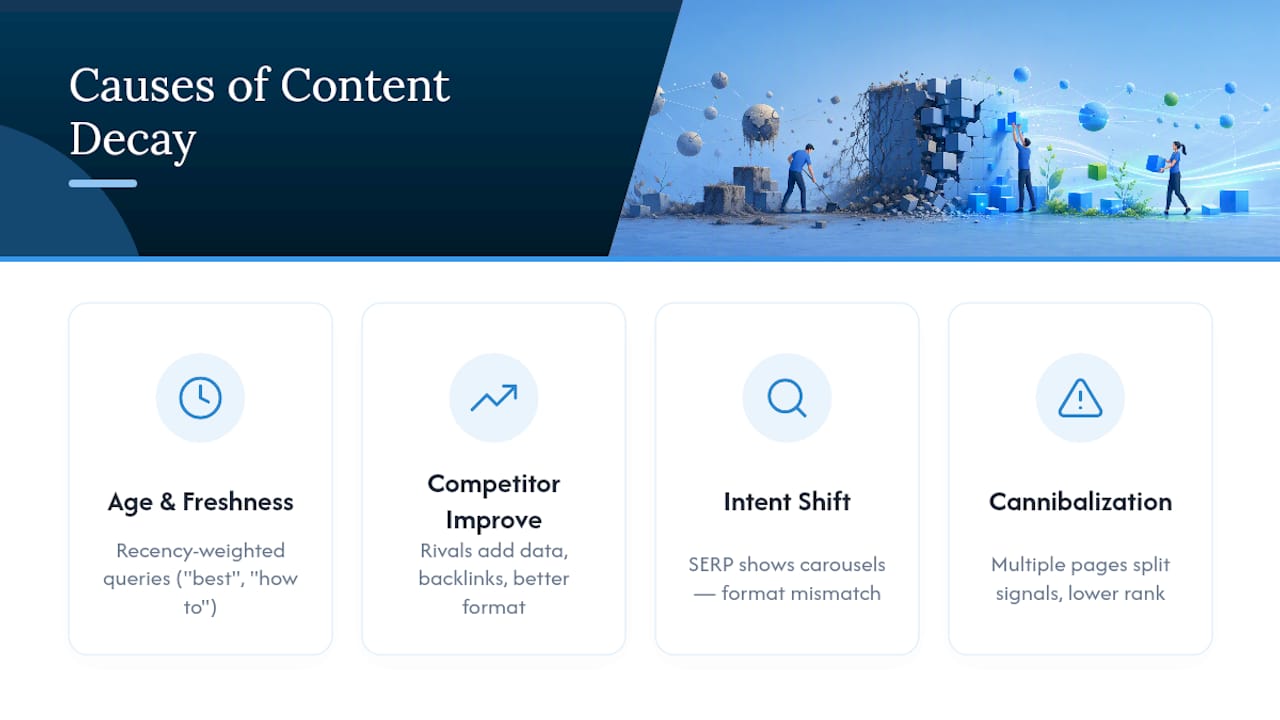
Four forces drive most decay, and only some of them respond to a content edit.
Age and freshness loss hits queries where Google and AI systems weight recency heavily, think “best,” “top,” or “how to” queries tied to tools, prices, or regulations. A 2022 roundup of software tools looks stale the moment three new competitors launch, even if nothing on the page is factually wrong.
Competitor improvement is displacement, plain and simple. A rival adds original data, builds backlinks, or restructures around a better format, and your page slides down not because it got worse, but because the field got better.
Search intent shift happens when the SERP itself changes shape. If you wrote a 2,000-word guide and the SERP now shows five product carousels above the fold, no amount of prose will win that query back until you address the format mismatch.
Internal cannibalization is the quiet killer. Multiple pages targeting near-identical queries split link equity and relevance signals between them, and Google often can’t decide which one deserves the ranking, so both underperform. Ahrefs flags this as one of the most common causes teams miss because no single page looks broken in isolation.
Not every decay signal demands a rewrite. Sometimes the right call is to do nothing: if a topic has genuinely gone out of demand (people stopped searching “how to jailbreak an iPhone 6”), reallocating your editorial time elsewhere beats chasing a dead query. Other times the fix isn’t more words, it’s a different surface entirely: a how-to article losing to video results needs a video, not a longer article.
Statistic to anchor your priorities: research on refresh outcomes shows major updates that materially expand a page’s information tend to produce measurable rank gains, while cosmetic edits, swapping a date stamp or tweaking a sentence, frequently produce no benefit at all. That single finding should reshape how your team allocates refresh hours.
Update, Consolidate, Redirect, or Prune: Which Fix Applies?
Once you’ve diagnosed the decay type, the next decision is which lever to pull. Four levers exist, and picking the wrong one wastes both time and the page’s remaining link equity.
Weigh each decaying page against five factors: current traffic value, referring domains pointing at the URL, its role in your conversion funnel, keyword relevance and search volume today, and whether the SERP format still matches your content type.
- Update the page when it still ranks in positions 4 through 15, retains backlinks, and the core topic remains relevant, just outdated.
- Consolidate two or more pages when they target overlapping queries and neither one dominates; merge the weaker URL’s content into the stronger one and 301 redirect it.
- Redirect a standalone page when its topic has been fully superseded by a newer resource elsewhere on your site, preserving the link equity it accumulated.
- Prune and deindex a page only when it has no backlinks, no traffic, and no strategic value, letting it sit does nothing but dilute your site’s overall quality signals.
| Situation | Action | Expected outcome | Follow-up measurement |
|---|---|---|---|
| Page ranks 4 to 15, has backlinks, topic still relevant | Update | Recovered or improved position within weeks | Track clicks and position for 4 to 8 weeks |
| Two pages compete for the same query | Consolidate + 301 | Combined authority outranks either page alone | Watch for ranking consolidation in GSC query report |
| Topic fully replaced by newer resource | Redirect | Link equity transfers, no ranking gap | Confirm redirect passes value via Ahrefs backlink check |
| No backlinks, no traffic, no strategic fit | Prune | Cleaner crawl budget, stronger site-wide relevance | Recheck site-wide average position after 90 days |
Pro Tip: Before you assume a page has organically decayed, check your CMS version history. If traffic cliffs right after an edit, whether a title change, a template swap, or a “simplified” rewrite, the fastest fix is often to restore the previous version and start your update from that baseline instead of digging deeper for a cause that isn’t there.
This matrix works because it separates diagnosis from action. A page can show ranking decay and still be a “prune” candidate if it has no backlinks and covers a topic nobody searches anymore, decay type tells you what happened, but traffic value and link equity tell you what’s worth saving.
How Do You Refresh Content for Measurable SEO Gains?
A “meaningful update” adds real information, not a new publish date. Research on refresh outcomes backs this up directly: pages that receive substantial expansions, new data, new sections, added evidence, tend to see measurable rank improvement, while cosmetic-only edits often produce nothing. If your refresh plan is “change the date and fix a typo,” skip it and spend the hour elsewhere.
Here’s the sequence that actually moves rankings:
- Run a topical gap analysis. Pull the top 5 ranking pages for your target query and note what they cover that you don’t, new statistics, a comparison table, an FAQ, a video embed.
- Add substantive new content, not filler. Update every statistic to its current source, replace stale screenshots, and where possible, include original data or a tool your competitors don’t have, this is what makes a page resilient to AI-driven summarization, since AI systems tend to cite fresher, more substantive sources.
- Rewrite H1 and H2 headings only if they’ll improve click-through rate. Don’t touch a heading that’s already performing; changing a working headline for the sake of “freshness” is a common, avoidable mistake.
- Preserve passages that are already ranking well. If a paragraph is driving featured snippet placement, leave its structure intact even as you update the surrounding content.
- Update metadata, title tag and meta description, to reflect the new depth of the page, since a stale snippet on a freshly updated page undercuts your own CTR.
After publishing, work through this checklist:
- Update the
dateModifiedfield in your schema markup so search engines and AI crawlers register the change. - Request indexing manually through Google Search Console rather than waiting for a natural recrawl.
- Add or refresh internal links pointing to the page from relevant, high-authority pages on your site.
- If the page suffered from a recent migration or a URL structure change, check your site migration checklist to rule out technical interference.
- Monitor clicks, impressions, and position daily for the first two weeks, then weekly through week eight, since most refresh impact appears within a 4 to 8 week window.
Pro Tip: *Set a rollback trigger before you publish, not after.
How Often Should You Check for Content Decay?
Content decay monitoring works best on a tiered cadence, not a single annual audit. Run a quarterly decay sweep across your full site, but shrink that window to every 90 days for pages that are AI-citation sensitive, since AI engines cycle through fresher sources faster than traditional organic rankings do. Slow-moving evergreen content, glossary entries, foundational explainers, can safely sit on an annual review.
Prioritize your limited refresh hours with a simple scoring approach: weigh traffic gap (how far current traffic has fallen from its peak), backlink value (referring domains at risk if the page is pruned), conversion importance (does this page sit in a revenue path), and decay velocity (how fast the drop is accelerating month over month). Pages scoring high on all four go to the top of the queue; pages scoring low on all four probably don’t need attention this quarter.
Build your monitoring stack around tools you likely already have:
- Google Search Console for the raw clicks, impressions, and position data.
- GA4 for engagement metrics that confirm whether a click drop is organic-specific.
- A rank tracker for daily position snapshots on your priority keyword set.
- Ahrefs or Semrush’s content-change detection features to flag pages losing organic traffic month over month.
- Manual AI citation spot-checks, running your target queries through ChatGPT or Perplexity monthly to see whether your page still gets cited.
One data point worth building your calendar around: teams that focus refresh resources on their top 20% of pages by traffic tend to see the highest return per hour spent, a useful ceiling when you’re deciding where quarterly effort actually goes. Staff this work as a standing quarter-hour review per priority page, and escalate to a full rewrite or a link-building push only when the decay-priority score has stayed elevated for two consecutive quarters.
A Practitioner Example: How Vertical Brands Approaches Decay Recovery
Vertical Brands treats content decay as one input into a broader growth diagnosis, not an isolated SEO chore. That result reflects the full engagement, not a content refresh in isolation, but it illustrates what happens when editorial diagnosis is paired with technical and paid-channel execution instead of treated as a standalone task.
The process Vertical runs looks consistent across clients: diagnose the decay type using the four-signature framework, prioritize the top-scoring pages, execute a substantive update or structural change, then measure over a defined window before moving to the next batch.
Three artifacts worth building into your own process:
- An audit rubric scoring each decaying page on traffic gap, backlink value, and conversion importance.
- A top-20% refresh checklist covering topical gap analysis, metadata updates, and schema changes.
- A 90-day monitoring schedule flagging AI-sensitive pages for a shorter recheck cycle.
[Author placeholder: Alex to confirm final phrasing on the FACEGYM proof point and any updated percentage figures before publish.]
When Should You Skip the Refresh Entirely?
Not every decaying page deserves your attention, and pretending otherwise is how teams burn a quarter chasing marginal gains. If a topic has genuinely lost demand, verified through Google Trends, not just gut feel, the correct move is to accept the loss and redirect that editorial hour toward a page with real traffic ceiling left in it.
The bigger trap is treating every refresh the same way. A cosmetic edit on a page suffering from competitor displacement does nothing, because the underlying gap, thinner content, weaker links, worse format, is still there after you change the date stamp. Major, substantive updates carry real risk of wasted effort if misapplied to a demand-decay page, but they’re the only lever that works against ranking decay or intent drift.
Budget accordingly: AI-sensitive pages need a 90-day check-in, not annual attention, because citation turnover moves faster than traditional rankings. Everything else can wait for the quarterly sweep. Spend your team’s hours where the decay-priority score says to, not where the loudest metric happens to be that week.
— Alex
Sources
- Content Decay: What It Is & How to Reverse Traffic Drops
- What Is Content Decay? (And How to Fix It Before It Tanks Your Traffic)
- Content Decay: The 31% Refresh Threshold and the Dual Decay Curve | Fahlout
- Content Freshness & AI Citations: Why Updating Old Content Boosts AI Visibility (2026) | Rankeo
Ready to put this framework to work without pulling your team off other priorities? Vertical Brands’ SEO and content services cover the full diagnostic-to-execution cycle, from decay audits through technical fixes, content updates, and the paid and creative work that often needs to move alongside a refresh.
FAQ
Is SEO Dead Now That AI Answers Most Questions?
No. Organic search still drives the majority of website discovery, but AI Overviews and chat assistants have added a second visibility channel that behaves differently, favoring fresher, more substantive sources over older ones. SEO now means optimizing for both traditional rankings and AI citation presence.
What Is the 80/20 Rule in SEO?
Teams that concentrate refresh resources on that top tier typically see the strongest return per hour invested, which is why prioritization matters more than refreshing every page evenly.
What Are the Three C’s of SEO?
Definitions vary across practitioners, but a common version refers to Content, Code, and Credibility, the substance of your pages, the technical foundation that lets search engines crawl and render them, and the authority signals (links, expertise) that back them. All three intersect directly with content decay, since a technically broken page or a low-authority page decays faster regardless of how fresh its content is.
What Is a Content Gap in SEO?
A content gap is a topic, subtopic, or format that competing pages cover and yours doesn’t, whether that’s a missing data point, an absent comparison table, or a video format the SERP now favors. Closing a genuine content gap is one of the most reliable ways to reverse ranking decay, since it directly addresses why competitors displaced you.
How Do I Know If a Traffic Drop Is Decay or a Penalty?
Content decay is gradual, unfolding over months and tied to specific pages or query clusters, while a penalty typically causes a sharp, site-wide drop tied to a manual action notice in Search Console or a known algorithm update date. Check the Security & Manual Actions report first; if it’s clean, compare your metric pattern against the four decay signatures to confirm gradual decay rather than a penalty.
Recommended

Other posts



























































Stay ahead with better decisions.
Get business insights today.
