Stop Losing Conversions: Consent Mode V2 Implementation for Marketers

Consent Mode v2 is Google’s updated framework for adjusting how tags behave based on a visitor’s cookie choices, built around four signals: ad_storage, analytics_storage, ad_user_data, and ad_personalization. If you run Google Ads or Google Analytics (GA4) on your site, the direct action is to upgrade your Google tag setup to v2 now and implement Advanced mode wherever your legal team allows it. Marketers, site owners, and advertisers who delay risk losing conversion data and ad personalization eligibility.
TL;DR:
- Using Advanced mode allows Google’s statistical modelling for conversion estimates from visitors who deny consent, reducing attribution gaps.
- Proper mapping of your CMP’s consent categories to the four signals is critical, otherwise you risk over- or under-collecting data, impacting reporting accuracy.
- Default consent commands must fire before any tags load; improper sequencing can cause tags to fire with full consent, risking legal and compliance issues.
- Google requires SDK updates for mobile apps to support Consent Mode v2 signals; mismatched web and app configurations create gaps in data collection.
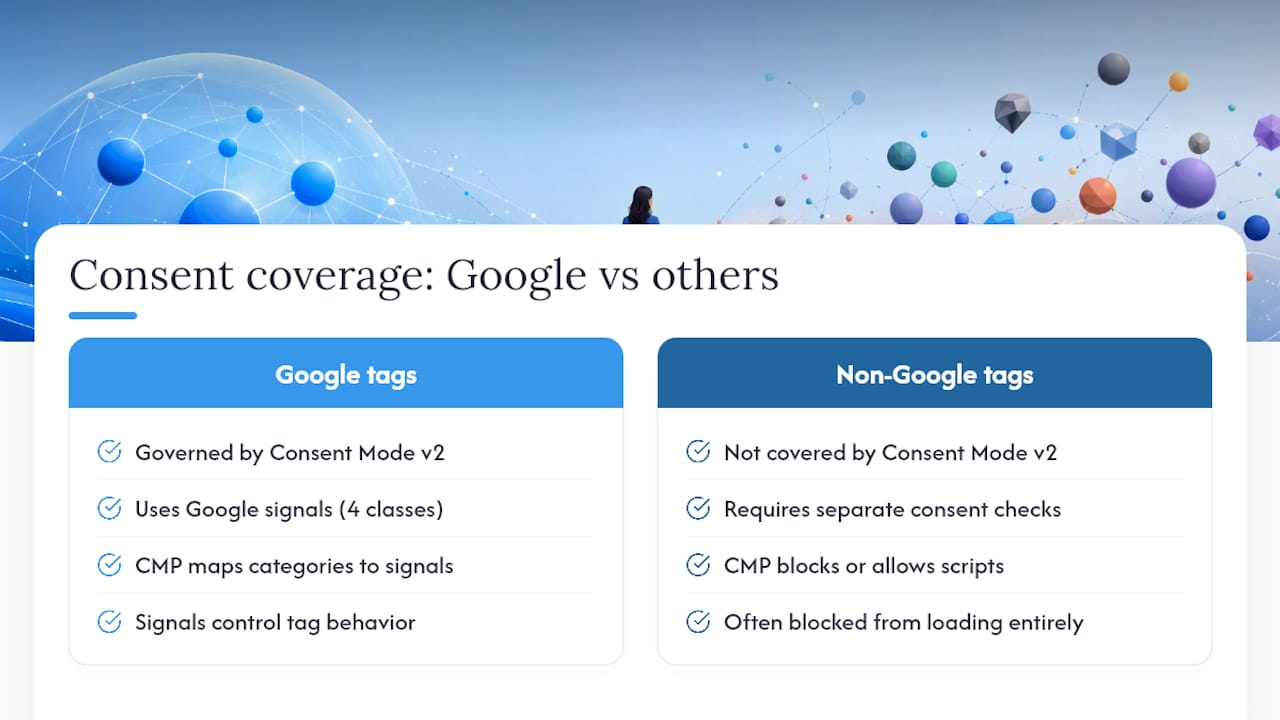
- Consent Mode V2 is platform-specific to Google tags; it does not automatically manage third-party pixels like Facebook Pixel or TikTok, which need separate consent handling.
Table of Contents
- What Changed in Consent Mode v2: The Four Signals Explained
- Basic vs Advanced Implementation: Which One Fits Your Site?
- How Does Consent Mode Actually Work Behind the Scenes?
- Step-by-Step: Setting Up Consent Mode V2 with Gtag or GTM
- How Do You Verify Consent Mode Is Actually Working?
- What Should Marketers Expect from Reporting and Modelling?
- What Vertical Sees in Real Consent Mode V2 Rollouts
- What Do App and SDK Upgrades Require?
- How Does Consent Mode V2 Fit into GDPR and CCPA Compliance?
- Does Consent Mode V2 Cover Facebook Pixel and Other Platforms?
- Does Consent Mode Slow Down Your Site?
- Why Isn’t My Consent Mode Setup Working?
- Why Consent Mode V2 Matters Beyond Compliance
- How Vertical Helps Teams Get Consent Mode V2 Right
- Primary Sources Worth Bookmarking
- Sources
- FAQ
What Changed in Consent Mode v2: The Four Signals Explained
Consent Mode v2 added two parameters that did not exist in the original version, and the distinction between them matters more than most implementation guides admit. ad_storage controls whether Google can set advertising cookies or use device storage for ads. analytics_storage governs the same permission for Google Analytics (GA4) data collection.
The two additions are subtler. ad_user_data determines whether Google can send user data for advertising purposes at all, regardless of storage. ad_personalization controls whether that data can be used to personalize ads, including remarketing and Google Ads audience features. A site could theoretically grant ad_user_data while denying ad_personalization, allowing measurement without personalized targeting.
These four signals combine into real-world scenarios you’ll see constantly once you start checking network requests:
- All granted: full ad targeting, remarketing, and standard GA4 tracking, no gaps.
- Analytics granted, ad signals denied: you get GA4 behavioral data but no ad personalization or remarketing lists.
- Everything denied: Google Tag Manager and gtag.js switch to cookieless pings for statistical modelling instead of stopping data collection outright.
- ad_user_data granted, ad_personalization denied: conversion measurement continues, but the visitor won’t enter remarketing audiences.
Get this mapping wrong in your consent management platform (CMP) and you’ll either overcollect data illegally or undercollect it needlessly, both of which show up in your reporting within weeks.
Basic vs Advanced Implementation: Which One Fits Your Site?
Basic mode blocks Google tags entirely until a visitor makes a consent choice. Advanced mode loads tags immediately with denied defaults, then sends cookieless pings that Google uses for statistical modelling instead of blocking data flow outright, according to Google’s Tag Manager documentation.
That difference cascades into everything downstream. Basic mode is easier to defend legally since nothing loads without explicit permission, but it creates a visitor segment your analytics can never fully see. Anyone who denies consent, or who never interacts with your banner before leaving, disappears from your data with no way to recover their behavior after the fact.
Advanced mode trades some of that legal simplicity for measurement completeness:
- Cookieless pings let Google build statistical models that estimate conversions from consent-denied visitors.
- You retain broader remarketing audience sizes because more browsing signal reaches Google’s systems.
- Attribution gaps shrink, particularly for sites with meaningful traffic from privacy-conscious regions.
- Setup complexity increases, since you’re managing default and pending states rather than a single block/allow gate.
Practitioners including Simo Ahava generally recommend Advanced mode for brands that depend on data-driven decisions, since Basic mode’s blind spots are permanent, not something you can backfill later.
Pro Tip: If your legal counsel is unsure which mode fits, start Basic mode in your highest-risk region and Advanced mode everywhere else. Region-scoped consent settings let you run both simultaneously without rebuilding your tag setup later.
How Does Consent Mode Actually Work Behind the Scenes?
Everything hinges on sequencing. The default consent state command has to fire in the page <head>, before your Google tag or Google Tag Manager container script loads. Miss that ordering, and the first tag on the page may treat consent as granted by default, writing cookies before any restriction takes effect, per Google’s own implementation guide.
A basic gtag.js default block looks like this, placed above your container snippet:
gtag('consent', 'default', {
  'ad_storage': 'denied',
  'analytics_storage': 'denied',
  'ad_user_data': 'denied',
  'ad_personalization': 'denied'
});
Once a visitor makes a choice through your CMP, you fire an update command with the same four keys, now reflecting their selection. Google Tag Manager handles this slightly differently: you set defaults through the built-in Consent Initialization trigger, then push updates via the CMP’s integration or a custom event, and Google Tag Manager applies those states to every tag configured to respect consent.
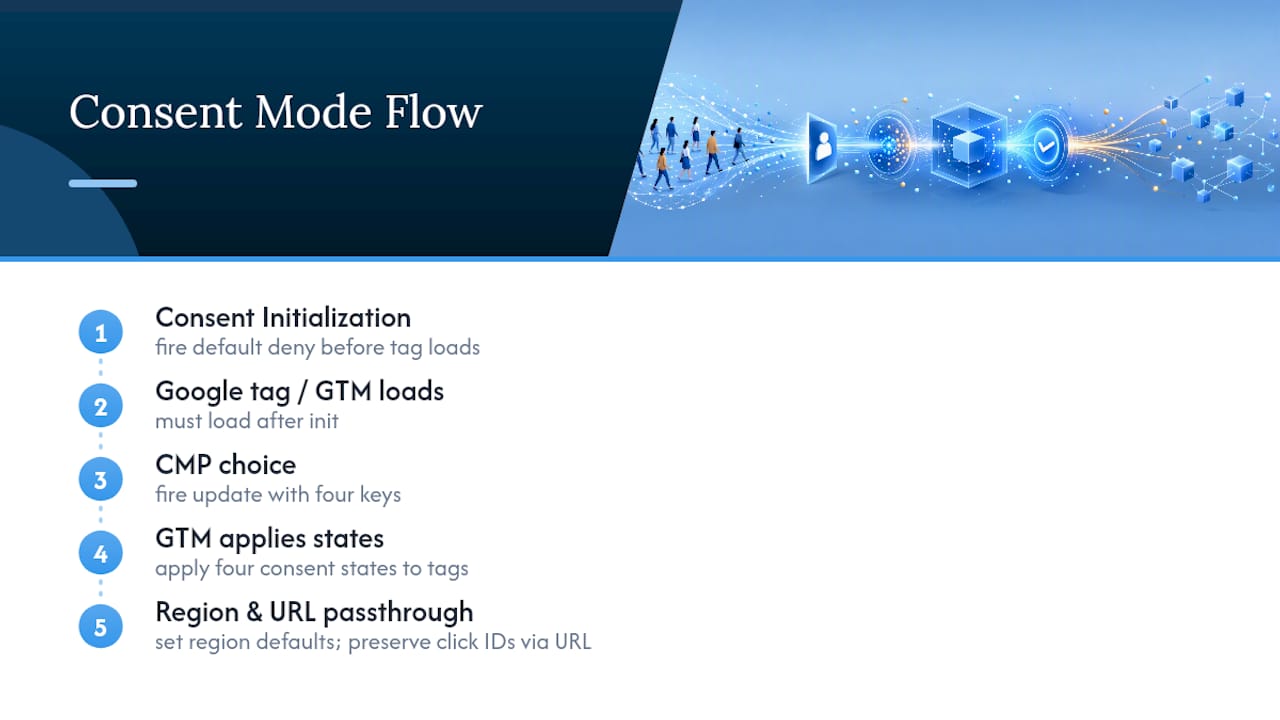
Region scoping matters here too. You can set stricter defaults for regions with rules like GDPR and looser ones elsewhere by passing a region array in your default command, so a single script can serve both a UK visitor and a non-EU visitor correctly without separate deployments.
The other piece worth understanding is URL passthrough. When cookies are restricted, Google can preserve ad click identifiers (like gclid) by appending them to outbound URLs instead of storing them in a cookie. Without this enabled, click IDs get lost the moment a user navigates between pages, and your attribution data develops holes that no amount of modelling fixes afterward.
Watch for race conditions above everything else. If your consent banner or CMP script loads asynchronously and lands after the Google tag fires, tags execute with whatever default state existed before consent logic ran, often full consent by accident. That single sequencing bug is behind a large share of the compliance issues we see during audits.
Step-by-Step: Setting Up Consent Mode V2 with Gtag or GTM
Implementation follows a fairly consistent order regardless of which platform you’re using, whether that’s a hand-coded gtag.js setup or Google Tag Manager.
- Map your CMP’s consent categories to the four signals. Most CMPs group cookies into categories like “necessary,” “analytics,” and “marketing.” Confirm which category controls each of
ad_storage,analytics_storage,ad_user_data, andad_personalization, since a single “marketing” toggle sometimes controls two signals at once. - Insert the default consent command in the page head, above your Google tag or Google Tag Manager container snippet, never below it.
- Configure the update flow. In gtag.js, call
gtag('consent', 'update', {...})when the visitor makes a choice. In Google Tag Manager, use the CMP’s native template or push aconsent_updateevent, then confirm your tags are set to check consent under Advanced > Consent Settings for any tag that isn’t a built-in Google tag type. - Turn on URL passthrough in your Google Ads and GA4 tag configurations if you’re running Advanced mode, so click IDs survive page navigation when cookies are restricted.
- Verify your Google Analytics (GA4) property links. Properties connected to Google Ads or other Google services expect
ad_user_dataandad_personalizationto be present, and Google explicitly requires this upgrade for sites running their own custom consent banner. - Confirm app SDK versions if you also run mobile properties, since the underlying SDKs need updating separately from your website tags.
Pro Tip: Run this checklist in a staging environment first. A single mismatched category mapping in your CMP can silently deny consent for the wrong signal, and you often won’t notice until conversion numbers drop weeks later.
Once deployed, don’t assume it’s working just because the page loads without errors. That verification step is its own project, covered next.
How Do You Verify Consent Mode Is Actually Working?
Trust the network panel tracking LLM traffic over your gut feeling. Open your browser’s developer tools, filter for requests to google-analytics.com or googleads.g.doubleclick.net, and check whether the consent parameters (gcs, gcd) appear on outgoing requests with values that match the state you selected in your CMP.
A few checks catch most real-world failures:
- Cookie jar inspection: with
analytics_storageandad_storageboth denied, confirm no_gaor advertising cookies get written. If they show up anyway, your default command likely fired after a tag already executed. - Fresh profile testing: run both the accept and deny flows in a private browsing window, then reload the page to confirm the choice persists rather than resetting to default.
- Cookieless ping confirmation: in Advanced mode, denied consent should still generate a lightweight ping request rather than nothing at all, which is what feeds Google’s modelling.
- Modelling eligibility check: in GA4’s admin panel, confirm whether your property meets the volume thresholds Google requires for advertiser-specific modelling.
That threshold is worth stating plainly: Google requires at least 1,000 events per day with analytics_storage denied over a seven-day window, plus at least 1,000 daily users with consent granted on 7 of the previous 28 days, before advertiser-specific modelling activates.
Testing only the acceptance path is the most common oversight. A tag setup that works fine when a visitor grants consent can fail silently on denial, still writing cookies it shouldn’t, and nobody notices because the site “looks like it’s working.”
Common misconfigurations we see repeatedly: a single consent toggle mapped to all four signals instead of granular control, default commands placed after the container script, and hard-coded tags outside Google Tag Manager that never check consent state at all.
What Should Marketers Expect from Reporting and Modelling?
Modelled data fills conversion gaps, but it doesn’t replace raw data everywhere. Google explicitly excludes modelled figures from several reporting surfaces:
- Audience building for remarketing lists still requires actual observed users, not modelled estimates.
- Data exports to BigQuery or other tools reflect only what was actually collected.
- Sequence-based explorations and predictive metrics in GA4 can’t incorporate modelled conversions either.
That’s a meaningful limitation to flag with stakeholders before launch, since expectations tend to run ahead of what modelling can actually deliver.
For mid-size properties, the volume thresholds mentioned earlier decide whether you get any benefit at all. A site doing a few hundred events a day with consent denied may never reach the 1,000-event threshold, meaning it stays reliant on raw, gap-filled data indefinitely. Larger sites often qualify within days.
The practical guidance: treat modelled metrics as trend indicators, not exact counts. Use them to judge whether a campaign is directionally improving, not to reconcile against ad spend to the dollar. For attribution, lean on data-driven attribution and view campaign performance across a rolling window rather than single-day snapshots, since modelling smooths volatility over time rather than eliminating it.
What Vertical Sees in Real Consent Mode V2 Rollouts
Every audit we run starts the same way: pull the network requests before touching a single line of code. Most consent issues we catch are not exotic edge cases. They’re default commands placed after the tag container, or a CMP category that quietly maps two signals to one toggle.
Getting Consent Mode v2 right takes more than a developer. It needs legal counsel confirming which regions and categories require what, an engineer who owns the sequencing and defaults, and someone from analytics who checks the GA4 property links match what Google Ads expects. Skip any one of those, and something breaks quietly.
We stage rollouts by region, watching modelling eligibility thresholds property by property, since a flagship site might qualify within a week while a smaller regional property never reaches advertiser-specific modelling at all. That staged approach is part of what drove FACEGYM’s 50% increase in purchases and 41% rise in bookings after a full tracking and attribution overhaul.
What Do App and SDK Upgrades Require?
Consent Mode v2 isn’t purely a website concern. If your business runs a mobile app alongside your site, and that app sends conversion or analytics data to Google, the underlying SDK needs its own upgrade separate from anything you change on the web.
For Android, that means updating to a Google Analytics for Firebase SDK version that supports the v2 consent parameters. iOS apps need the equivalent SDK update to pass ad_user_data and ad_personalization alongside the original two signals. Google has been explicit that properties linked to other Google services expect all four parameters present, and an outdated SDK simply won’t send two of them, regardless of how your consent banner is configured.
This creates a gap many teams miss: your website consent solutions might be fully upgraded while your app SDK still runs the old version, silently withholding personalization consent even when a user granted it. Check your Firebase or Analytics for Firebase SDK version explicitly, don’t assume a general app update covered it.
If you maintain a custom consent banner rather than a Google-provided CMP integration, the upgrade obligation is stated directly: you must implement Consent Mode v2 to keep collecting ad measurement and personalization signals at all. There’s no legacy fallback that keeps working indefinitely. Treat the app and web upgrades as one project with two tracks, not two separate initiatives on different timelines, since a mismatch between them is one of the more common gaps that surfaces during a later privacy regulations impact review.
How Does Consent Mode V2 Fit into GDPR and CCPA Compliance?
Consent Mode v2 is a technical mechanism, not a compliance program by itself. It gives you the tool to honor a consent choice once it’s made, but the legal obligations around collecting, wording, and recording that choice still come from frameworks like GDPR and CCPA, and those rules vary by jurisdiction and audience.
Under GDPR, consent has to be freely given, specific, and revocable, and your CMP needs to actually record what a visitor chose, not just what your tags did with it. Consent Mode v2’s four granular signals make it easier to honor a genuinely specific choice, since you’re no longer forced into a single all-or-nothing toggle that either overcollects or undercollects relative to what the visitor agreed to.
CCPA works differently. It’s built around opt-out rights rather than opt-in consent, so a California visitor’s default state and the mechanics of “Do Not Sell or Share” requests need separate handling in your CMP configuration, distinct from how you’d treat a GDPR-scoped EU visitor under the same tag setup.
Region scoping in your default consent command is the practical bridge between these frameworks. You can apply GDPR-appropriate defaults for EU traffic and CCPA-appropriate defaults for California traffic within the same deployment, without maintaining separate codebases. What Consent Mode v2 doesn’t do is decide for you whether your banner wording, consent logging, or vendor list meets either law’s requirements. That’s still a legal review, not a tagging task, and it belongs on the same audit checklist as the technical rollout.
Does Consent Mode V2 Cover Facebook Pixel and Other Platforms?
No. Consent Mode v2 is a Google framework specifically for Google tags, Google Ads, and Google Analytics (GA4). It has no direct effect on Meta’s Facebook Pixel, TikTok’s pixel, or other third-party advertising platforms running on your site.
That distinction trips up a lot of teams who assume one consent implementation covers everything. In reality, most CMPs handle this by triggering separate consent checks per vendor: your Consent Mode v2 signals govern Google tags, while a parallel set of rules, often configured through the same CMP interface, governs whether Facebook Pixel, LinkedIn Insight Tag, or other scripts fire at all.
The practical setup usually looks like this: your CMP maps its consent categories to Google’s four signals for Google Tag Manager tags, and separately blocks or allows non-Google tags entirely based on the same category choices, since those platforms don’t recognize Google’s consent state format. A marketing category toggle might simultaneously set ad_user_data to denied for Google and block the Facebook Pixel script from loading at all, two different mechanisms triggered by one visitor choice.
This matters most for attribution work spanning multiple platforms. If you’re running Spark Ads or other TikTok campaigns alongside Google Ads, your consent management tools need to coordinate signal handling across all of them consistently, or you’ll end up with mismatched data where Google shows a consented session and Meta shows a blocked one, or vice versa, for the identical visitor. Auditing every third-party tag on your site against your CMP’s non-Google blocking rules is a separate task from your Consent Mode v2 implementation, and it’s easy to overlook once the Google side is working.
Does Consent Mode Slow Down Your Site?
Barely, if implemented correctly. The default and update commands are lightweight JavaScript calls that execute in milliseconds. The performance risk isn’t the consent logic itself, it’s what happens around it when implementation goes wrong.
The most common performance mistake is loading a heavy CMP script synchronously and blocking render while it initializes. That’s a CMP loading problem, not a Consent Mode v2 problem, and the fix is the same one you’d apply to any third-party script: load it asynchronously and defer non-critical execution until after the page becomes interactive.
Advanced mode’s cookieless pings add a small number of additional network requests compared to a fully blocked Basic mode setup, but they’re deliberately lightweight, designed to carry just enough signal for statistical modelling without the overhead of a full tag execution.
A few practical habits keep performance in check:
- Keep default consent commands minimal, four key-value pairs, nothing else, placed inline rather than loaded from an external file.
- Avoid firing redundant update commands on every page load if the visitor’s choice hasn’t changed since their last session.
- Test page speed before and after rollout using the same tool and conditions, since CMP vendors vary widely in how much overhead their banners add.
If your Core Web Vitals dip after a consent mode setup, audit the CMP script’s loading behavior first. The signals themselves are rarely the bottleneck.
Why Isn’t My Consent Mode Setup Working?
Most Consent Mode v2 problems trace back to a small set of repeat offenders, and the network panel almost always reveals which one you’re dealing with.
Tags firing with full consent by default. If cookies appear even when you selected “deny” in your CMP, your default command is either missing, malformed, or loading after the tag container. Check the page source order first, not the CMP configuration.
Consent choice not persisting across page loads. This usually means your CMP is storing the choice, but your update command isn’t firing on subsequent page loads to reapply it, so Google Tag Manager treats each new page as a fresh session with default denied states.
GA4 showing a sudden data drop after upgrading. This is often expected behavior if ad_user_data or ad_personalization weren’t previously configured and are now correctly denied for a segment of visitors. Confirm it’s not a regression by checking whether the drop correlates with your actual consent rates.
Modelling never activates despite waiting weeks. Recheck your property against the 1,000 events and 1,000 daily user thresholds. Smaller properties may simply never generate enough denied-consent volume to qualify, and that’s a structural limit, not a misconfiguration.
One tag ignoring consent entirely. Hard-coded tags outside Google Tag Manager’s tag templates don’t automatically respect consent settings. Route them through Google Tag Manager’s Advanced > Consent Settings so they check consent state before firing.
Why Consent Mode V2 Matters Beyond Compliance
Consent signals are measurement infrastructure now, not a legal checkbox bolted onto your site. Every gap in how ad_user_data or ad_personalization gets handled shows up later as a hole in your reporting, and by then it’s much harder to diagnose than it would have been during setup.
Advanced mode is the stronger default for any team making budget decisions off Google Ads or GA4 data, provided legal counsel signs off, because the alternative is a permanent blind spot Basic mode can never recover. The teams that get this right treat it as a cross-functional project from day one, with legal, engineering, and marketing reviewing the same consent map together rather than each group assuming someone else owns it.
— Alex
How Vertical Helps Teams Get Consent Mode V2 Right
Vertical Brands is the alternative to piecing this together across three different vendors: our team handles the tagging, Google Tag Manager configuration, CMP integration, and analytics linking as one coordinated project instead of a developer patching Google Tag Manager while a separate agency owns your ad accounts.

An engagement typically starts with an audit of your current tag setup and CMP category mapping, the same kind of review that catches sequencing errors and mismatched signals before they cost you weeks of clean data. From there, we build the implementation plan, handle the Google Tag Manager and gtag.js configuration, run the accept and deny testing flows, and set up reporting that accounts for modelling limits rather than overpromising exact numbers. It’s the same integrated approach that helped drive measurable gains for clients, combining strategy, tagging, and reporting under one roof instead of scattered across vendors who never quite talk to each other.
If your consent setup needs an audit, or you’re planning a Google Analytics (GA4) and Google Ads overhaul alongside it, explore Vertical’s services and get a plan built around your actual tag stack.
Primary Sources Worth Bookmarking
For exact parameter names and policy wording, go straight to Google’s Tag Platform consent guide and the Tag Manager help center’s consent mode overview. For GA4-specific verification steps, use Google’s consent settings update guide. For deeper technical nuance beyond the official docs, Simo Ahava’s writing on Consent Mode v2 remains one of the most reliable independent references available.
Sources
- Set up consent mode on websites | Tag Platform
- About consent mode - Tag Manager Help
- Consent Mode V2 For Google Tags — Simo Ahava
FAQ
Is Google Consent Mode V2 Mandatory?
It’s mandatory if you want to keep collecting ad measurement and personalization signals in Google Ads or GA4. If you run your own custom consent banner, Google requires the v2 upgrade to continue sending ad_user_data and ad_personalization.
How Do I Implement Google Consent Mode V2?
Map your CMP’s consent categories to the four signals, place a default consent command in your page head before your tag container loads, and fire an update command when the visitor makes a choice, using either gtag.js directly or Google Tag Manager’s built-in consent settings.
How Do I Activate Google Consent Mode?
Activation happens through the default and update commands in gtag.js, or through Google Tag Manager’s Consent Initialization trigger paired with your CMP’s integration, both of which need to run before any tag that should respect consent fires.
What Does Consent Mode Do in Google Tag Manager?
It lets tags check the visitor’s consent state before firing, blocking or allowing execution based on the four signals, and routes non-Google tags through Advanced > Consent Settings so custom scripts also respect the same consent framework.
Should I Choose Basic or Advanced Mode?
Choose Advanced mode if your legal team allows it and you rely on Google Ads or GA4 for decision-making, since it enables modelling that recovers data Basic mode permanently loses. Choose Basic mode only when legal simplicity outweighs the value of that recovered measurement.
Recommended

Other posts





























































Stay ahead with better decisions.
Get business insights today.
