Shopify Site Speed Optimisation Service for Store Owners
53% of mobile users abandon a website that takes over three seconds to load. For a Shopify store, slow pages can interrupt product discovery, weaken confidence and cost completed purchases. A Shopify site speed optimisation service should identify the causes of delay, then improve images, theme code...

53% of mobile users abandon a website that takes over three seconds to load. For a Shopify store, slow pages can interrupt product discovery, weaken confidence and cost completed purchases. A Shopify site speed optimisation service should identify the causes of delay, then improve images, theme code and content delivery without making the shopping experience harder to use.
Store owners know speed matters. The harder question is which fixes will make a meaningful difference, and how to choose a Shopify site speed optimisation service that addresses the store’s actual bottlenecks. This article explains how image and theme improvements affect performance, why speed shapes conversions and user experience, and what a thorough optimisation process should cover. It also sets out practical criteria for assessing a service, from diagnosis through implementation. The goal isn’t speed for its own sake; it’s removing friction that makes buying harder. You’ll come away with a clearer basis for deciding what your Shopify store needs next.
Key Takeaways
• Review theme code, Liquid, JavaScript and CSS to find features or scripts that adds unnecessary work to each page.
• Audit product images for oversized files and formats that add page weight, especially on mobile.
• Assess speed alongside the shopping journey: faster pages matter when customers browse, compare products and complete purchases.
• Separate platform hosting from delivery choices, then identify where delays occur before changing your setup.
• Choose a service with a clear audit, prioritised fixes and post-change testing; this helps keep optimisation focused on your store’s needs.
How Can Image and Theme Optimisation Elevate Your Shopify Store’s Performance?
A Shopify theme shapes the storefront, while Liquid, JavaScript and CSS determine how its features load. Review the code and theme behaviour together, rather than treating them as isolated fixes.
In the UK, the price depends on the scope of work and is provided after a quote request. Theme condition, bespoke design, code changes and testing all affect the cost.
For a practical look at common design and technical bottlenecks, watch this video from Ecom Masterclass:
Theme and Code Optimisation
Start with a page-level audit of the Shopify theme, then inspect Liquid templates for repeated or unnecessary rendering. Review JavaScript and CSS for scripts and styles that load across every page, even when only one feature needs them. Some experts recommend keeping a JavaScript file below 16kb. A product-page script, for example, shouldn’t add work to the homepage without reason.
Check whether sliders, animations or third-party features justify the code and loading time they require. Remove unused snippets carefully, then test key templates on mobile and desktop. A change that speeds up one page but breaks product variants damages the user experience. The objective is a leaner engine without removing useful storefront functions.
Choosing a Lightweight Theme
Compare themes by the features they load, not just by appearance. A demo with several animations, carousels and pop-ups may include more code than a simpler layout. Preview the product page, collection page and mobile menu, then note which elements are essential to your Shopify store. A lightweight starting point can reduce the need for later code work.
Shopify manages the store’s hosting, so choosing a theme isn’t the same as choosing a separate web host. Hosting and theme decisions still interact: the theme determines what the browser must process, while delivery affects how assets reach visitors. Test a theme on your own pages, where apps, product data and content reveal the real experience.
Custom theme design and development can suit stores whose requirements exceed an existing theme’s structure. Before commissioning a build, define the templates, interactions and merchandising needs. A designer can then build around those priorities instead of adding features by default. Defining the scope also makes project costs clearer.
Use a disciplined review: identify slow-loading sections, map each feature to a business need, then test code changes against the same pages. Keep the visual hierarchy and shopping functions intact. If a new theme adds complex JavaScript for decorative effects, assess whether they justify the extra browser work. The right choice supports both speed and the store’s commercial design.
Image optimisation
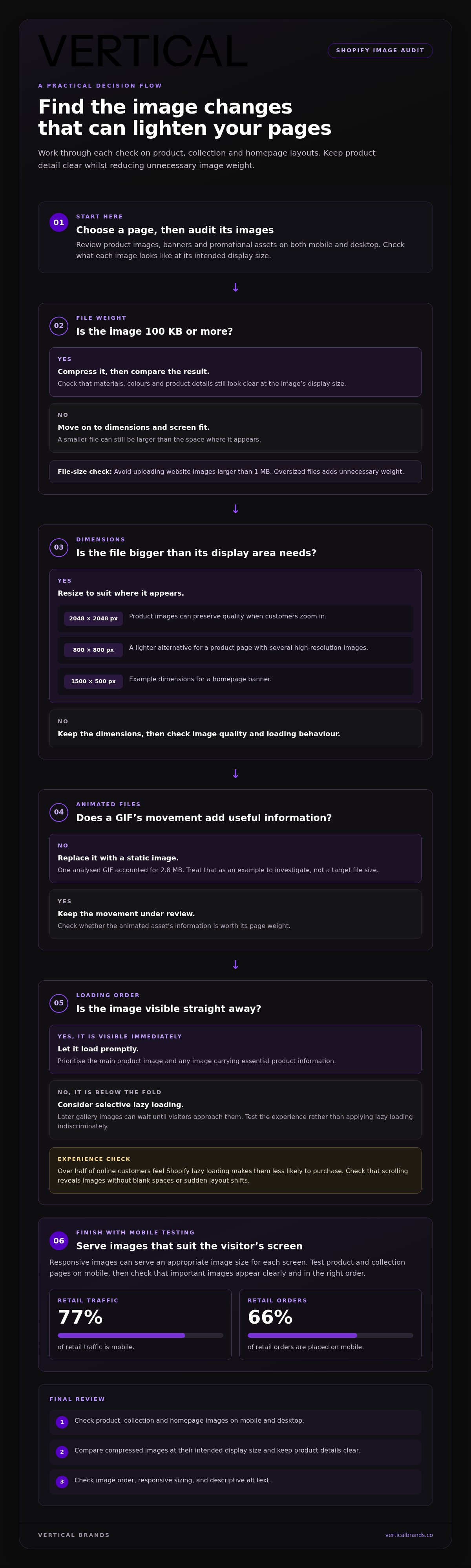
Image weight affects loading because each file must travel from the server to a visitor’s device. Start by auditing product images, banners and promotional assets on mobile and desktop.
For a UK Shopify shop, image choices should balance sharp product detail with fast page delivery. The right dimensions depend on where each image appears.
Compressing and Resizing Images
Match each file’s dimensions to its display area before uploading it. Product images at 2048 x 2048 pixels can preserve quality when customers zoom in. If a product page carries several high-resolution images, 800 x 800 pixels can be a lighter alternative. Check that resized images still show materials, colours and product details clearly.
Compression reduces file size without changing the displayed dimensions. Begin by identifying images of 100 KB or more, then compare their visual quality after compression. A homepage banner, for example, may use dimensions of 1500 x 500 pixels. Avoid uploading website images larger than 1 MB. A group of oversized files add unnecessary weight, even when each image looks sharp on its own.
Animated assets also need scrutiny. One analysed GIF accounted for 2.8 MB, so replace GIFs with static images where movement adds no useful information. Review collection pages as well as product pages: repeated thumbnails can multiply the weight transferred to mobile devices. Keep an original copy before editing, then check the compressed version at its intended display size.
Image Loading and Responsive Display
Responsive images let a page serve an appropriate image size for the visitor’s screen. Check the mobile product page, where a desktop-sized file may be unnecessarily heavy. Retail traffic is 77% mobile, and 66% of retail orders are placed on mobile. These figures make mobile testing a core part of image optimisation.
Lazy loading delays below-the-fold images until visitors approach them. Apply it selectively: product images visible immediately should load promptly, while later gallery images can wait. Over half of online customers feel Shopify lazy loading makes them less likely to purchase, so test the experience rather than enabling it indiscriminately.
During a review, compare image loading on a product page with its collection page. Check whether the main product image appears before lower-page assets, and whether scrolling reveals images without blank spaces or sudden layout shifts. If an image carries essential product information, prioritise its visibility. Images sized for the screen use fewer bytes, but careful loading order also shapes the experience.
Finally, check descriptive alt text alongside file weight. It helps explain an image’s content when it cannot be viewed and supports clearer product-page information. Stores aligning imagery with page content can also use search engine optimisation to strengthen how product pages communicate relevance.
How Does Page Speed Directly Impact Shopify Conversion Rates and Overall User Experience?
Speed affects whether visitors can browse, evaluate products and complete checkout without friction. A delayed product page can interrupt the path from paid traffic or search results to purchase. The browser must load content and respond to actions; unnecessary scripts can slow both steps. Measure speed alongside conversion behaviour, not as a technical score alone.
A 0.1-second improvement in page loading speed can increase retail conversion rates by 8.4%. Treat this as evidence that small delays can matter, not a forecast for every shopify store. Results depend on the page, its traffic and the changes made. Compare product views, add-to-basket actions and completed orders before and after optimisation.
Use Core Web Vitals to identify specific friction. A good Largest Contentful Paint result means the main content appears within 2.5 seconds or less. A good Interaction to Next Paint result means responses take 200 milliseconds or less. A good Cumulative Layout Shift result is 0.1 or less. These thresholds help teams distinguish slow loading from delayed functionality or shifting content.
Search visibility is connected, but speed alone does not determine rankings. Search engines, including Google, use signals to decide where pages appear, and site speed is one factor. A faster page can support the experience after someone clicks a result. It cannot replace relevant product information, clear navigation or useful content. Review organic traffic and landing-page behaviour together.
Customer loyalty is also at stake. 79% of customers are less inclined to buy again from an online business after a poor site-speed experience. Slow interactions makes repeat shopping feel harder, especially when customers revisit product pages or use filters. Check the browser experience on mobile and desktop, including search, variants, basket updates and checkout progression.
Protect functionality while removing delays. For example, test whether a review widget, tracking script or promotional pop-up slows product selection. Disable one non-essential feature at a time, then compare the same page and user journey. Keep features that support informed buying. Remove or defer elements that add work without helping visitors choose or purchase.
For a focused assessment, segment results by device, landing page and traffic source. Compare product-page engagement with checkout completion, then investigate where users leave. A mobile campaign landing page may need different priorities from a desktop collection page. This makes speed work a conversion decision: fix the bottleneck that obstructs the next customer action, then measure the effect.
Hosting and content delivery networks
Shopify hosting and a content delivery network handle different parts of storefront delivery. Hosting runs the shop; a CDN helps deliver cached files to visitors. For UK commerce businesses, the practical task is to locate delays before changing infrastructure.
Shopify provides hosted storefront infrastructure, so merchants don’t manage a separate web server for the standard online shop. That doesn’t make every page automatically faster. Theme code, apps, product data and external scripts still affect how quickly content reaches the browser and begins rendering.
Separate server response from page rendering during diagnosis. A slow first response points towards server-side processing or a request dependency. A quick response followed by a long blank screen can indicate that the browser still needs to process scripts, styles or page content. Google PageSpeed Insights can help identify where loading is delayed.
A CDN stores copies of static assets, such as images, stylesheets and JavaScript files, closer to visitors. When a customer in the UK opens a product page, cached assets can be delivered without each file travelling from its original source. This can speed up delivery, but it won’t remove code the browser must execute.
Shopify’s infrastructure manages core hosting and asset delivery for its platform. Adding a separate CDN or hosting layer without a diagnosed need can add configuration without solving the bottleneck. First, record the slow pages, devices and assets. Then establish whether the delay occurs before the first response, during asset delivery or during rendering.
Use this sequence to investigate a slow collection page:
• Compare the initial server response with the time required to display the main content.
• Review whether large assets come from Shopify or an external app.
• Test the same page on mobile and desktop to expose delivery differences.
• Disable one non-essential app integration at a time, then retest.
This process distinguishes a hosting concern from a storefront issue. For example, if removing a review app improves rendering, the bottleneck lies in the page’s dependencies, not necessarily the host. If assets load slowly across several pages, investigate their delivery path and caching behaviour. These checks identify where work is needed before considering infrastructure changes.
Keep the comparison consistent. Test the same Shopify page, device and connection conditions before and after each change. Record the first response, asset delivery and visible content separately. A single overall PageSpeed score can hide whether the server, CDN or browser is responsible. Fix the specific delay, then verify that product browsing and checkout functionality remain intact.
Choosing a Shopify speed optimisation service
The timeline depends on audit scope, theme complexity, app dependencies and testing requirements. Verify results by comparing the same pages, devices and performance measures before and after changes. When assessing a service, look for detailed reviews that describe relevant work.
Optimisation Service Timelines
Work begins with an audit of key ecommerce pages, such as the homepage, product page and checkout. The team then identifies causes, agrees priorities, implements changes and tests functionality. A store with a simple theme and few dependencies needs a different workflow from one with bespoke code and several app integrations.
Ask for a sequence of deliverables, not an unsupported completion date. An audit, implementation plan, change log and final test report make progress visible. Delays can arise when the team needs access, discovers theme conflicts or must preserve complex product features. Identify these dependencies early so decisions can move forward without avoidable rework.
Verifying Provider Results and Reviews
Use a baseline and a comparable post-change test. Keep the same URLs, device type, test location and measurement method. Compare loading, interaction and layout measures, then inspect the page manually. A faster homepage means little if a product template or basket still performs poorly.
Review case studies for the store type, problem, changes made and measured outcome. Specific details are more useful than broad claims. Read customer reviews for evidence of clear communication, careful testing and follow-through. A clear report also makes it easier to connect technical changes with the store’s actual needs.
Before work starts, define the pages that matter most and the functions they must retain. For example, a product page may rely on size selection, reviews and a basket update. The optimisation plan should identify what can be removed, deferred or refined without breaking those actions. This is the difference between chasing a score and improving the buying journey.
Agree how results will be reported. Ask for before-and-after measurements, a record of code or app changes, and notes on any remaining bottlenecks. Separate improvements to page loading from changes in conversion behaviour. Traffic mix, promotions and merchandising can affect sales, so reports shouldn’t present every commercial change as a technical result.
Reviews are useful context, not a substitute for evidence from your own store. Look for examples involving Shopify stores and comparable ecommerce journeys. Then assess whether the proposed work covers diagnosis, implementation and retesting. A good process is transparent about priorities and explains why each change matters.
If your store needs a clearer link between technical performance and organic visibility, explore search engine optimisation support as part of your growth plan.
Vertical Brands: Klaviyo Email Marketing
Vertical Brands helps Shopify stores support a smoother shopping experience with Klaviyo Email Marketing and Email Marketing & CRM Management. These services extend customer communications beyond the storefront, with messaging shaped around customer relationships and business goals.
Once speed improvements reduce friction on key pages, email can help maintain contact with customers after they leave. Paid Search and Paid Social can also support customer acquisition, while coordinated campaign activity connects traffic with the store experience. The right next step depends on your growth priorities.
If you’re ready to strengthen the marketing around your Shopify store, contact Vertical Brands to discuss your priorities.
Make your next improvement count
Make speed part of a wider store-improvement plan, not a one-off technical task. Decide which customer journey matters most, then prioritise changes that support it. A Shopify site speed optimisation service should fit your theme, trading priorities and internal capacity. This keeps the work connected to commercial decisions instead of isolated performance scores.
Before moving forward, record the pages and customer actions you want to improve. Set a clear baseline, agree how changes will be assessed, and keep a record of updates. This gives your team a useful reference when new apps, campaigns or design changes affect the storefront. The strongest next steps are those your team can maintain and evaluate.
For support connecting store performance with broader growth priorities, start a conversation with Vertical Brands. Choose a focused next step, make the reasoning clear, and keep building a more effective experience for your customers.
Frequently Asked Questions
Which Approach Makes Sense for Your Shopify Store?
Choose an approach that matches your store’s main bottleneck and your team’s technical capacity. If one collection page is slow, investigate that template and its app integrations first. If delays affect several parts of the buying journey, a broader review may be more useful. In-house developers can take on defined code changes, while stores without that resource may prefer structured external support and documented testing.
What Impact Does Slow Speed Have on your eCommerce?
Slow pages can make browsing and purchasing feel less reliable, particularly for customers on mobile connections or switching between product options. A shopper might leave if filters respond late or basket updates seem uncertain. That friction can affect completed purchases and future visits. Review customer behaviour alongside page performance, including exits from product pages and interruptions during checkout, to find where the experience loses momentum.
What Measurable Results Can Merchants Realistically Expect from Optimisation Services?
Expect changes in loading, interaction responsiveness or layout stability, depending on the issues identified and work completed. Set a baseline for priority templates before implementation, then compare equivalent pages and devices afterwards. Track business measures separately, such as product engagement and completed orders. Results depend on the starting point and scope, so treat performance scores as diagnostic measures rather than sales forecasts.
What does a Shopify site speed optimisation service include?
A Shopify site speed optimisation service typically starts by assessing key storefront pages and identifying technical or content bottlenecks. Work may involve reviewing theme code, app activity, image handling and page behaviour, followed by prioritised changes and testing. Agree which templates and customer actions matter before work begins. A useful delivery report records the changes made and highlights any remaining issues affecting the shopping journey.
Which UK agencies offer Shopify speed optimisation services?
Vertical Brands is a UK digital growth agency with website design and development and search engine optimisation capabilities. For a speed-focused project, look for evidence that an agency can diagnose Shopify-specific issues, explain proposed changes and report comparable results. Review case studies for the problem addressed and the work completed, rather than relying on headline claims alone. This helps you assess whether the agency’s capabilities fit your project.
How do Shopify speed optimisation services measure performance improvements?
Compare consistent measurements before and after changes, using the same page templates, device types and testing conditions. Review loading, responsiveness and visual stability separately, then test important actions such as selecting a product variant or adding an item to the basket. Keep a record of dates and updates. This makes it easier to identify whether later app or campaign changes affected the comparison.
What are the most common causes of slow Shopify stores?
Common causes include heavy theme features, unnecessary app scripts, large media files and third-party widgets that delay page activity. A store may also load fonts or tracking tools on pages that don’t need them. Check whether the slowdown affects every template or just one. If it appears on a product page, inspect its review tools, variant selector and embedded content before changing the wider storefront.
How do Shopify speed optimisation agencies compare with freelancers?
An agency can bring several disciplines into one project, while a freelancer may focus on an individual skill set. The right fit depends on the work: a code issue may need a developer, while a broader project could involve design, analytics and marketing priorities. Compare scope, communication, testing and reporting. Ask how changes will be documented so your team can maintain the store afterwards. Clear records help prevent avoidable rework.

Other posts























































Stay ahead with better decisions.
Get business insights today.
